Appearance
Facility Management
Facility Management is where your building's maintenance lives: the problems people report, the jobs that fix them, the planned servicing that stops them happening, and the register of equipment it all applies to. It is for the facilities manager who decides what gets done, the technicians who do it, and anyone in the building who needs something fixed.
Who uses it
AishaFacilities ManagerDanielTechnicianRaviOperations LeadMei LingReceptionistJasonAccount Manager
| Role | What they do with it | At Northwind Tower |
|---|---|---|
| Facilities manager | Reviews requests, turns them into jobs, assigns them, keeps the planned maintenance on time, reads the reports | Aisha Rahman |
| Technician | Works through the jobs assigned to them, adds notes and photos, marks them done | Daniel Lim |
| Operations lead | Watches cost, backlog and maintenance compliance | Ravi Kumar |
| Staff with Facility access | Raise jobs and follow them | Mei Ling Tan (reception), Jason Wong |
| Everyone else in the building | Report a problem on the public form, no account needed | Visitors, staff without the app |
Cleaning jobs from Toilet Hygiene are work orders too, so they appear in the same lists and counts here.
A day at Northwind Tower
| Time | What happens | How |
|---|---|---|
| 08:00 | Aisha opens the Overview. The cards show 5 overdue jobs and 2 pending requests. One of the overdue jobs is this month's fire extinguisher check: Daniel has done Levels 1 and 2 but is waiting to get into the Server Room. | Read the overview |
| 08:25 | The Loading Bay gateway is still not reporting after Kumar switched its socket back on in Security Watch. Aisha raises a high-priority job, Loading Bay gateway not reporting — check power adapter, and gives it to Daniel. | Raise a work order |
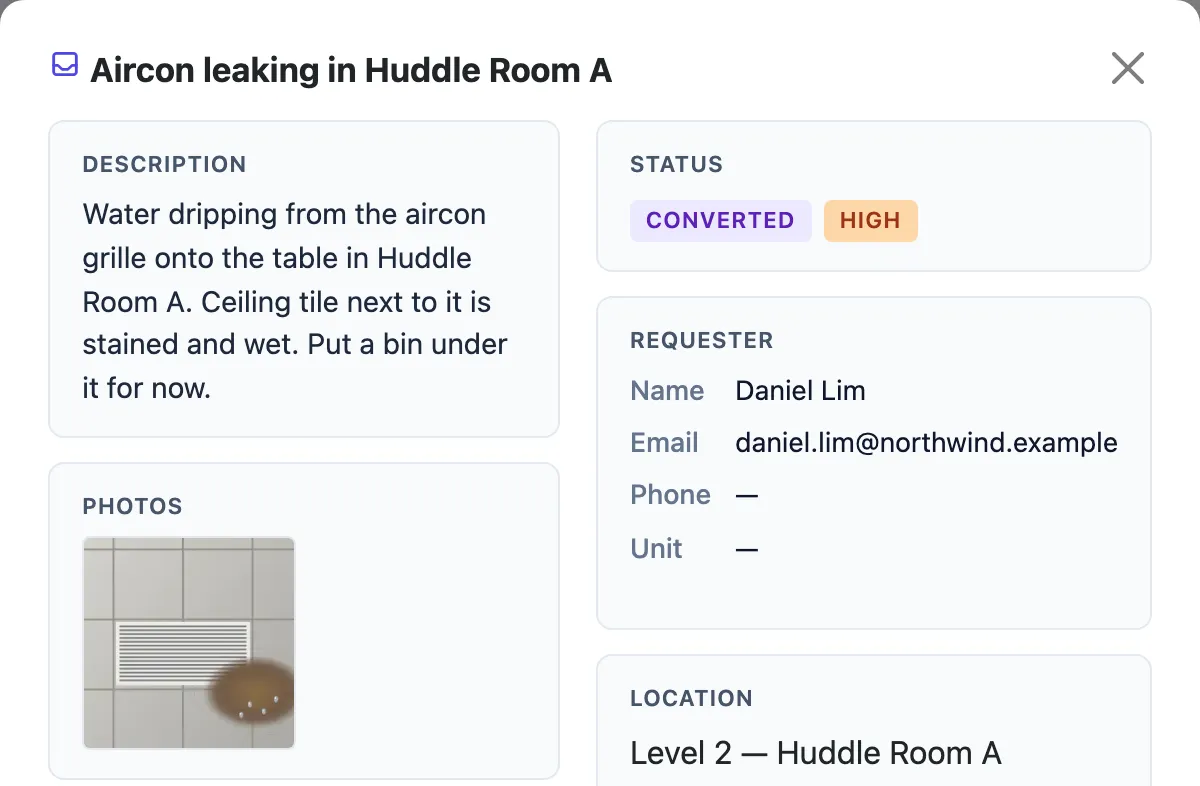
| 09:20 | In Huddle Room A, water is dripping from the aircon onto the table. Daniel reports Aircon leaking in Huddle Room A from his phone, with a photo. | Report a problem |
| 09:31 | Aisha sees it in Requests, with Daniel's photo, approves it and turns it into a work order. She assigns it to Daniel, who is already on Level 2. | Handle a request |
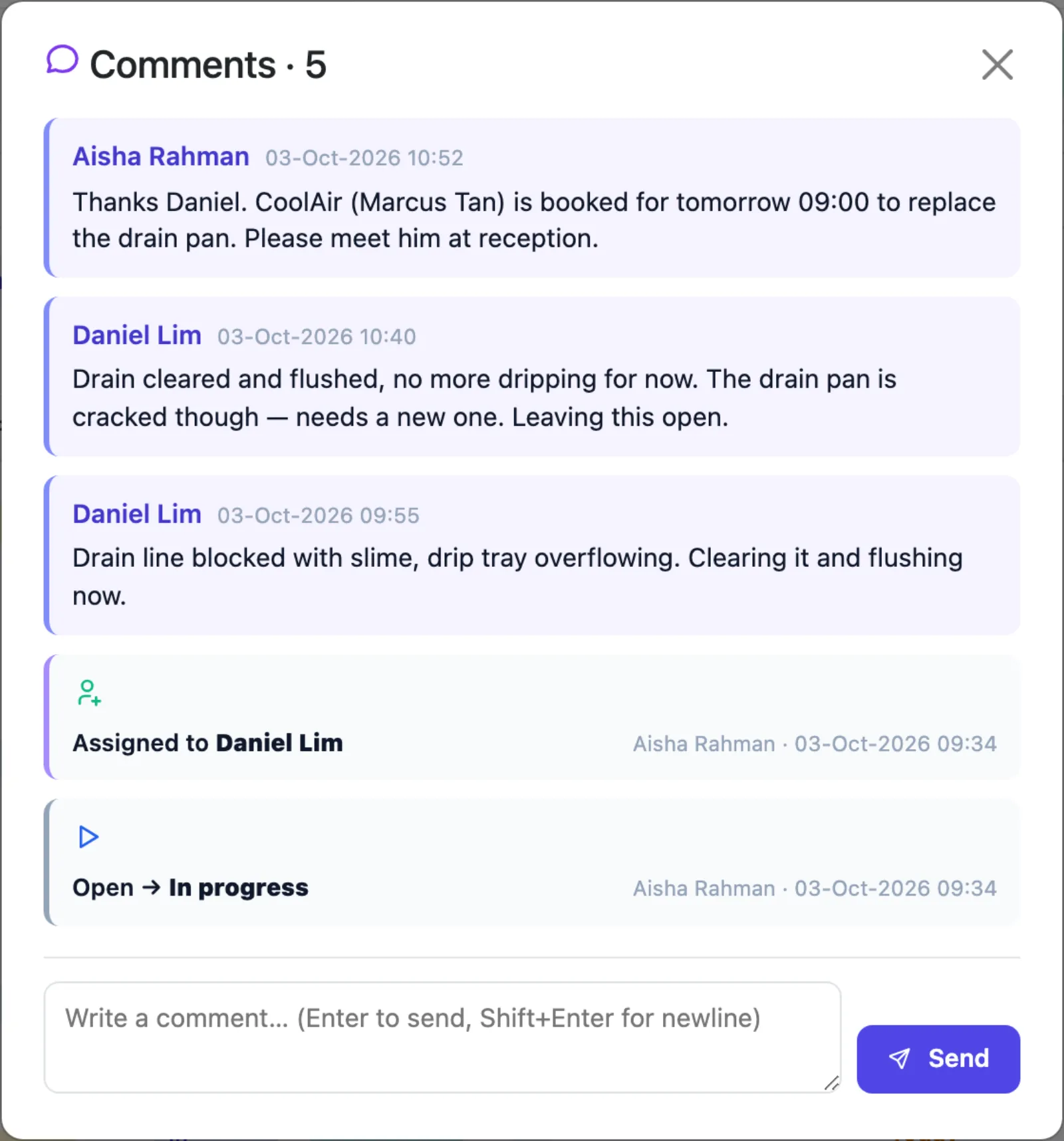
| 09:55 | Daniel opens the job, notes that the drain line is blocked, and clears it. At 10:40 he adds that the drain pan is cracked and leaves the job open. | Work on your jobs |
| 10:52 | Aisha books CoolAir for tomorrow 09:00 and comments on the job. Mei Ling registers Marcus Tan from CoolAir as a contractor visitor in Visitor Management. | Comments and activity |
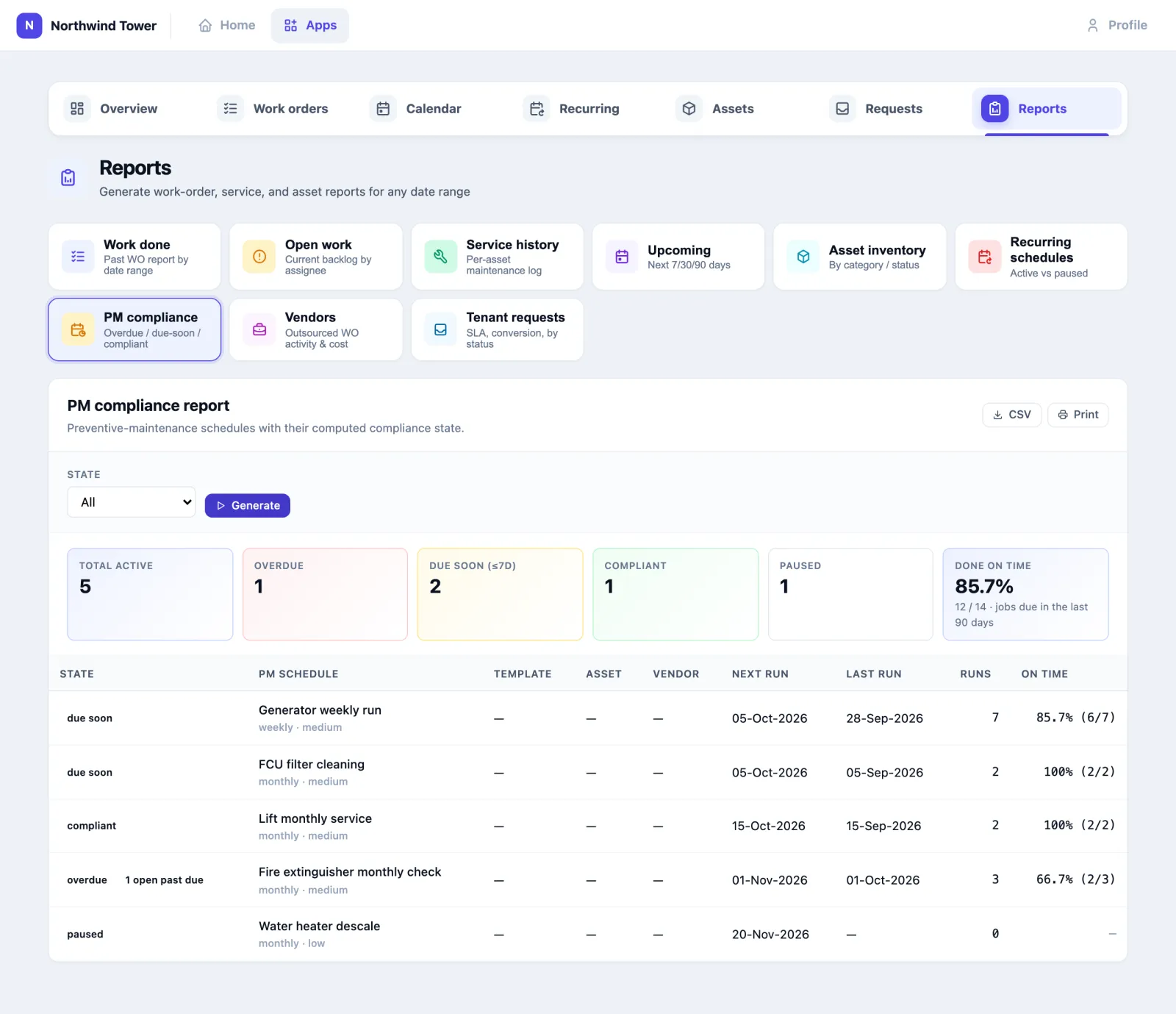
| 16:00 | Ravi checks the PM compliance report: 85.7 % of planned jobs done on time. The one late generator run was the week the generator room key was with security. | Run a report |
| Tomorrow | CoolAir replaces the drain pan. Daniel marks the job done with a note, and the request's history shows the whole story. | Mark a job done |
The rest of the day at Northwind Tower is in A day at Northwind Tower.
How to read the overview
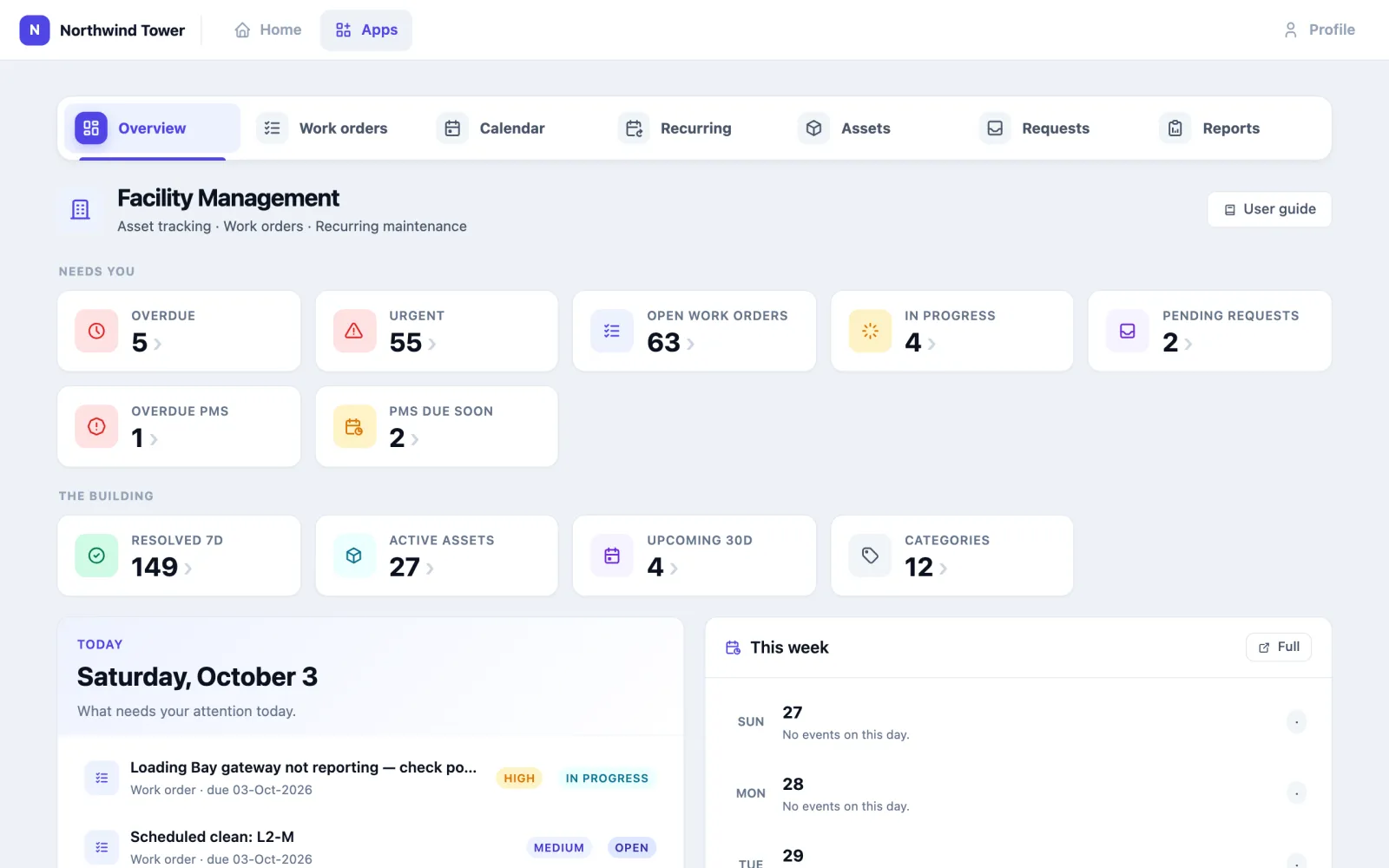
The Overview tab answers "what needs me?".
- Needs you: Overdue, Urgent, Open work orders, In progress, Pending requests, Overdue PMs and PMs due soon. Each card opens the list behind it.
- The building: Resolved 7d, Active assets, Upcoming 30d and Categories.
- Today lists the jobs due today. Add task for Today creates a job due by the end of today, and Calendar opens the full calendar.
- This week shows how many jobs fall on each day. Full opens the calendar.
- Recent staff shows the people whose badges were heard in the last 24 hours and where: useful when you want to give a job to someone who is already nearby. It only lists people whose app account is linked to a badge.
The tabs along the top are the same on every screen: Overview, Work orders, Calendar, Recurring, Assets, Requests and Reports.
How to report a problem
There are three ways in, and all of them land in the same Requests inbox.
On the phone. Staff with the mobile app tap Report an issue, describe the problem, add photos and send it. That is how Daniel reported the leak. See Report a problem on the phone.
On the web, signed in. The short Report a problem form asks two things: What's wrong? and Add a photo. Tap Send report; it is sent under your name. Your own reports and what became of them are on My reports, where a report that became a job shows the job's progress (for example Being worked on).
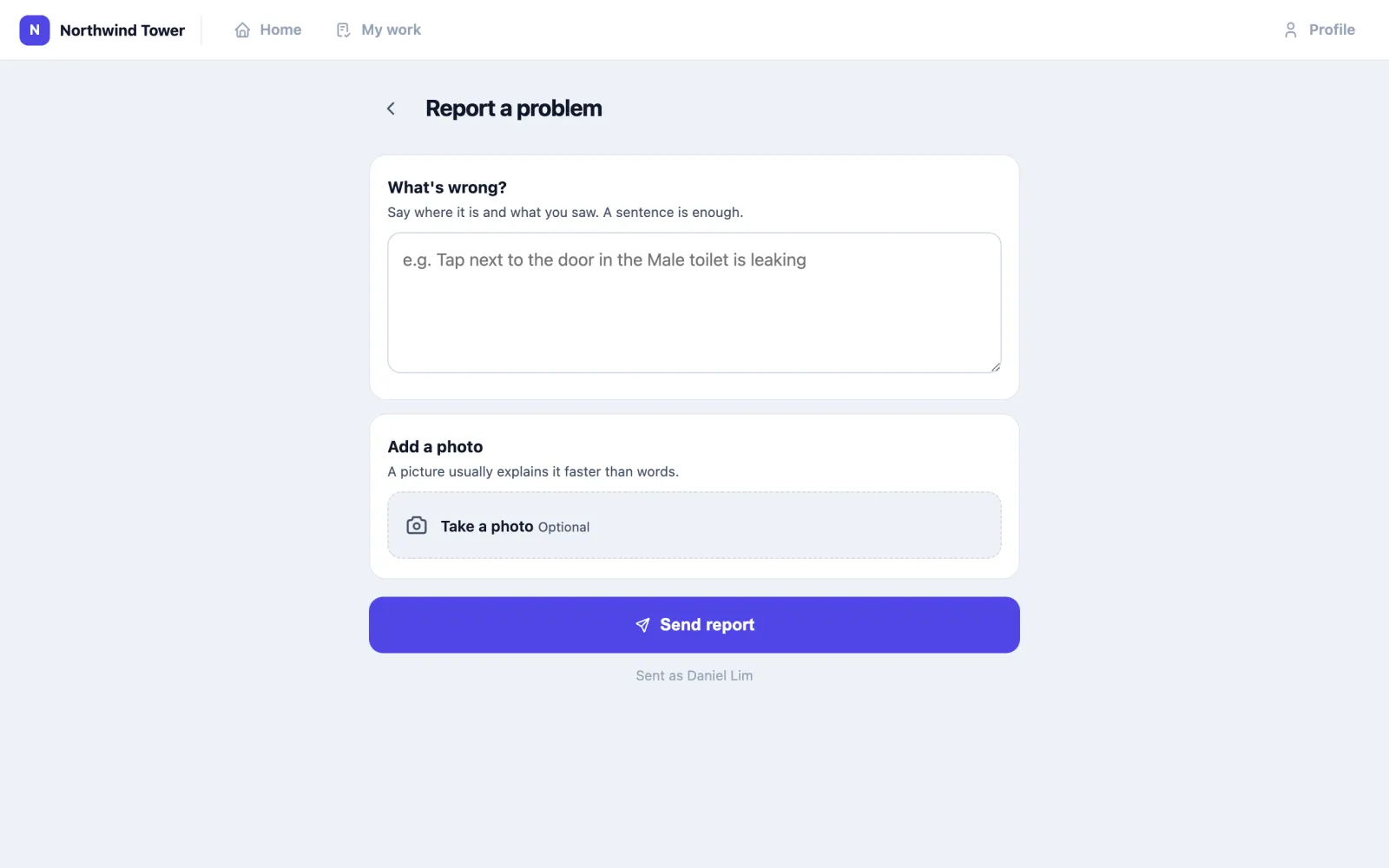
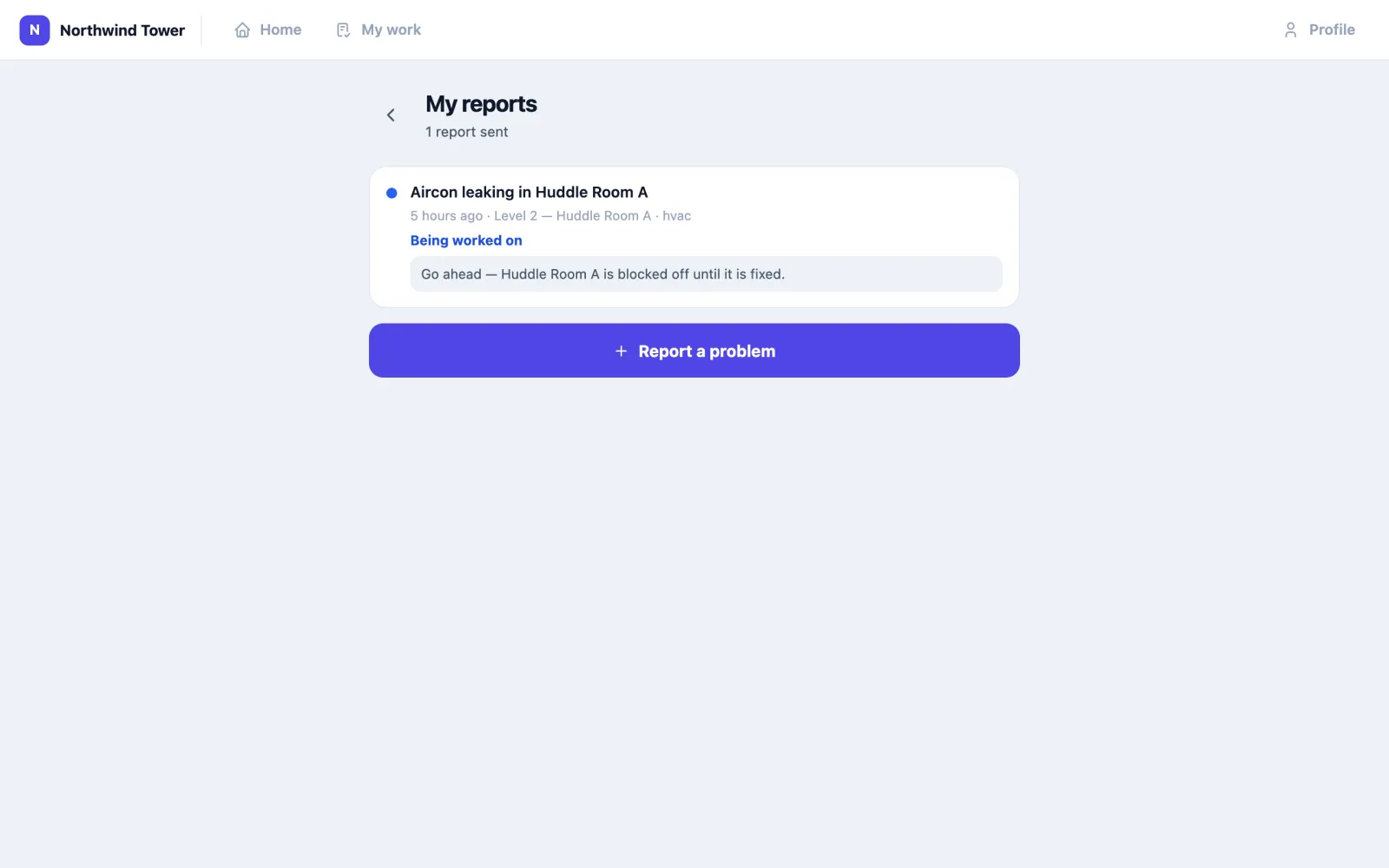
To get there, open Profile, then My reports; its Report a problem button opens the form. The addresses are your organisation's address followed by /report and /reports, so your administrator can also give everyone a bookmark or a QR code that points there.
The public form, no account. Anyone in the building — a visitor, a tenant's employee, a contractor — can open Submit a maintenance request at your organisation's address followed by /maintenance-request. They fill in What needs attention? and Describe the issue, and optionally their name, Unit / location, Email, Phone, Priority, Category and Where. They must leave at least a name, an email or a phone number so you can reach them. Submit request sends it.
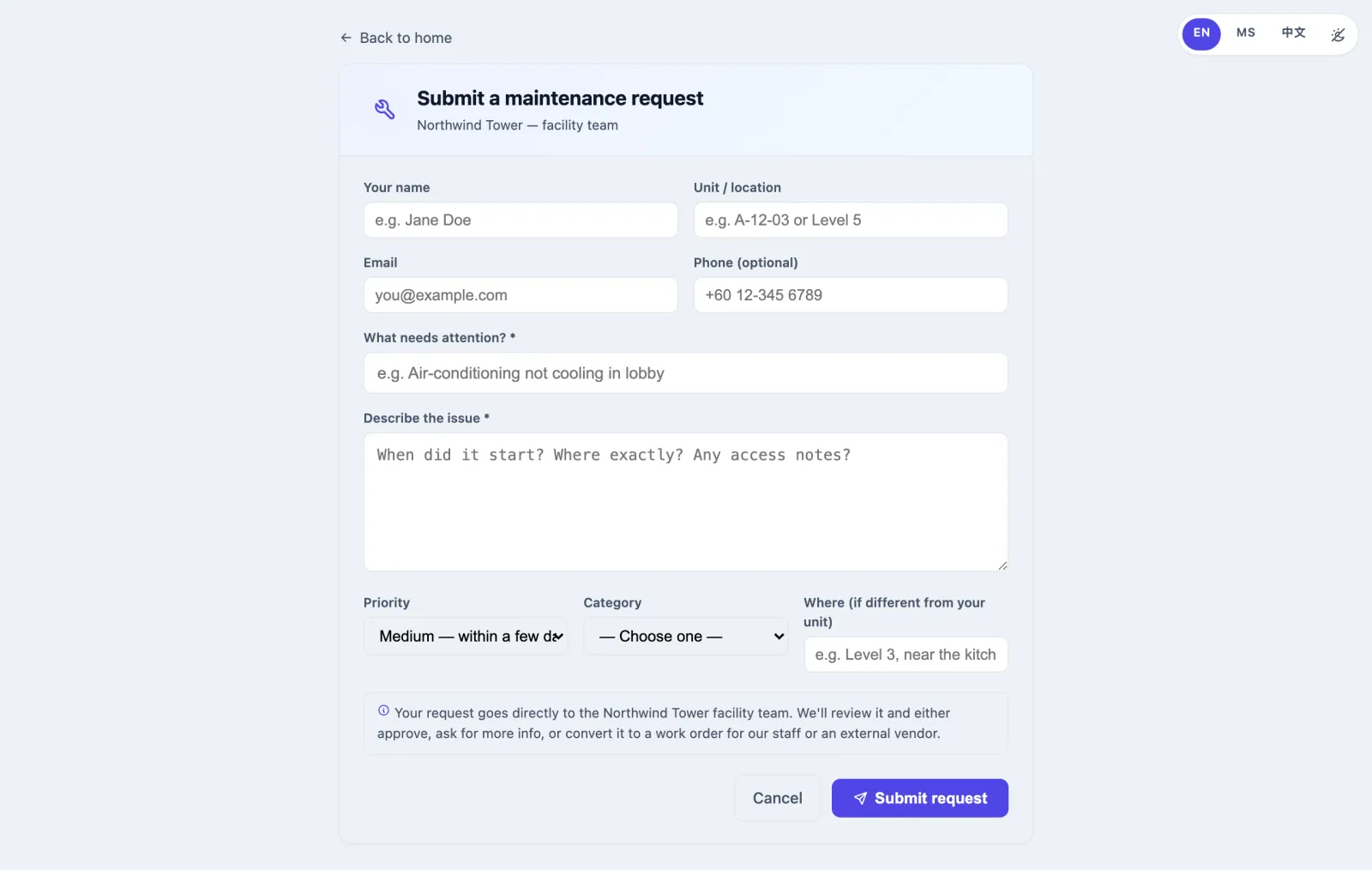
When a request arrives, every active administrator gets an in-app notification and the organisation's default email recipients get an email.
How to handle a request
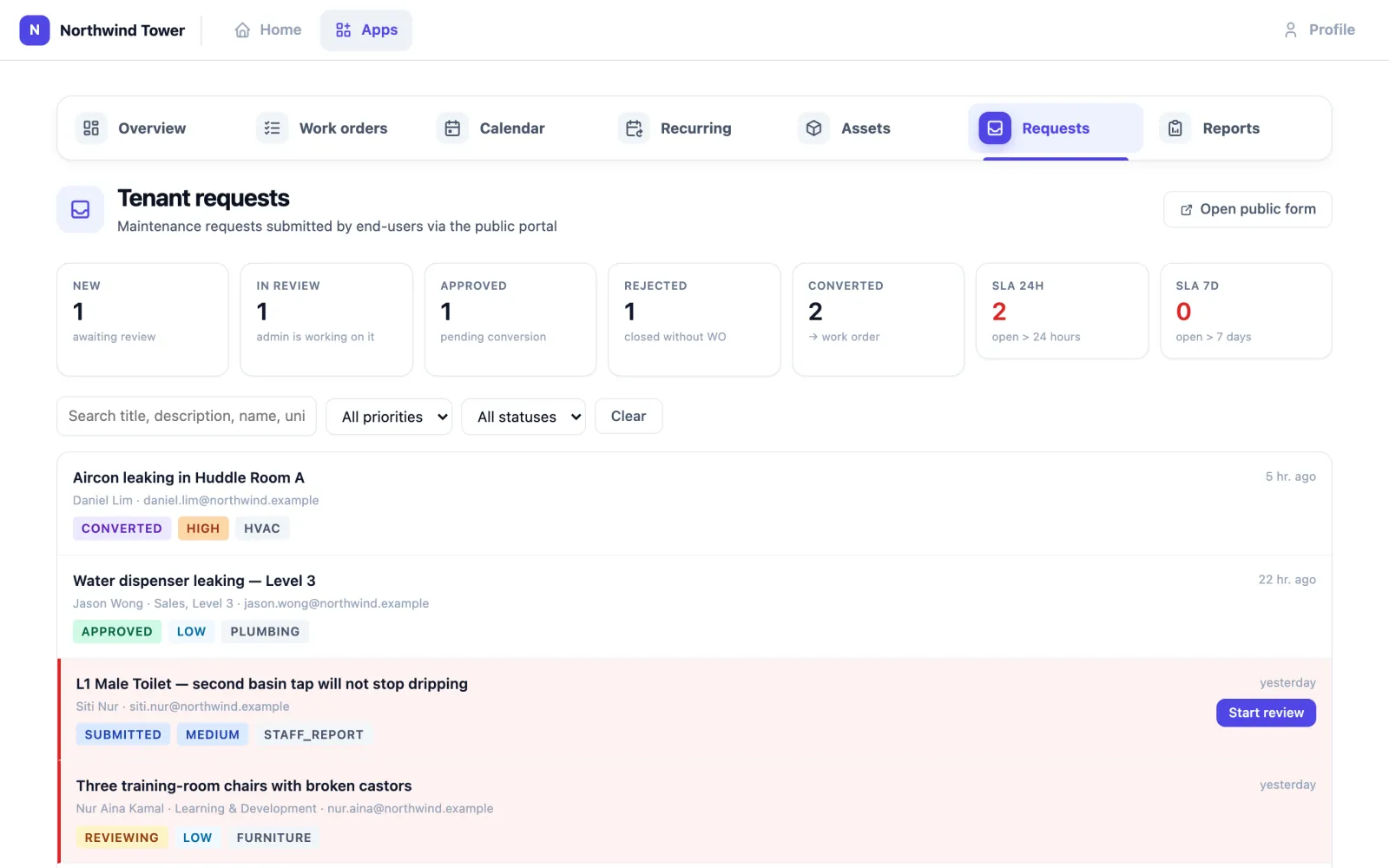
- Open Requests. The cards count requests by status: New, In review, Approved, Rejected, Converted, and two time limits, SLA 24h (open for more than 24 hours) and SLA 7d (open for more than 7 days). A request past 24 hours is shaded red in the list.
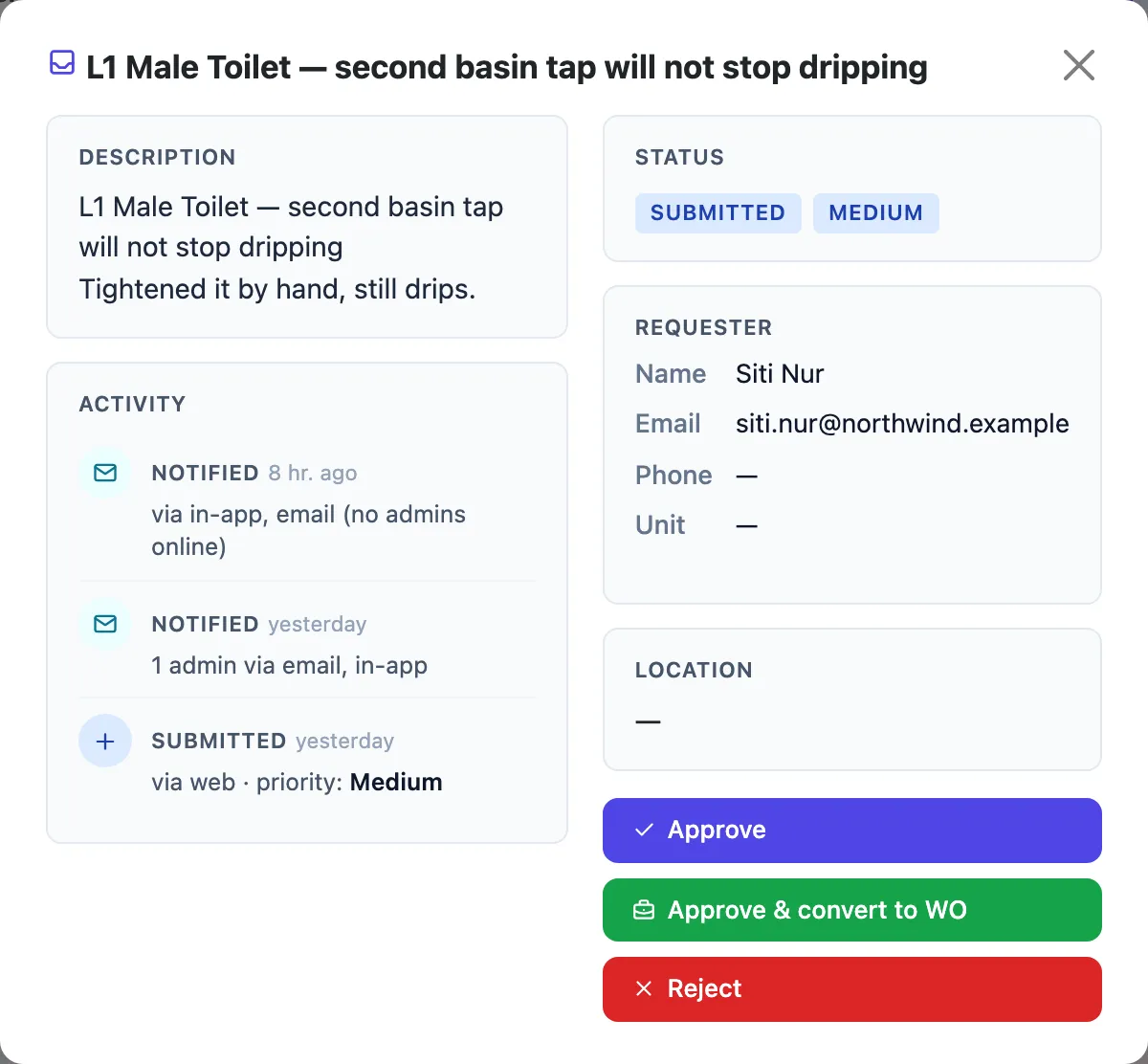
- Click a request to open it: the description, who sent it and how to reach them, the location and any Linked asset (its name opens it in Assets), any Photos sent with it, and the Activity history. Once converted, Work order created shows the job's title; click it to open the job.
- Decide:
- Start review (on the list) marks it as being looked at, so colleagues know.
- Approve accepts it without creating a job yet. You can add a note.
- Approve & convert to WO accepts it and creates a work order at once. You are asked whether to change the priority; leave it blank to keep the requester's.
- Reject needs a reason. The requester is emailed that reason.
- An approved request shows Convert to WO for when you are ready.
- After converting, open Work orders and assign the new job (see below). The requester is emailed that their request is now a work order.
There is no Close button in the web inbox today; a request stays Converted when its job is done. On the phone, managers can approve and reject requests from the Requests tab (Requests on the phone).
How to raise a work order
- Open Work orders and click New work order (or Add task for Today on the Overview, or Add work order for this day on the Calendar).
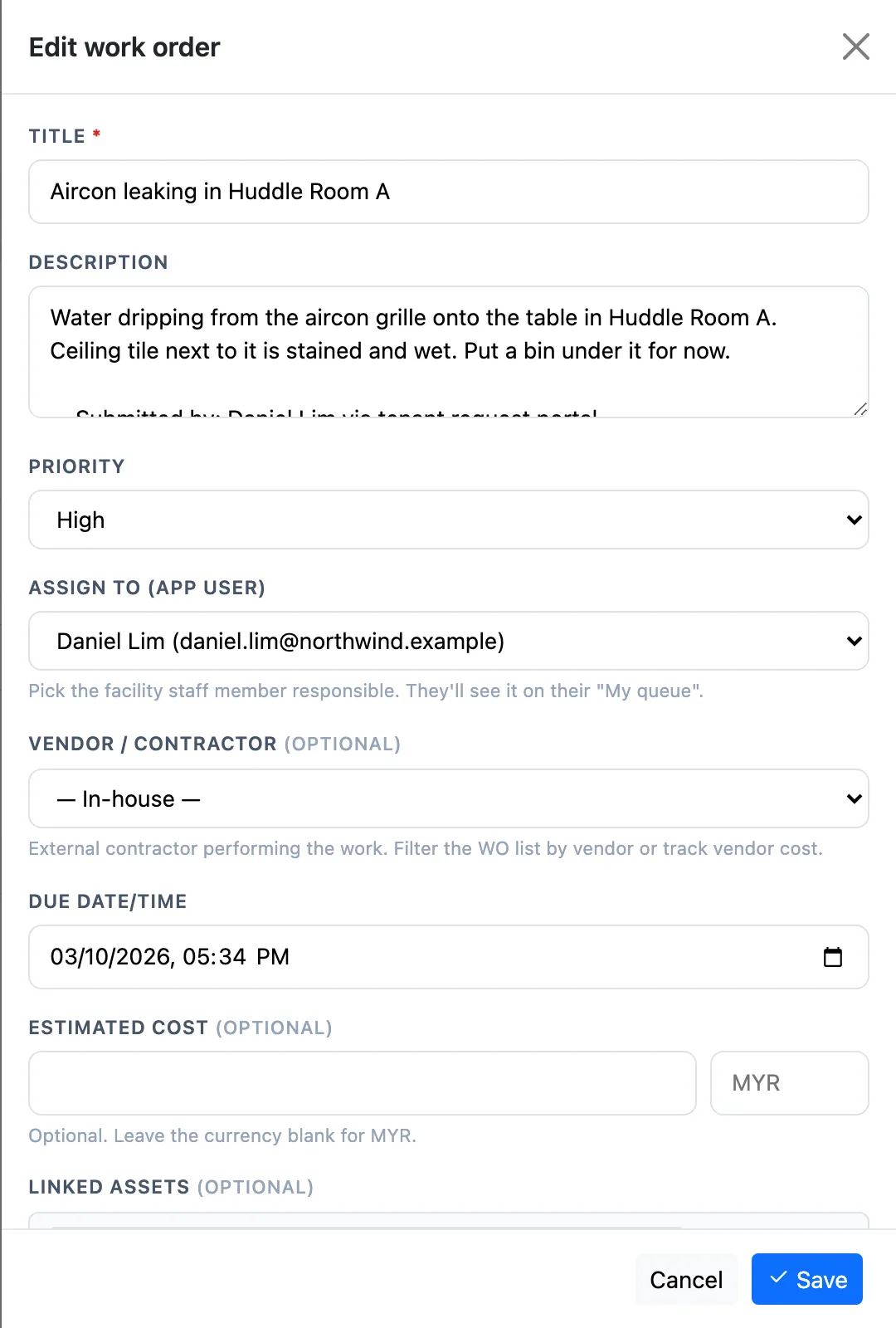
- Fill in Title and, if useful, Description and Priority (Low, Medium, High, Urgent).
- Assign to (app user): pick who will do it. Nearest available suggests people who are in the building and not already busy.
- Vendor / Contractor: leave — In-house —, or pick an outside company from your vendor list.
- Due date/time: leave it empty and the job gets a due time from your organisation's response targets (by default 2 hours for urgent, 8 for high, 24 for medium, 72 for low).
- Estimated cost (optional) and Linked assets: tick the equipment the job is about, so it shows in that asset's history.
- Photos: drop or pick images (JPEG, PNG or WebP up to 10 MB).
- Click Save.
Giving a job to someone moves it from Open to In progress. To hand a job over, open it and change Assign to (app user), or use the hand button on the list (Claim (assign to me)) to take an unassigned job yourself.
How to find work orders
The Work orders list opens on Open jobs. The cards along the top — All, Open, In progress, Urgent, Overdue, Done 7d and Mine — are filters: click one to show those jobs. Narrow further with the search box, All priorities and All sources (manual, recurring, battery, gateway offline and so on). The chips under Active filters show what is applied; Clear all resets.
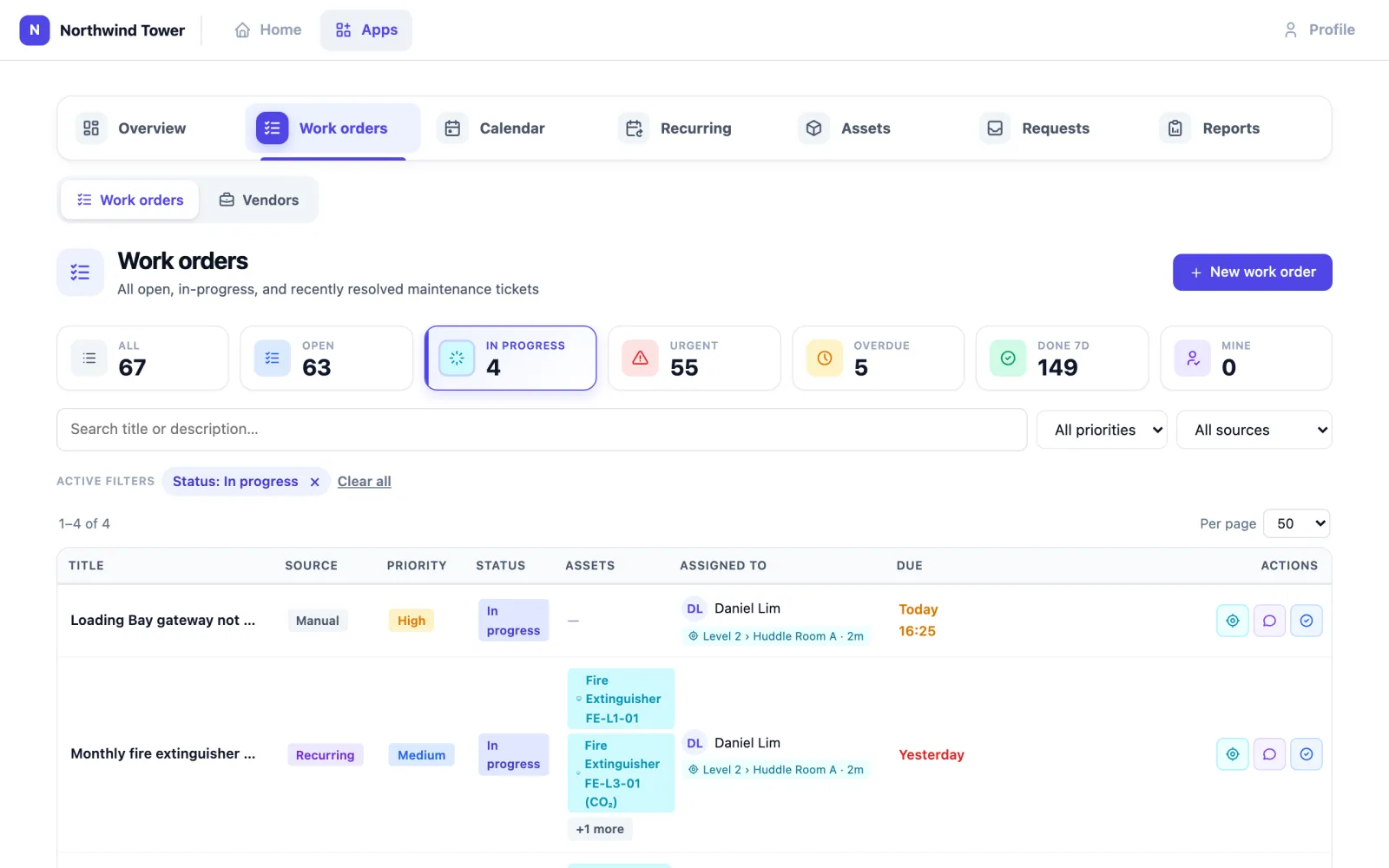
Each row shows the job's source, priority, status, linked assets, who has it and where that person was last heard, and when it is due. Due times in red are past due; a done or cancelled job's due time is never red. The row buttons are Locate user (the assignee's last movements), Comments + activity, and Resolve / cancel.
How to work on your jobs
Daniel signs in and clicks Mine: every open or in-progress job assigned to him.
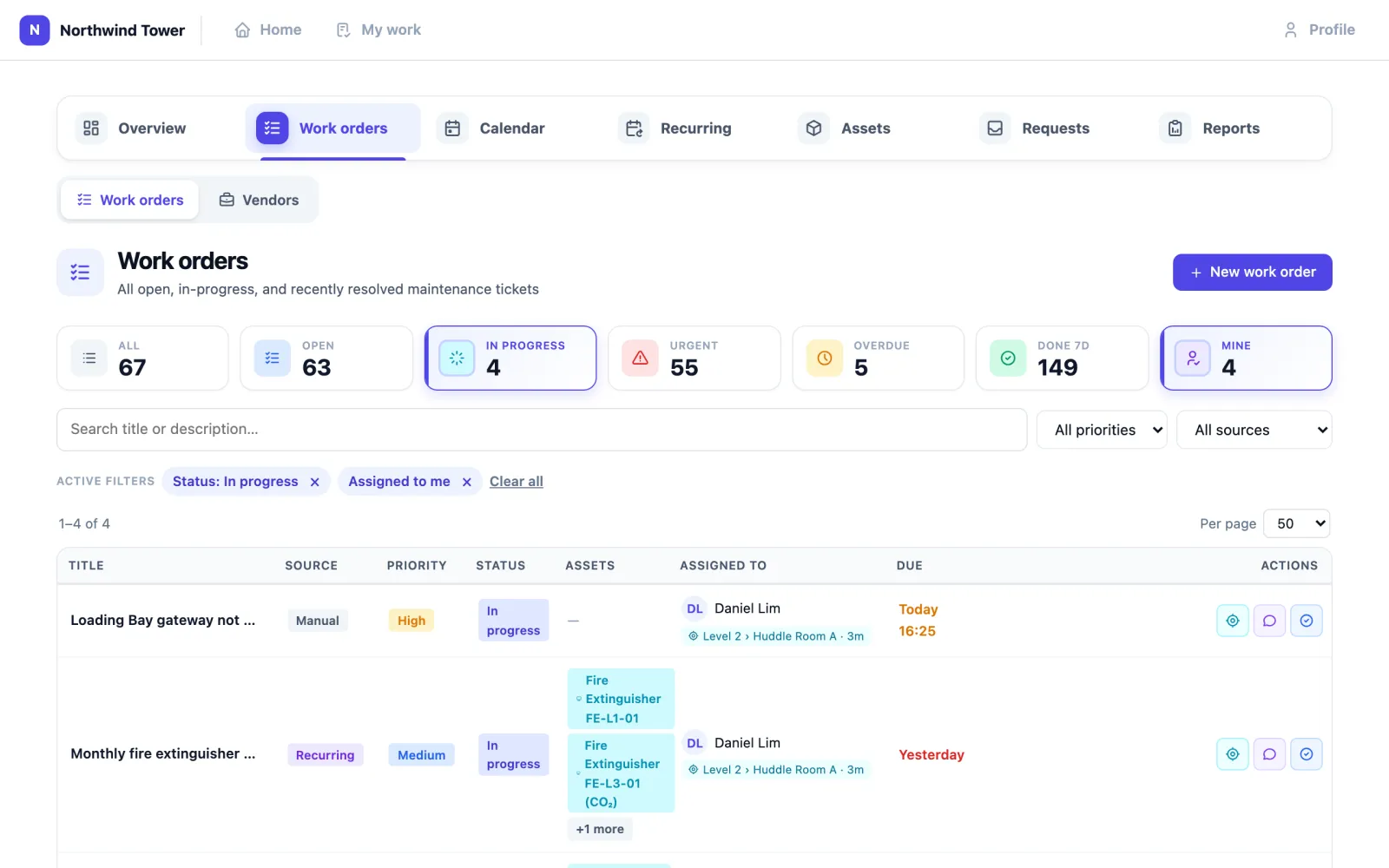
Click the speech-bubble button (Comments + activity) on a job to read and add notes. Type in Write a comment… and press Send (Enter sends, Shift+Enter starts a new line). The same window shows who assigned the job and when its status changed.
To add a photo, open the job and use Photos in its panel.
How to mark a job done
- Click the tick button (Resolve / cancel) on the job.
- Write a Resolution note: what you found and what you did.
- Optionally enter the Actual cost.
- Click Mark done, or Cancel WO if the job is no longer needed (a duplicate, for example).
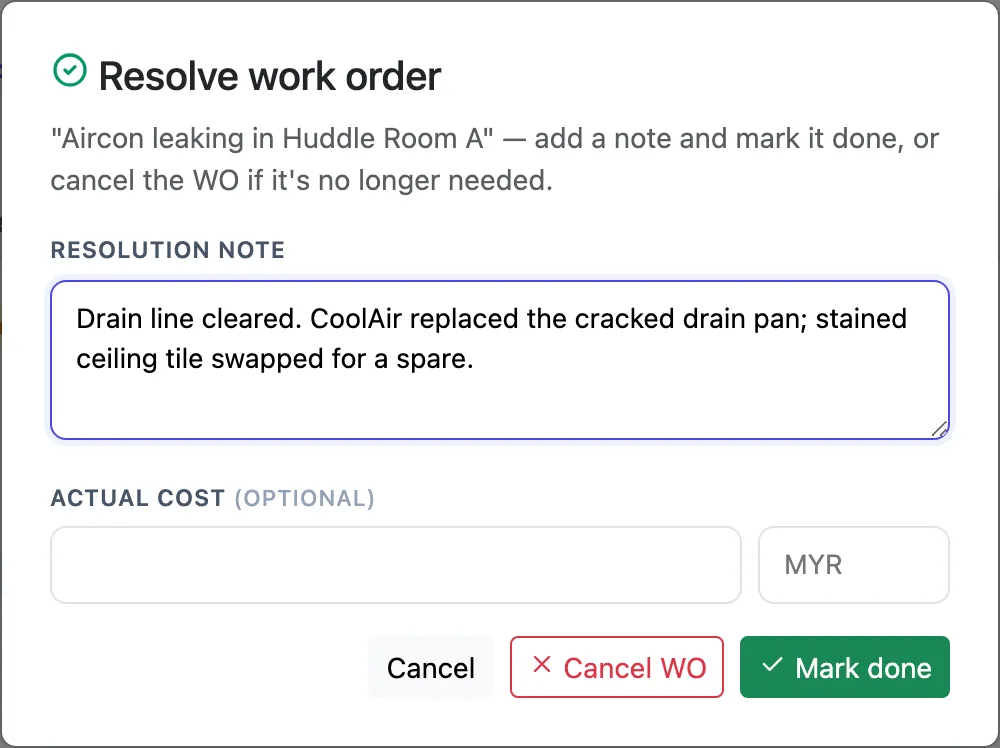
A done or cancelled job cannot be reopened. If the problem comes back, raise a new job.
How to plan recurring maintenance
Recurring holds the jobs that come round on a timetable: Northwind's weekly generator run, monthly fire extinguisher check, FCU filter cleaning and lift service.
- Click New schedule.
- Give it a name, a Frequency (Daily, Weekly or Monthly), the day and the hour (your local time), the job's title, description and Priority, and the Linked assets it covers.
- Save. The first run is the next time the day and hour come round in your local time, counting from now: a daily schedule made at 07:00 for 09:00 runs today at 09:00, and a monthly one made on the 3rd for the 5th runs on the 5th of this month. At the scheduled hour the schedule creates a work order with those assets attached. It is unassigned: someone claims it or is given it, like any other job.
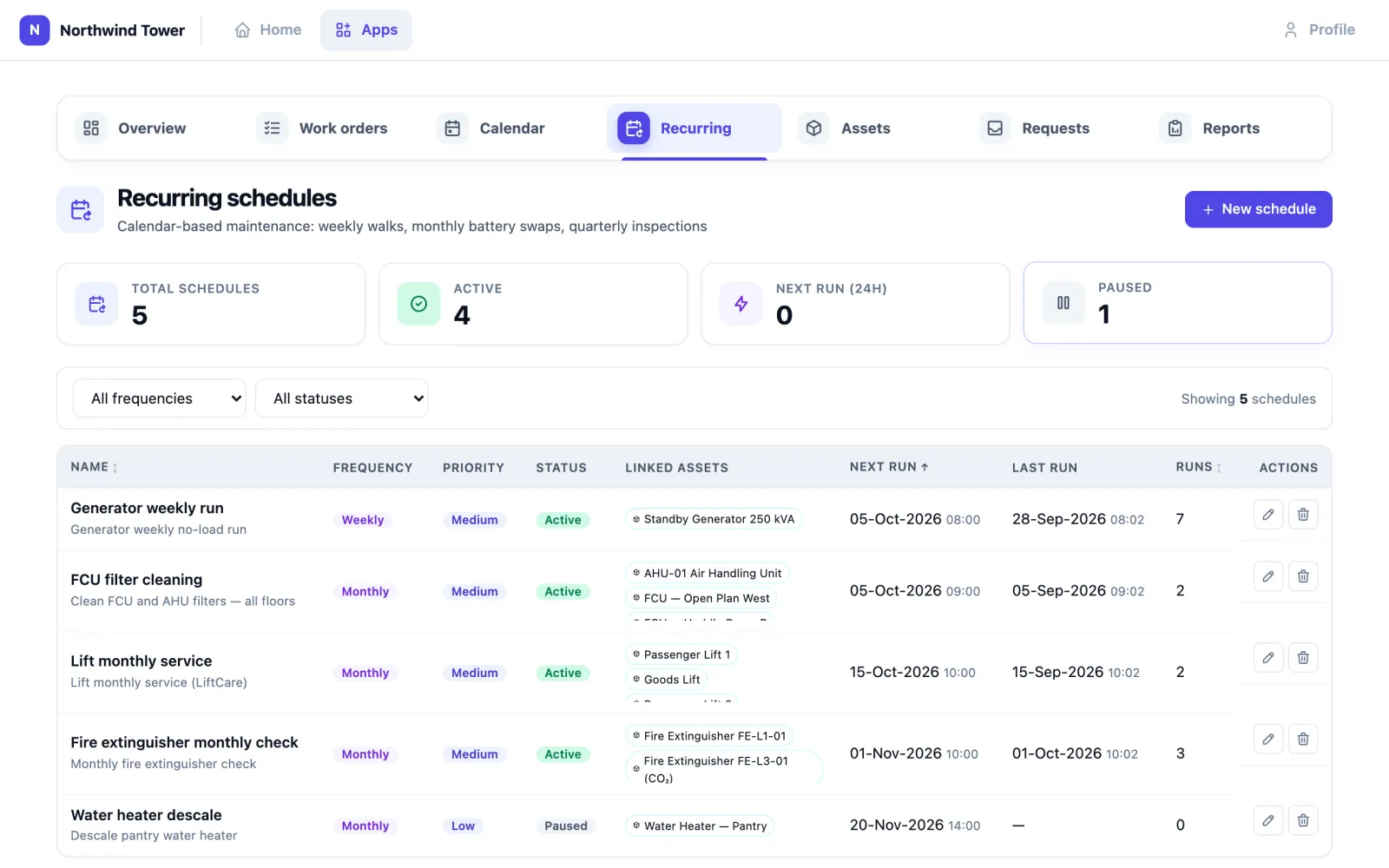
The list shows each schedule's Next run, Last run and Runs. Use the pencil to change one and the bin to delete it; pause a schedule rather than deleting it if you may need it again. A schedule creates one job per run and does not create next month's job in advance.
Run now (the play button on a schedule's row) creates the schedule's work order straight away, after you confirm, with its linked assets attached and due by the end of today. It is an extra run: Last run and Runs update, but Next run stays as it was, so the planned job still comes at its usual time.
A schedule cannot name a vendor or an assignee today.
How to use the calendar
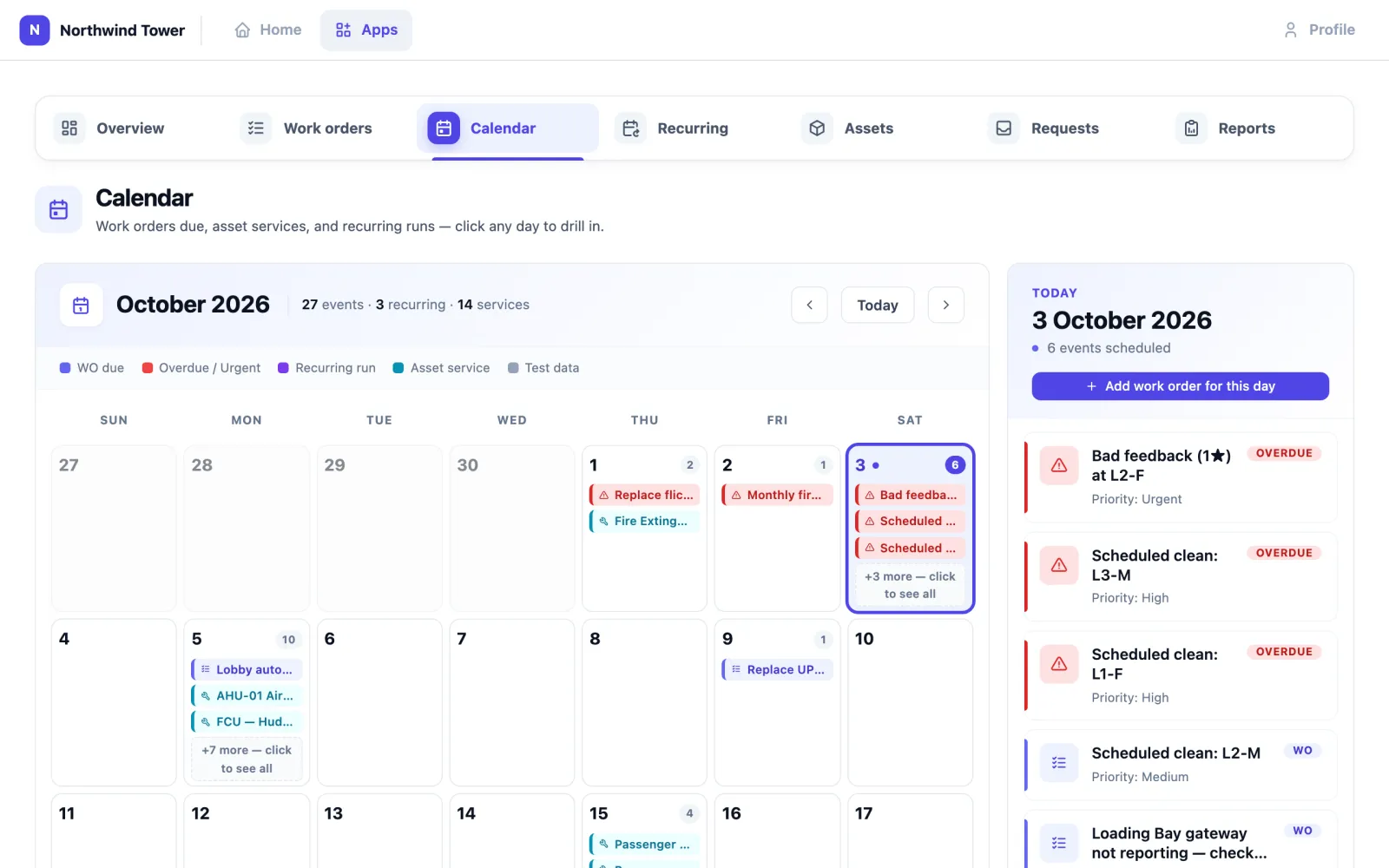
Calendar shows a month of jobs falling due, asset servicing and recurring runs, colour-coded (WO due, Overdue / Urgent, Recurring run, Asset service). Click a day to see everything on it; Add work order for this day raises a job due that day. Today brings you back to the current month.
How to keep the asset register
Assets lists every piece of equipment you maintain, with its category, location, status, last service and actions. Search by name, serial, category or location.
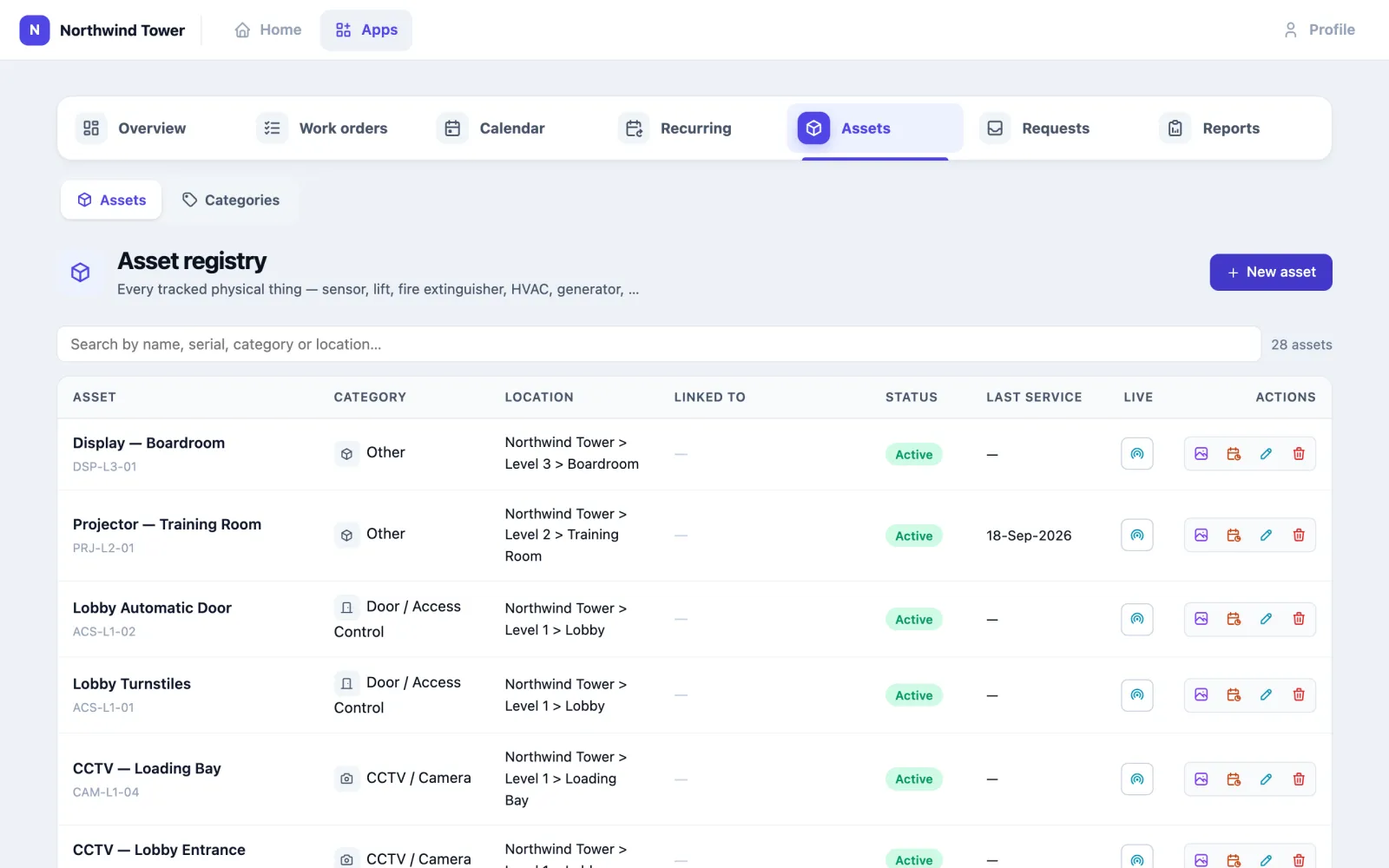
- New asset: name, serial number, category, manufacturer and model, location (picked from your floors and rooms), installation date, status (Active, Inactive, Retired) and notes. Linking optionally attaches a sensor or another asset.
- Row buttons: Live (the linked sensor's status and recent movements), Photos, PM plans (the recurring schedules that cover this asset), Edit asset, Delete asset.
- Last service comes from the asset's service records. Every job you link to an asset shows in its history.
- Categories (under Assets) lets you add your own categories with an icon and colour.
Keep retired equipment as Retired instead of deleting it, so its history stays.
How to keep the vendor list
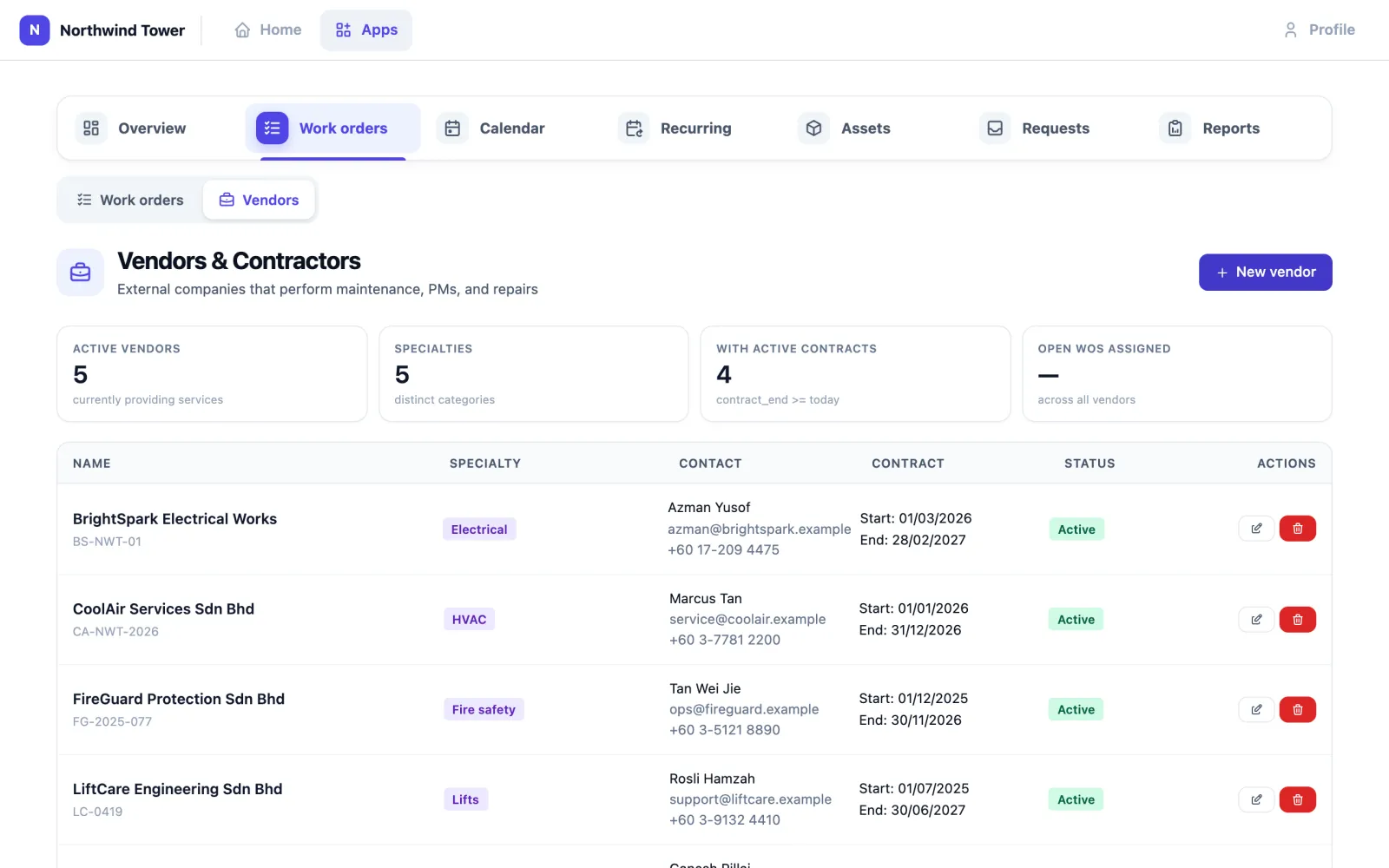
Vendors sits under Work orders. Each vendor has a name, contact person, email, phone, address, specialty, contract reference and contract dates. New vendor adds one; the pencil edits, the bin removes. Once a vendor is on the list you can pick it on any work order and see its jobs and costs in the Vendors report.
The cards above the list count Active vendors, Specialties, vendors With active contracts (a contract running today: started, and ending today or later) and Open WOs assigned (open and in-progress work orders that name a vendor).
How to run a report
Reports has nine reports: Work done, Open work, Service history, Upcoming, Asset inventory, Recurring schedules, PM compliance, Vendors and Tenant requests. Pick one, set its filters (for example From, To or a Quick range such as Last 30d), and click Generate. CSV downloads it and Print prints it. Dates are written in your organisation's date format, for example 05-Oct-2026 at Northwind.
PM compliance is the one to watch: for each recurring schedule it shows whether it is compliant, due soon, overdue or paused, and Done on time: of the jobs that fell due in the last 90 days, how many were finished before their due time.
Emailed on a schedule
Whoever can change this app's settings can have work orders, planned maintenance compliance and vendor activity emailed daily, weekly or monthly, from Reports › Scheduled reports in the app, to the app's users or any address. See Scheduled reports in the apps.
Using it in your organisation
Corporate office
The setting: a tower like Northwind, one facilities manager, two technicians, outside contractors for aircon, lifts and fire safety.
Who does what: the manager triages Requests twice a day and assigns; technicians live in Mine on their phones; reception staff report what visitors tell them.
Settings that matter: response targets per priority; technicians' access set to their own jobs only, so their list stays short; vendors entered with contract dates.
Tip: put the public form's QR code in every meeting room and pantry. People report a broken thing when it is in front of them, not when they are back at their desk.
Hospital or clinic
The setting: equipment that must be serviced on a strict timetable — sterilisers, medical gas alarms, fire doors — and wards that cannot wait.
Who does what: the biomedical and estates teams own Recurring schedules for every regulated item; ward staff report faults with the short form; the estates manager reads PM compliance before each audit.
Settings that matter: an Urgent target measured in minutes, not hours; every regulated item in Assets with its serial number, so the Service history report is your evidence.
Tip: link each recurring schedule to the exact assets it covers. An auditor will ask for one steriliser's history, not "all sterilisers".
Shopping mall
The setting: hundreds of tenants, public toilets, escalators, a loading dock, and shoppers who notice problems first.
Who does what: tenants and shoppers use the public form; the mall's operations desk triages; in-house technicians take small jobs and contractors the specialist ones.
Settings that matter: categories that match how you dispatch (escalator, plumbing, lighting); the Tenant requests report to show tenants how quickly you respond.
Tip: ask tenants to fill in Unit / location with their lot number. It is the fastest way to find them, and the report can be searched by unit.
Setting it up for your organisation
What must exist first:
- App users for everyone who will raise, receive or decide jobs, with access to Facility Management. A technician who is not an app user cannot be assigned a job.
- Floors and rooms (venues and zones), so assets and jobs have a location.
- Badges linked to app users if you want Recent staff, Nearest available and Locate user to work. Without them, everything else still works.
- Sensors are optional: an asset register needs no hardware at all.
Checklist:
- Switch the app on and give each person access. Choose each person's data scope: all records, or only the jobs assigned to them plus unclaimed ones. A person limited to their own jobs cannot open anyone else's, even by its address.
- Set the response targets under Admin → Your Apps → Facility.
- Enter your vendors, then your assets (start with what is inspected by law: fire, lifts, electrical), then your recurring schedules.
- Share the public form address (your organisation's address followed by
/maintenance-request) and the staff form (/report). - Decide who receives the request emails (Organisation → Notifications, default recipients).
| Setting | What it changes |
|---|---|
| Response target, urgent / high / medium / low (hours; defaults 2 / 8 / 24 / 72) | The due time given to a new job, converted request or recurring job that has no due date of its own. 0 or blank means no due time. |
| Work orders opened automatically: battery critical, device anomaly, gateway offline, meeting-room counter silent (all on by default) | Untick one to stop Omaya opening jobs for it. The alerts still appear; only the work order is not raised. |
| Auto-assign, default vendor | Saved but not used yet. |
| Data scope on a person's access | All records, or only their own jobs and unclaimed ones. |
| Notification default recipients | Who is emailed when a new request arrives. |
Problems reported in a meeting room. In Meeting Room, anyone can press Report a problem in a room — on the Rooms page, on a booking or on the door display — and pick what is wrong (screen, video kit, too hot or cold, lights, cleaning, chairs or table). It arrives here as a job on that room, source Meeting room problem, with the priority and due time you set for that priority. The same problem in the same room is not raised twice while its job is open; a second report adds its note to the job.
Problems reported in a meeting room. In Meeting Room, anyone can press Report a problem in a room — on the Rooms page, on a booking or on the door display — and pick what is wrong (screen, video kit, too hot or cold, lights, cleaning, chairs or table). It arrives here as a job on that room, source Meeting room problem, with the priority and due time you set for that priority. The same problem in the same room is not raised twice while its job is open; a second report adds its note to the job.
Jobs the platform raises on its own. If Facility Management is switched on, four things create a work order without anyone asking — each can be switched off under Admin → Your Apps → Facility → Work orders opened automatically: a battery alert at critical, a device anomaly at warning or critical, a gateway offline for 24 hours, and a meeting room's people counter silent for four hours. A device gets one open job per kind of problem: if it goes quiet again while its silent job is still open, no second job is raised and the job counts the repeat instead. A gateway job, and a device's silent job, close themselves when the gateway or device reports again, unless someone has already taken the job. A battery job on a rechargeable device (a PS101 badge, an MWC01 tag) is titled Charge … rather than a battery job, because it needs its charger, not a new battery. Do not write rules for these four, or you will get two jobs for one fault — switch the built-in one off first if you want a rule instead.
Rules can raise jobs. Raise a work order is a rule action, so anything a rule can test can become a job, for example a room too warm for an hour. You give it a title (placeholders such as {zone_name} are filled in), and optionally a description, work type, role and priority. While a job from that rule is open no second one is raised, and after it is closed the rule waits for its cool-off (24 hours by default) before raising another. The rule gallery has two templates, Room too warm and Unusual power draw, both switched off until you adopt them.
An outside maintenance system. With a CMMS connector enabled under Integrate, every new work order is sent to it and marked resolved there when it is closed here.
Questions and problems
A technician says the job is not in their list. Check Assign to (app user) on the job. Jobs made by a recurring schedule start unassigned; the technician can claim them from Open, or you assign them.
The Overview shows far more urgent jobs than I expect. Cleaning jobs and bad toilet feedback from Toilet Hygiene are counted too. Use All sources on Work orders to look at one kind of job.
Nobody appears in Recent staff or Nearest available. The people have no badge linked to their app account, or their badges have not been heard today.
Live on an asset shows nothing. The asset has no linked sensor. Being in the same room as a sensor is not the same as being linked to it.
There is no QR code button on an asset. Printing asset QR labels is not on the Assets screen today.
On the phone
Technicians and managers can report problems, follow their jobs and decide requests in the mobile app: see Facility and Cleaning and the Requests tab.