Appearance
Roll Call
When the alarm goes, the question is not how many people are in the building. It is which people, and which of them have not reached the assembly point yet. Roll Call takes a list of everyone who wears a badge, ticks them off as their badges are heard at the gathering point, and shows you who is still to find, floor by floor, with where each was last seen. Wardens mark their floor swept, the people still missing can be asked "Are you safe?" on their phone, and a screen at the assembly point shows everyone the names still to find.
Who uses it
FarahHR & Safety OfficerKumarSecurity SupervisorHafizSecurity Guard (day)HairulSecurity Guard (night)AishaFacilities Manager
| Role | What they do with Roll Call | At Northwind Tower |
|---|---|---|
| Safety officer / fire warden lead | Starts drills, runs the board at the assembly point, marks people safe, asks the missing "Are you safe?", ends the roll call, prints the report | Farah Aziz, HR & Safety Officer |
| Floor wardens | Sweep their floor, mark it swept, look for the people last seen on it | Kumar Selvam (Level 1), Hafiz Ismail (Level 2), Hairul Anuar Salleh (Level 3) |
| Security supervisor | Starts a roll call in a real emergency, runs the board when the safety officer is away | Kumar Selvam |
| Everyone with a badge | Walks to the assembly point; answers "Are you safe?" if asked | All 42 staff |
| Whoever signs the compliance record | Reads the history, the after-action report and the CSV | Farah, with Aisha Rahman (Facilities Manager) |
Everyone who has the app can start, run and end a roll call. Someone with configure rights on Roll Call also sees Floors & wardens and can delete a drill.
A day at Northwind Tower
Farah runs the October fire drill. The building has 42 people with badges, and the assembly point is the car park, a zone of its own called Assembly Point — Car Park with a gateway on the lamp post. Each floor has a warden.
| Time | What happens | How |
|---|---|---|
| 10:55 | Farah opens Roll Call. Ready for the next alarm? shows two badges have gone quiet this week — Rajesh's and Lee's. | Before the alarm |
| 11:00 | The alarm sounds. Farah presses Start a fire drill and confirms. The board opens with all 42 people. | Start a roll call |
| 11:00 | The TV in the lobby switches to the roll call: Go to: Assembly Point — Car Park. The tablet at the car park shows the names still to find. | Screens |
| 11:01 | Deepa Krishnan is on leave. Farah presses Excuse… on her card and picks On leave. | Mark or excuse someone |
| 11:03 | Hafiz has checked Level 2 and presses Mark floor swept on his phone. | Wardens |
| 11:04 | Five still to find. Farah presses Ask the 5: "are you safe?". Lee Chee Keong replies I'm safe — at a client's office and drops off the list. | "Are you safe?" |
| 11:05–11:08 | Teh, Goh and Wong walk out and are counted as their badges reach the car park. Rajesh is standing next to Farah but his badge is flat; she presses Mark safe. | Mark someone safe |
| 11:09 | Everyone accounted for — 42 of 42. Farah presses End roll call: 9 minutes 12 seconds, inside the 10-minute target. | End a roll call |
| 11:30 | Back at her desk she opens the After-action report, prints it for the fire marshal to sign, and downloads the CSV. | After the roll call |
Earlier that morning Security Watch dealt with an unknown badge in the Server Room; the two apps use the same badges. A visitor from Visitor Management is on the list while they carry a badge that is bound to them or labelled visitor.
Before the alarm: "Ready for the next alarm?"
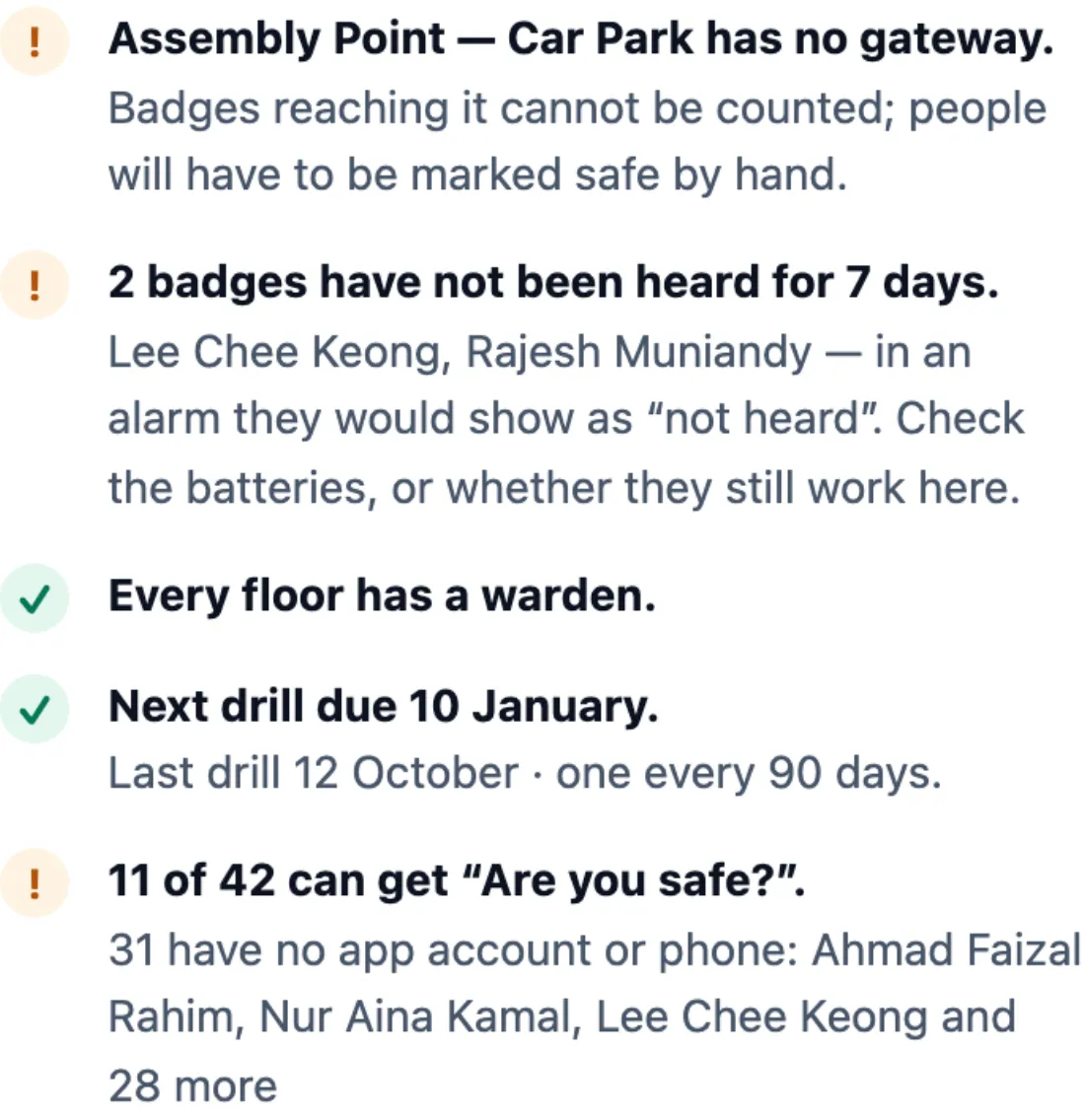
Open Roll Call. Next to the past roll calls, Ready for the next alarm? checks what decides whether a real roll call will work, now rather than during one:
- The assembly point can hear badges — whether the gateway at your usual gathering point has reported in the last 15 minutes. If it has not, badges reaching it cannot be counted and people must be marked safe by hand.
- Badges not heard for a week — they would show as not heard in an alarm. Check their batteries, or whether the people still work here.
- Every floor has a warden — floors people work on without one.
- Next drill due — one every 90 days.
- Who can get "Are you safe?" — people with no app account or phone cannot be asked.
How to start a roll call
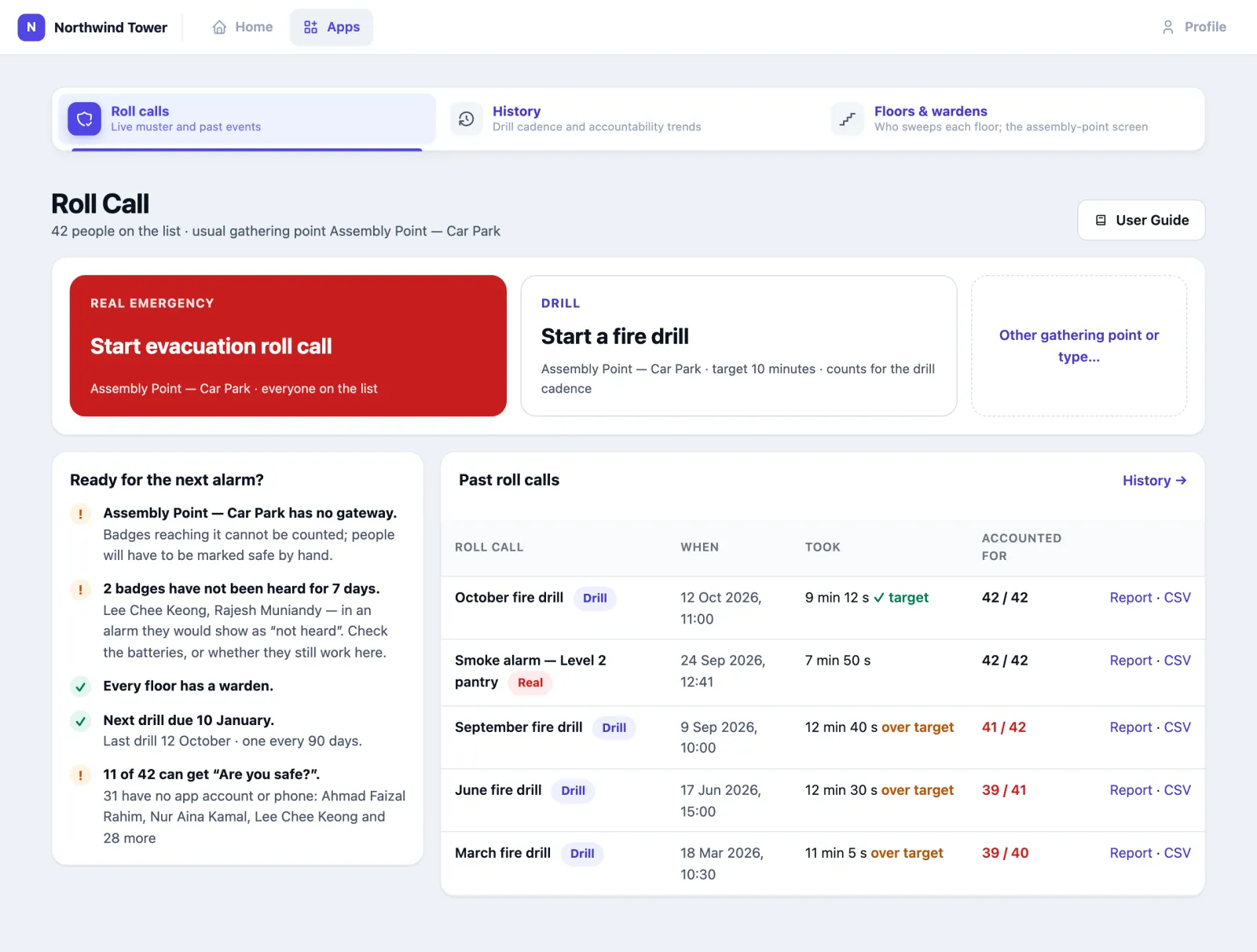
In one press. Once you have run one roll call, the home page offers:
- Start evacuation roll call (red) — a real emergency at your usual gathering point, everyone on the list, critical priority.
- Start a fire drill — a drill at the same point, with a 10-minute target.
Confirm, and the board opens.
Choosing everything. Press Other gathering point or type… (or, the first time, either button) for the form:
Event name, Type (Roll Call, Fire Drill, Evacuation) and Priority.
Gathering point — the Location, then the Venue and the Zone people report to. It starts on the one you used last. Pick the zone whenever you can: only a badge heard in that zone counts. A venue on its own means anywhere on that floor counts. A location on its own is refused.
Outdoor gathering point (GPS). If your organisation has tags that report GPS and has drawn geofences, the form also offers a geofence such as a car-park assembly area. Someone counts there when their GPS tag reports from inside it. See Indoor and outdoor.
Notes if you like. They are printed on the report and in the CSV.
For a planned exercise, tick Mark as a drill, set the Target: everyone out within (minutes) and, if you want, a Drill objective. Drills count towards your drill cadence and are the only roll calls that can be deleted later.
Press Start roll call.
What happens next. The app makes its list: everyone whose badge is bound to a person, plus any badge labelled staff, employee, human or visitor. That list is fixed for this roll call (Refresh list adds badges bound since). Only one roll call can run at a time; starting another opens the one running.
How to read the board
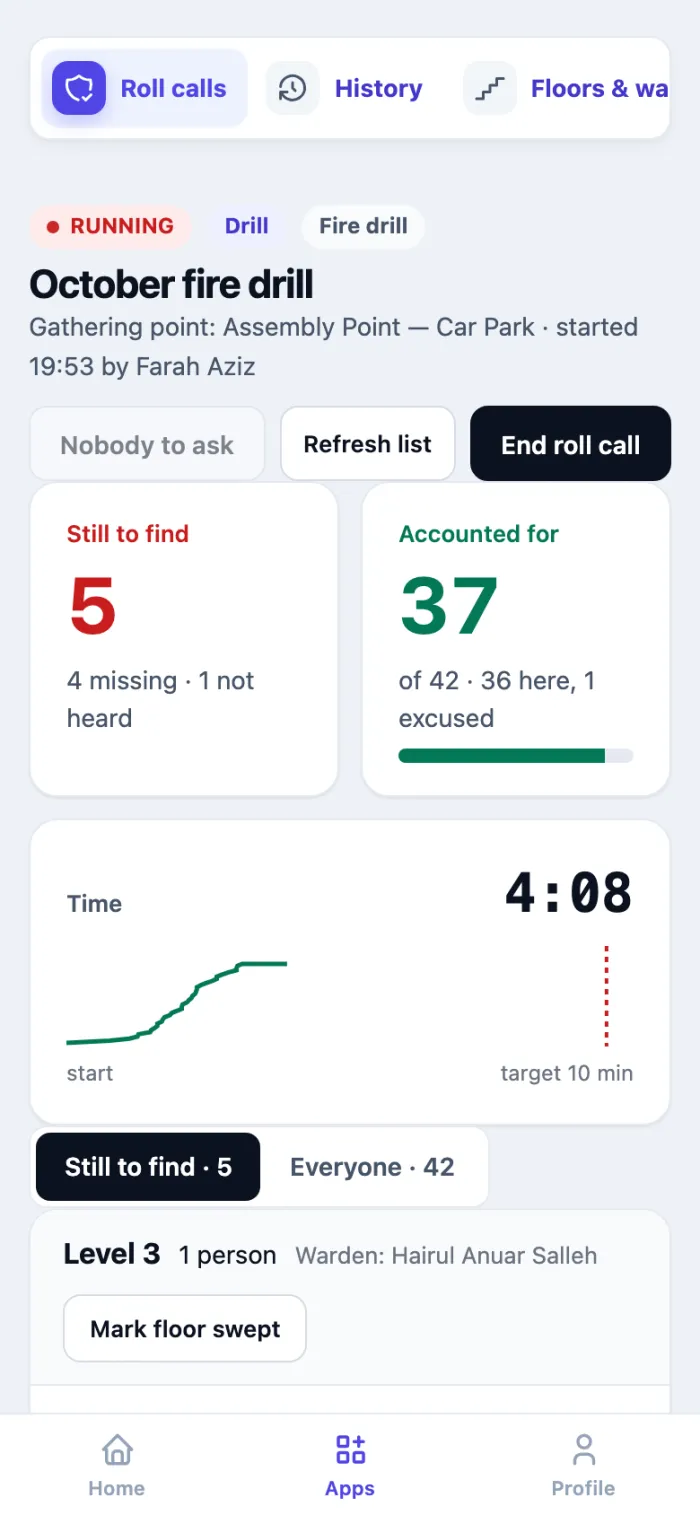
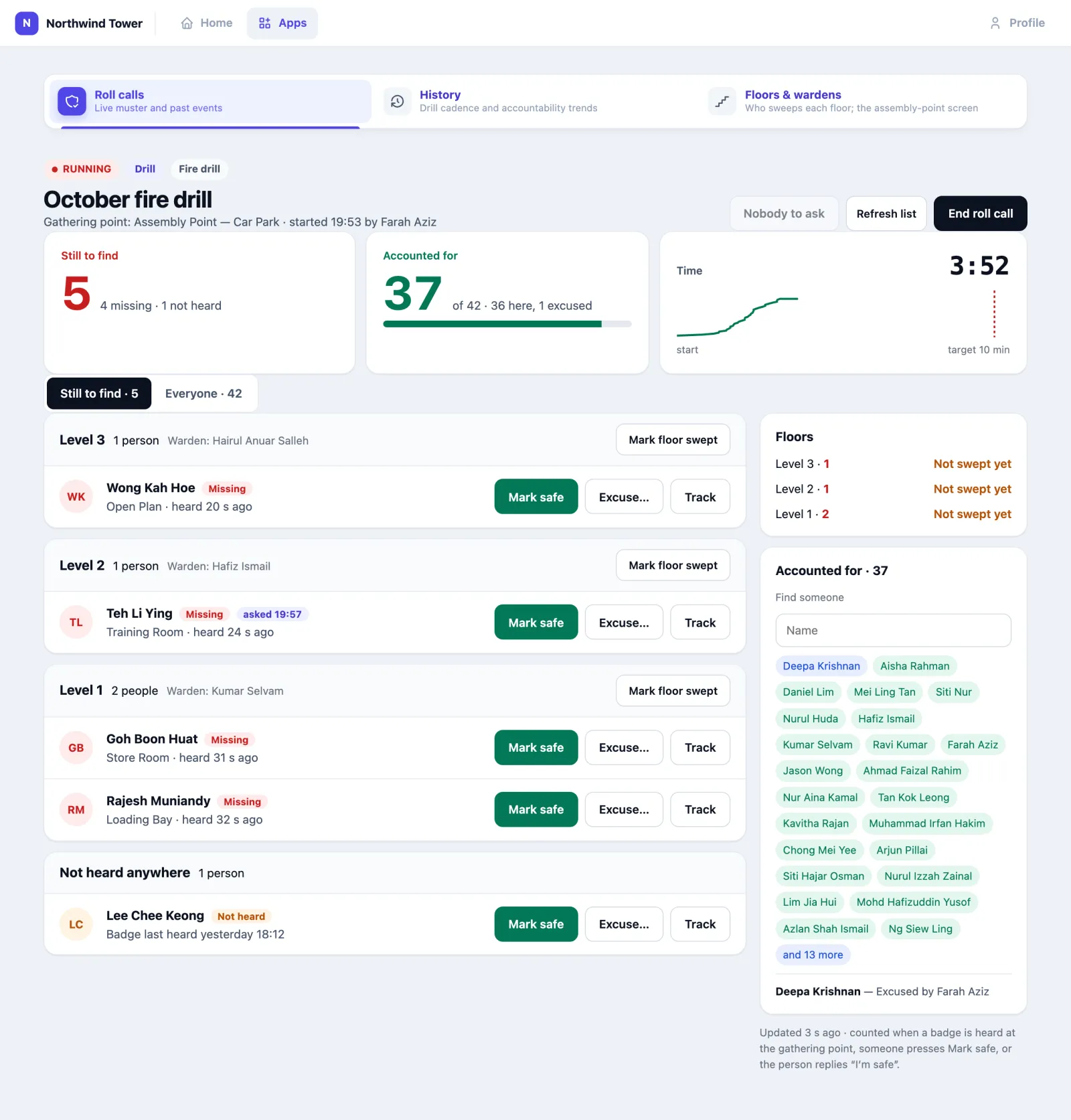
At the top:
- Still to find — the people not accounted for yet: missing (their badge is heard somewhere else) and not heard (their badge has not been heard anywhere for five minutes).
- Accounted for — safe at the gathering point, excused, or off site, out of everyone on the list.
- Time — since the start, with the curve of people accounted for and the drill's target.

Still to find, the first tab, groups the people still to find by the floor their badge was last on, with that floor's warden. Each person shows where their badge is now (Store Room · heard 18 s ago) and three buttons: Mark safe, Excuse… and Track. People who have not been heard anywhere come last, under Not heard anywhere, with when their badge was last heard. Someone who asked for help comes first, in red, and a red banner at the top says who and where.
On the right: each floor's sweep status, and Accounted for — everyone safe, with a Find someone box to check a name quickly ("is Siti out?").
Everyone, the second tab, is the whole list in a table: status, where, since when, and how they were counted — Badge at the gathering point, Marked safe by Farah Aziz, Replied "I'm safe", Excused by Farah Aziz — On leave.
The board refreshes itself every few seconds; the line under the panel says Updated … s ago. If it stops updating, a red banner says so and offers Reload — trust nothing on a board that says it is not updating.
| Status | What it means |
|---|---|
| Safe | The badge has been heard at the gathering point since the roll call started, or someone pressed Mark safe |
| Not seen yet | The first minute, or a badge that was already at the gathering point when you started and has not been heard there again yet (see below) |
| Missing | More than a minute in, and the badge is heard somewhere else |
| Left again | Was counted and then left the gathering point during the first minute |
| Not heard | The badge has not been heard anywhere for five minutes. The person could be anywhere, including outside gateway coverage |
| Excused | Someone pressed Excuse…, or the person replied "I'm safe" |
| Off site | Their badge has a GPS tracker and it places them outside the building — but not at an outdoor gathering point (that counts as Safe) |
| Needs help | They replied "I need help" to "Are you safe?" |
Why someone standing at the assembly point is not counted yet
A badge that was already in the gathering zone when you pressed Start only counts once it is heard there again two minutes later. Gateways keep repeating a badge's last signal for a short while, so a badge dropped in that zone just before the alarm would otherwise look like a person who got out. Anyone who walks into the gathering point after the start counts at once.
How to mark someone safe or excuse them
On a person in Still to find, while the roll call runs:
- Mark safe — you can see them, but their badge has not been counted: a flat battery, a badge left on a desk, a gathering point at the edge of coverage.
- Excuse… — they are accounted for without being here. Pick why — On leave, Working from home, At another site, Taken to hospital, Left the building earlier — or type a reason. The reason goes on the board, the report and the CSV.
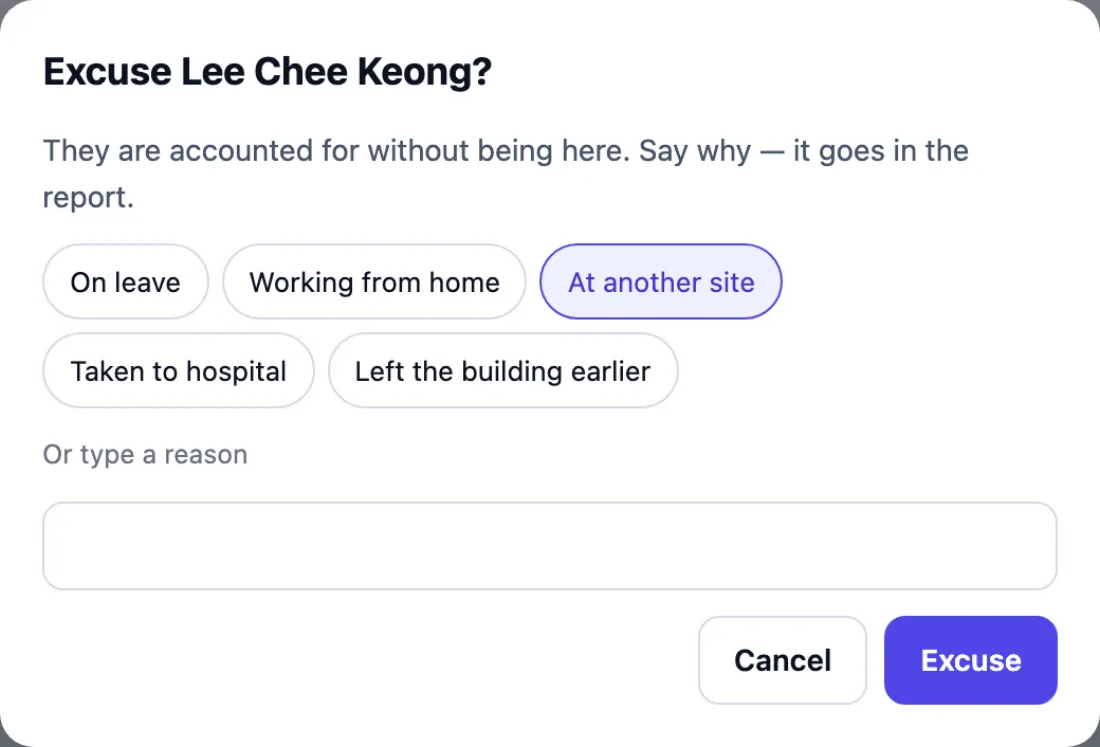
A hand mark stands: the sensors do not overrule it. Every mark is recorded with who made it and when, and appears in the report.
How to find someone who is missing
- Read the floor they are under and where their badge is now. Send that floor's warden there first.
- Press Track for every room their badge was in over the last 24 hours.
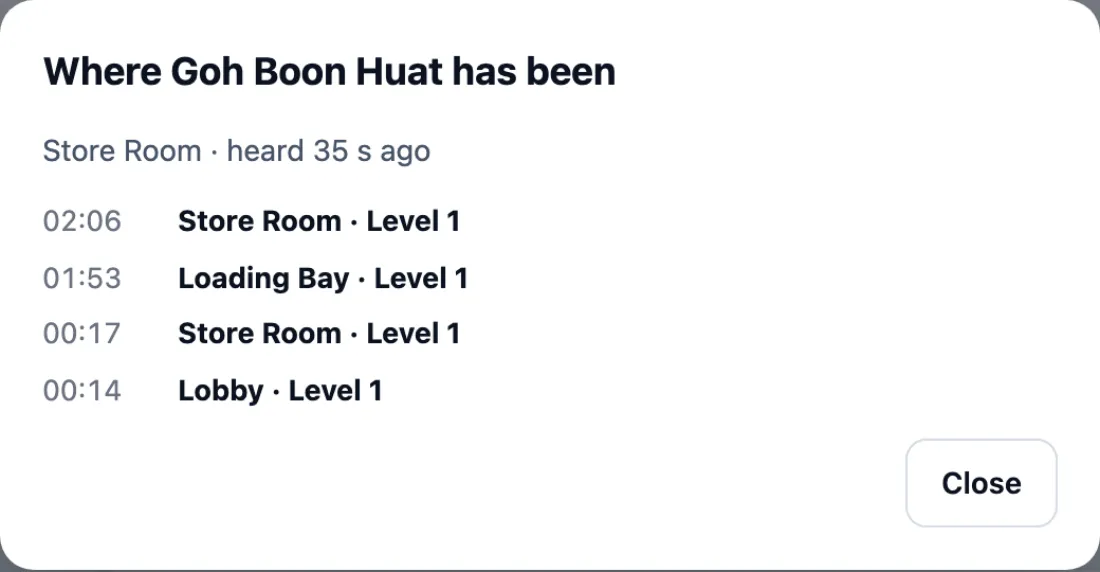
Someone under Not heard anywhere has no live position. Badge last heard tells you how long it has been silent: a few minutes means a blind spot; since yesterday usually means a badge left at home, or a person who is not in today.
How wardens sweep their floor
Each floor can have one or more wardens (see Setting it up). On the board, each floor shows its warden and a Mark floor swept button. When the warden has checked every room on their floor — toilets, store rooms, meeting rooms — they press it, on their phone or on the board. It turns green: Swept · Hafiz Ismail 11:03. Press it again to take it back.
A floor marked swept with somebody still listed under it is the cue to look harder: their badge says they are there.
Floor sweeps are listed in the report's timeline, and the ended summary says how many floors were swept and when.
How to ask "Are you safe?"
Press Ask the 5: "are you safe?" at the top of the board. Everyone still to find who can be reached gets a personal link — by email, the Omaya app, and SMS or WhatsApp where your organisation has those connected. The button counts only the people who can be reached; hover it to see how many cannot.
Opening the link needs no sign-in. It asks "(their name), are you safe?" with two big buttons and an optional Where are you?:
- I'm safe — I'm out — they are accounted for straight away (Excused, Replied "I'm safe", with what they wrote).
- I need help — they stay on the list, marked Needs help in red at the top of the board with what they wrote, and the person running the roll call and their floor's warden are alerted at once.
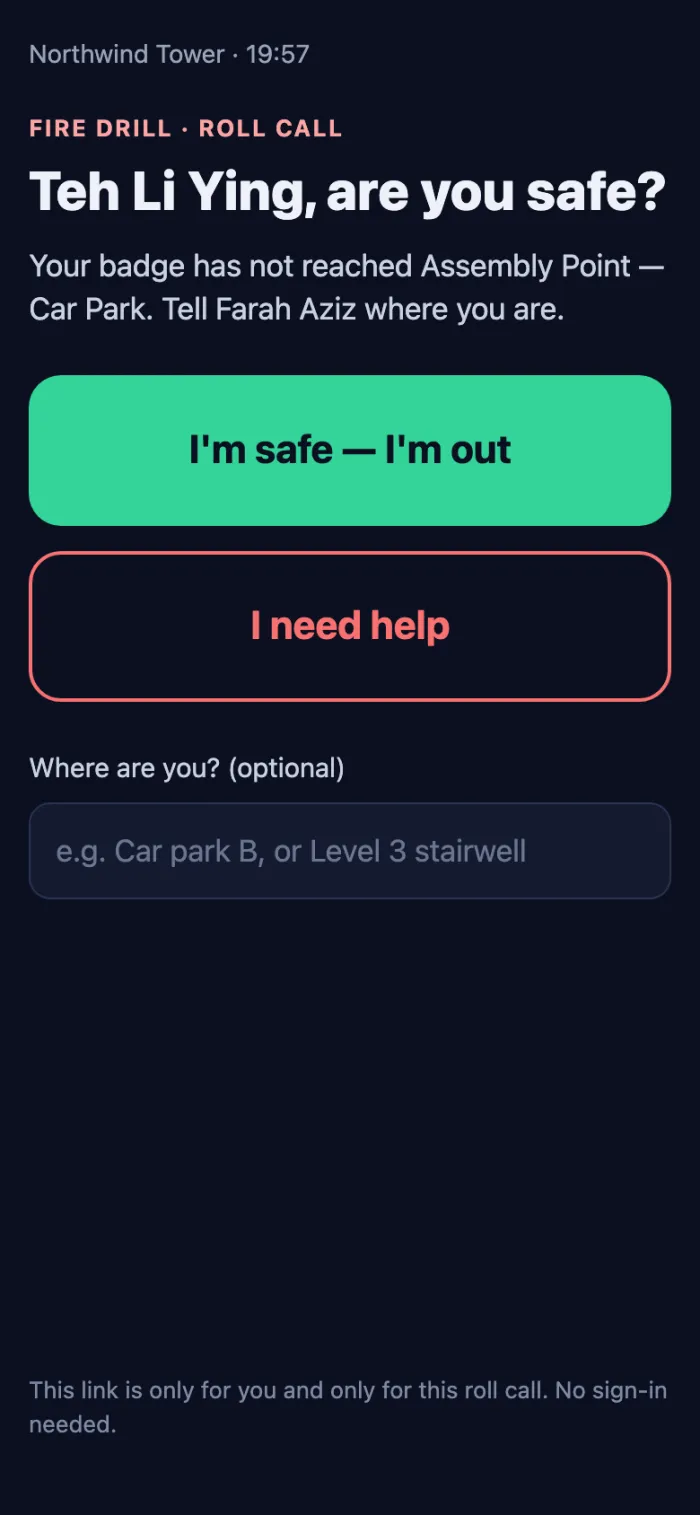
The link is for that person and that roll call only; it stops working when the roll call ends. Asking again re-sends the same link to anyone who has not answered. It is never sent automatically: someone has to press the button.
Only people with an app account linked to their person record (with an email or phone) can be asked. Ready for the next alarm? says how many that is.
The assembly-point screen
A TV or tablet at the assembly point can show the roll call to everyone standing there. Set it up once under Floors & wardens → Assembly-point screen: press Set up the screen link, and open the link on the screen. Nobody signs in on it.
- With no roll call running it shows the site and the clock.
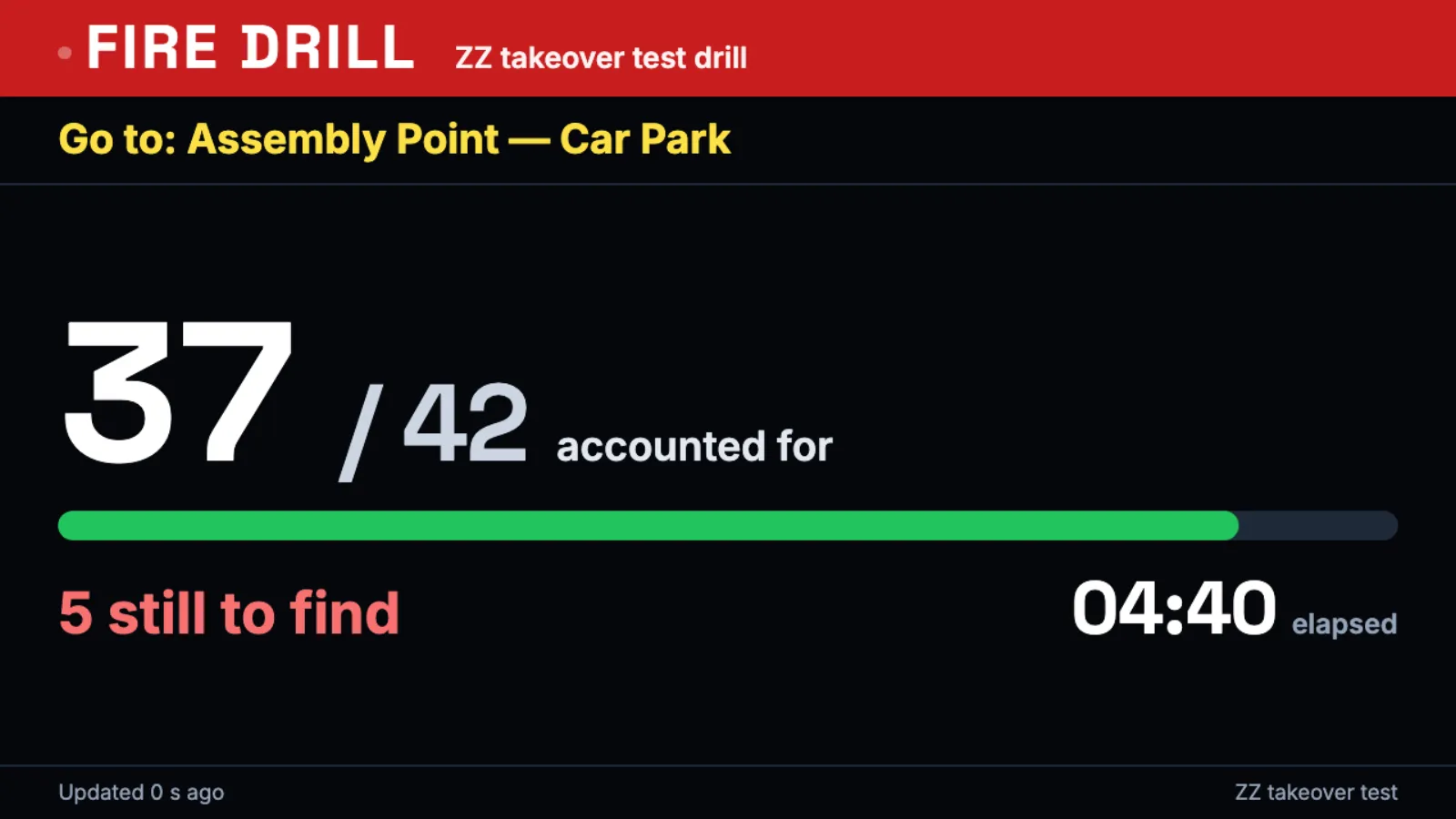
- When a roll call starts it switches by itself within seconds: Go to: the gathering point, the count, the time, and the names still to find by floor.
- When the roll call ends it shows the result for ten minutes, then the clock again.
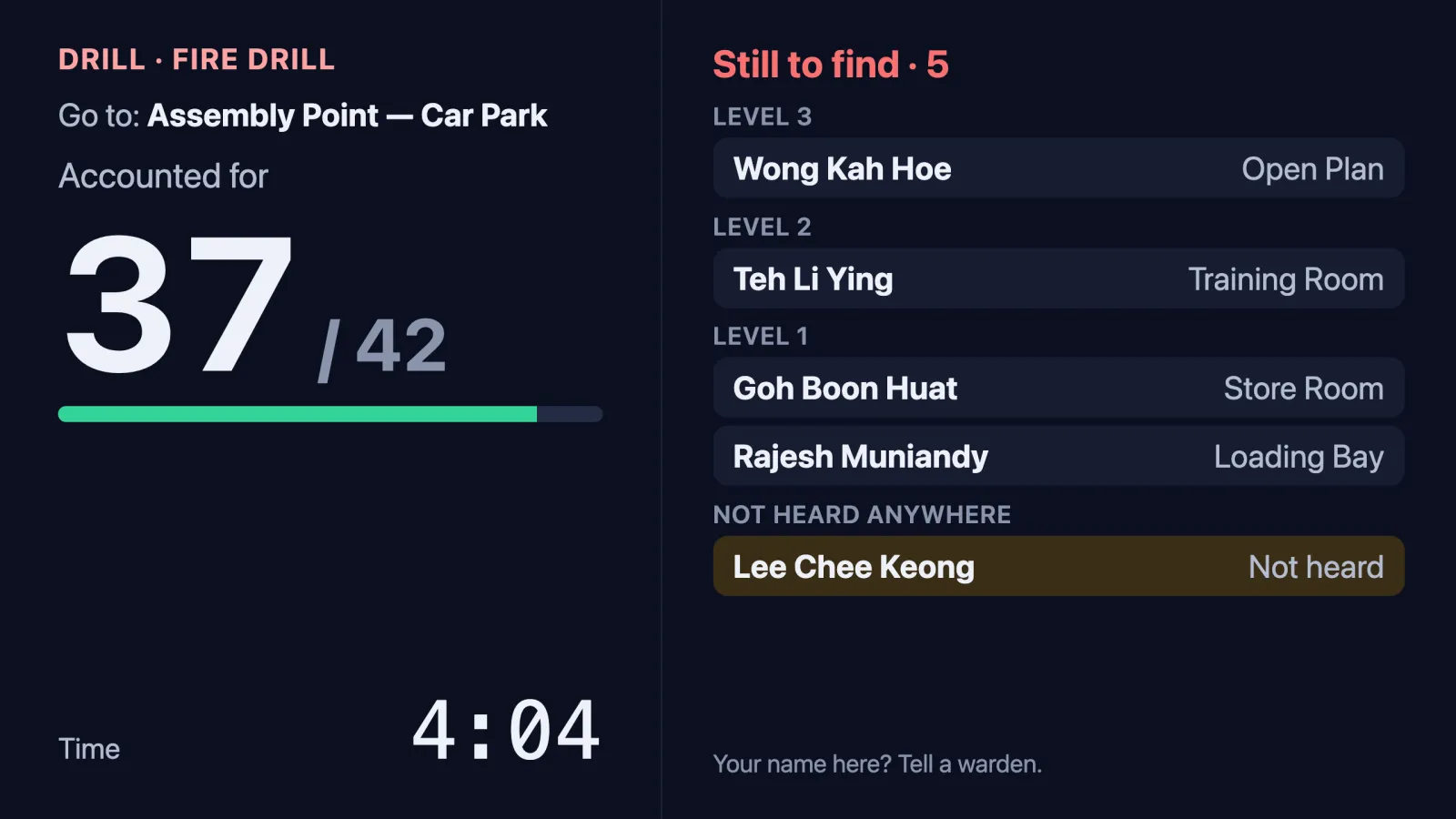
People at the muster check the screen: a name on it whose owner is standing in the crowd is the cue for a warden to press Mark safe. If the screen is in a public place, switch it to Numbers only. New link makes a new link; a screen with the old one then says the link is no longer valid.
Lobby TVs. A TV Dashboard board can be set to Take over this board during a roll call. While one runs it shows Go to: the gathering point and the count — numbers only, never names — then returns to its normal board.
How to end a roll call
Press End roll call. The box says how many are still not accounted for; confirm with End roll call.
The counts freeze as they stand. Anyone still missing, not heard or not seen yet is kept as not accounted for — the record does not round them up. An ended roll call cannot be reopened, so end it when you are sure.
After the roll call
The ended roll call shows how it went:
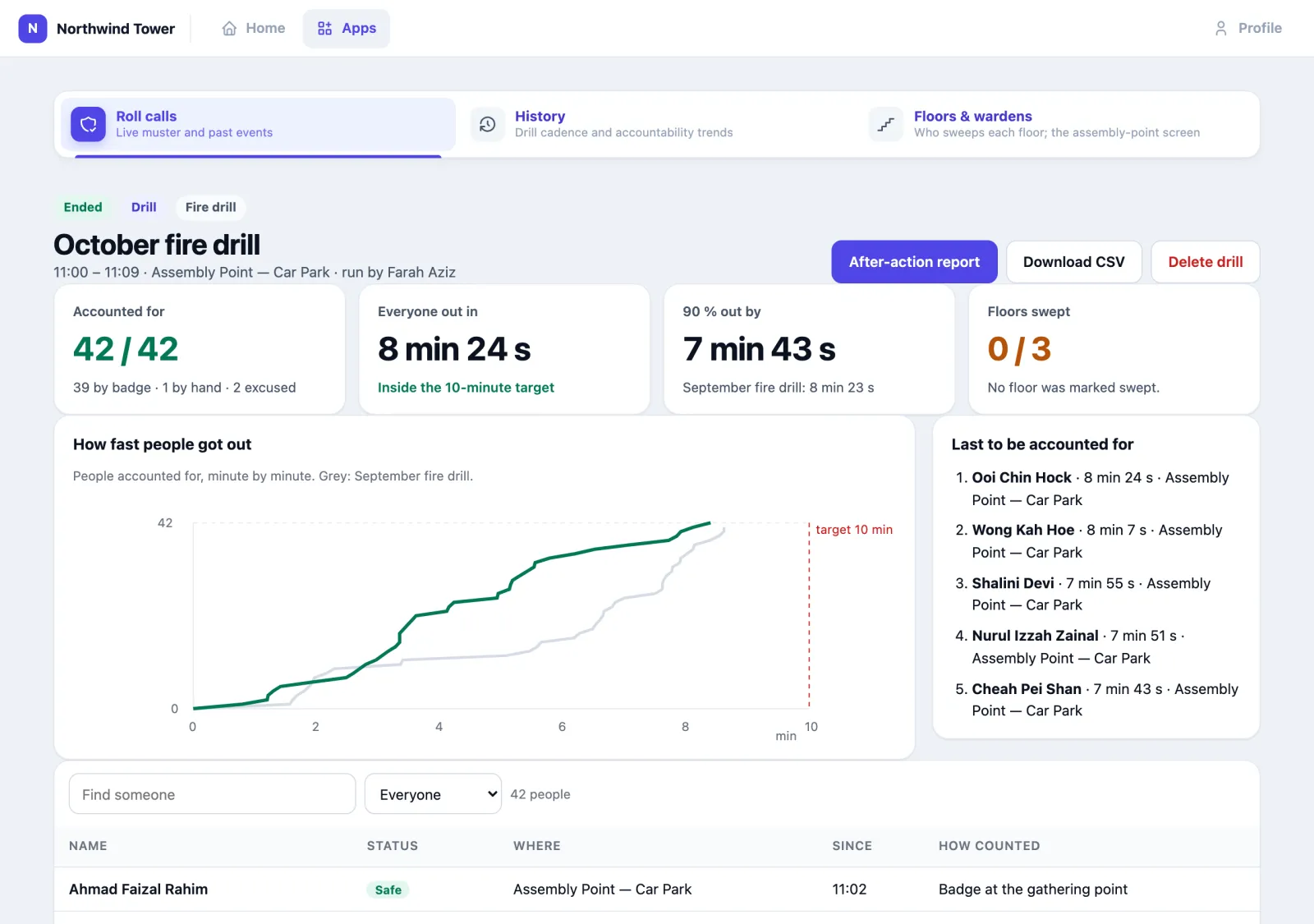
- Accounted for, and how: by badge, by hand, excused.
- Everyone out in — from the start until the last person was accounted for, and whether that met the drill's target.
- 90 % out by — usually most of the time goes on the last few people; compared with the previous drill.
- Floors swept, and when.
- How fast people got out — the curve of people accounted for, with the previous drill in grey and the target as a red line.
- Last to be accounted for — or, if anyone was never found, who.
- The full list with how each person was counted.
After-action report opens a printable report in a new tab (your browser's Print makes a PDF). Download CSV gives one row per person: the record you file. Both are also in the past roll calls list (Report, CSV).
The report has when it started and ended, the gathering point, the drill objective and notes, the accountability, the average and slowest response, a breakdown by zone, the timeline of every start, mark (with the person and the reason), floor swept, "Are you safe?" reply and end, a Lessons learned box and a sign-off table.

The Lessons learned box is not saved
Type into it before you print, or write on the printed copy.
Badge reliability
A badge that is not heard cannot be counted: the person wearing it shows as Not heard, whether or not they are safe. To find those badges before the next alarm, open the report of a roll call and press Check badge reliability. It checks on how many of your working days in the last 30 days each badge was heard.
| Verdict | What it means |
|---|---|
| Reliable | Heard on at least 8 working days in 10 |
| Intermittent | Heard on 5 to 8 in 10 |
| Unreliable | Heard on fewer than 5 in 10: check the battery, or replace the badge |
| Never heard | Not heard on any working day |
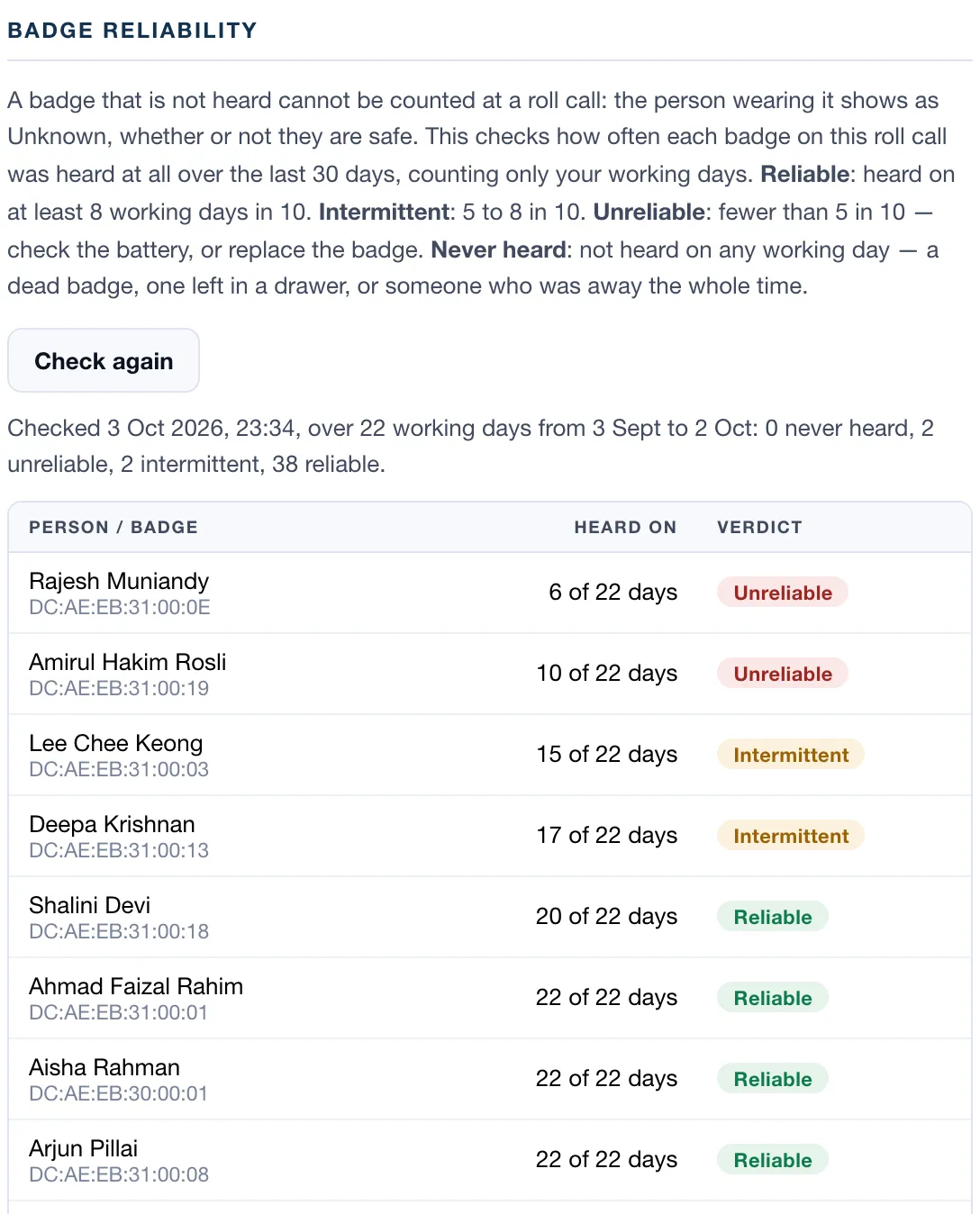
Working days are your organisation's operating days; if none are set, every day counts. Ready for the next alarm? on the home page gives the quick version every day: badges not heard for a week.
How to check your drill history
Open History.
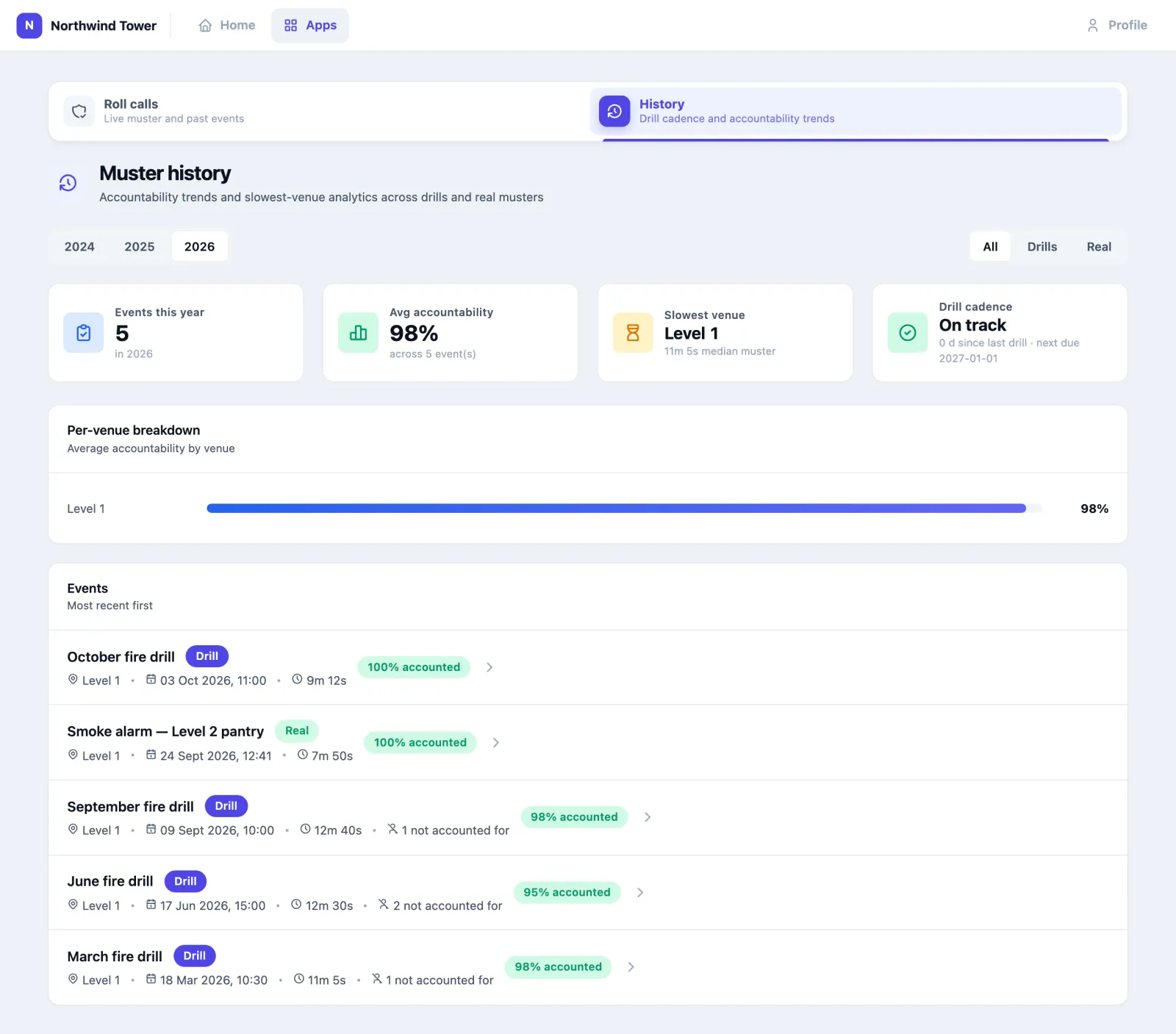
- Pick the year and All, Drills or Real.
- Avg accountability — (safe + excused + off site) ÷ everyone on the list.
- Slowest venue — the gathering venue with the longest median roll call.
- Drill cadence — On track, Overdue or No drills yet. The target is one drill every 90 days; a real evacuation does not reset it.
Deleting a drill
Someone with configure rights can delete an ended drill: open it and press Delete drill. This removes the drill, its list of people and its timeline for good. A real roll call (not a drill) is a safety record and cannot be deleted.
Using it in your organisation
Corporate office
Setting. Three to thirty floors, one assembly point outside, staff badges on lanyards. Who does what. The safety officer runs drills twice a year from a phone at the assembly point; one warden per floor; reception excuses visitors who left earlier. Settings that matter. A zone for the assembly point with its own gateway; a warden for every floor; the assembly-point screen on a tablet by the car park; lobby TVs set to take over. Tip. Link staff app accounts to their person records so "Are you safe?" can reach them — it turns a phone tree into one press.
Hospital or care home
Setting. Staff on shifts, patients who cannot walk out, wards that evacuate horizontally to the next fire compartment. Who does what. The nurse in charge of each ward is its warden; security runs the overall board. Settings that matter. Use a venue (the ward's floor) as the gathering point when people move to the next compartment. Screens set to Numbers only in public corridors. Tip. Patients without badges are not on the list. Keep the paper ward list for them, and use Roll Call for the staff.
Factory or warehouse
Setting. A large floor, contractors and drivers coming and going, noisy areas where the alarm is hard to hear. Who does what. The EHS officer starts the roll call; supervisors are the wardens of their areas; the gatehouse excuses drivers who have already left. Settings that matter. A rule that starts a roll call when a fire alarm input trips; contractor badges labelled visitor at the gate. Tip. After every drill look at who was Not heard rather than Missing: the same far corner every time is a gap in gateway coverage, not a person who ignored the alarm.
Setting it up for your organisation
This part is for the administrator.
What must exist first
- Badges on people. Each person needs a badge (a BLE tag) bound to their person entity, under people and assets. Visitor and contractor badges can instead carry the device label staff, employee, human or visitor.
- A zone for the gathering point, with gateway coverage. It is usually outdoors, where coverage is weakest — stand there with a badge before the first drill.
- App accounts linked to people, for "Are you safe?": each app user's Linked person, with an email or phone number.
- Operating days for accurate badge reliability.
Floors and wardens
Floors & wardens (configure rights) lists every floor with how many badges are on it now. Tick who sweeps each floor — one or several app users — and press Save. A floor with people on it and no warden is flagged here and on the home page.
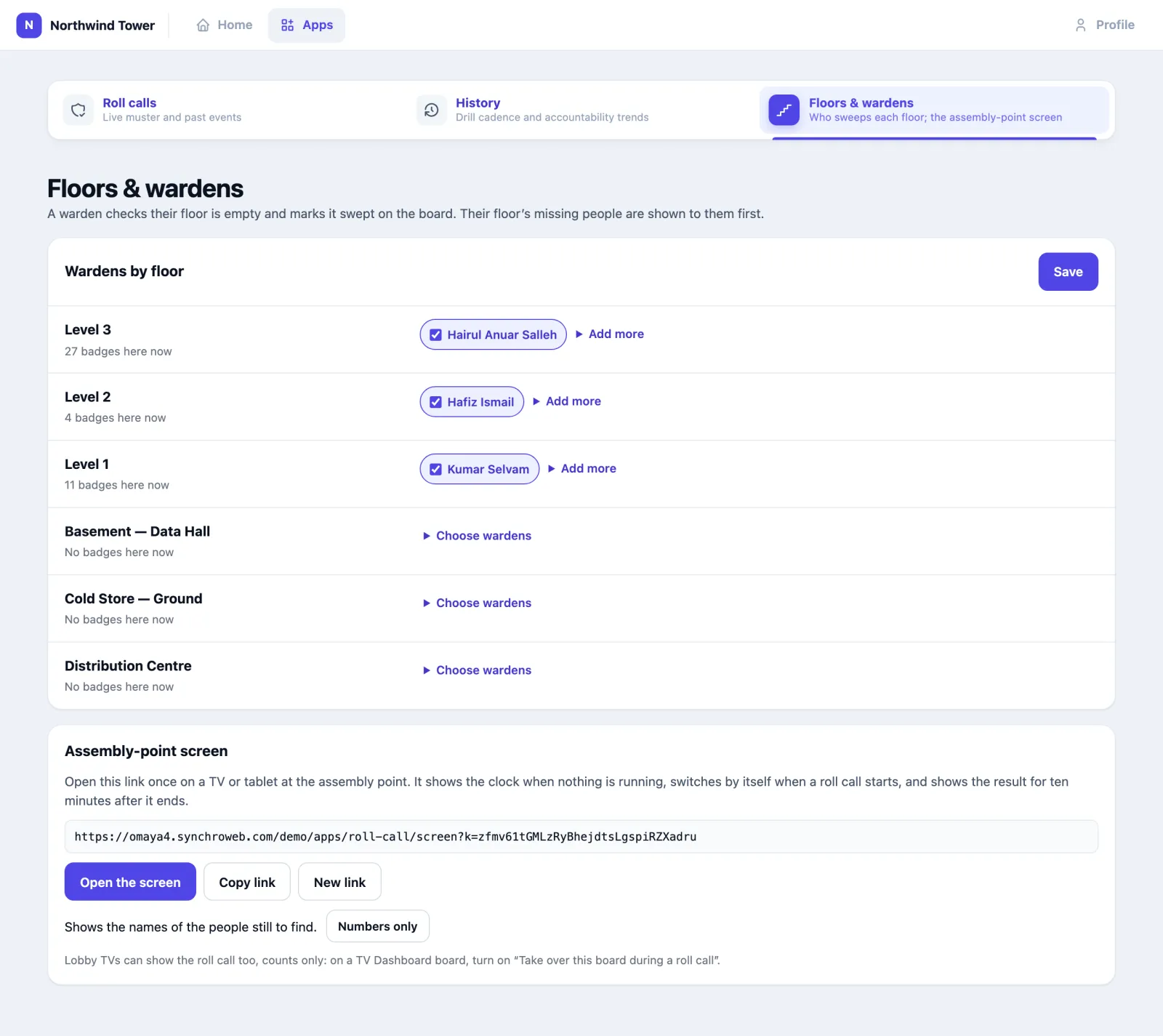
The same page holds the Assembly-point screen link (see above).
Checklist
- Bind every staff badge to its person entity.
- Create the assembly-point zone and put a gateway there.
- Give the app to the people who run roll calls, with configure for whoever sets up wardens and may delete drills.
- Set a warden for every floor.
- Link app accounts to people, so "Are you safe?" can reach them.
- Put the assembly-point screen on a tablet or TV at the car park; set lobby TV boards to take over during a roll call.
- Optionally, add a rule with the action Start Roll Call.
- Run a drill. Afterwards, fix what Ready for the next alarm? and the Not heard names point at.
Settings
| Setting | Where | What it changes |
|---|---|---|
| Badge bound to a person entity | Places → Entities | The person is on every roll call, under their own name |
| Device label staff, employee, human or visitor | Devices | The badge is on every roll call even if it is bound to nobody |
| App user's linked person, email, phone | App users | Whether "Are you safe?" can reach them |
| App user grant Roll Call | App users | Can open the app, start, mark and end roll calls |
| …with configure | App users | Can also set wardens and the screen link, and delete ended drills |
| Wardens | Roll Call → Floors & wardens | Who is shown on each floor and alerted when someone on it asks for help |
| Assembly-point screen | Roll Call → Floors & wardens | The screen's link, names or numbers only |
| Take over this board during a roll call | TV Dashboard → a board → Settings | Lobby TVs show the roll call, counts only |
| SMS / WhatsApp connectors | Connectors | "Are you safe?" also goes by SMS / WhatsApp |
| Rule action Start Roll Call | Rules | Starts a roll call when the rule fires (critical priority unless the rule says otherwise), named [Rule] …. If one is already running, the rule joins it |
| Organisation's notification recipients | Organisation → Notifications | Who gets the reminder email when no drill has been held this quarter |
| Webhooks | Webhook subscriptions | rollcall.event_started and rollcall.event_ended |
If no badge is bound to anyone
When no badge is bound to a person and none carries a label, the app musters every badge that is not bound to an asset, and the board says so in an amber note. Fix the bindings before you rely on it.
Questions and problems
The list is far too long, full of things. No badge is bound to a person, so every unbound badge is on it. Bind the staff badges to their people.
The list is short; people are not on it. They have no badge, or their badge is not bound to them. If you fixed badges after starting, press Refresh list: it adds the newly bound badges and keeps everyone's status.
People at the assembly point stay "Not seen yet". Their badges were already in the gathering zone when you started. They count once heard there again two minutes later — wait, or press Mark safe.
Nobody is counted automatically. The roll call has no gathering zone, or the assembly point has no working gateway — Ready for the next alarm? says so.
"Ask the …" says Nobody to ask. Nobody still to find has an app account linked to their person, with an email or phone.
Someone replied "I'm safe" but they are not here. They are accounted for — that is what the reply means. If you doubt it, phone them; you can still Mark safe or change the mark while the roll call runs.
The assembly-point screen says the link is no longer valid. Someone pressed New link. Open the current link from Floors & wardens on the screen.
A lobby TV did not switch. Its board's Take over this board during a roll call is off, or the Roll Call app is off for the organisation.
The board says "Not updating". Your session expired or the connection dropped. Reload the page before relying on any status.
I ended it too early. An ended roll call cannot be reopened. Start a new one; if the first was a drill, someone with configure rights can delete it.
On the phone
The board works on a phone: the warden sees each floor and big buttons. The Omaya app also starts, runs and ends roll calls.