Appearance
Security Watch
Security Watch turns the building's badges, gateways, buttons and sensors into a short list of incidents a guard can act on: a panic button pressed, someone in a restricted room, people where nobody should be after hours, a stranger's device hanging around, a room the sensors can no longer see, heat that could be a fire. Each incident comes with a two-line explanation and a suggested first step, and the guards take it from there: acknowledge, send someone, write what they found, close it with what it turned out to be.
Who uses it
HafizSecurity Guard (day)HairulSecurity Guard (night)KumarSecurity SupervisorAishaFacilities Manager
| Role | What they do with Security Watch | At Northwind Tower |
|---|---|---|
| Guard on shift | Watches the board, acknowledges and attends incidents, writes notes, resolves them with an outcome | Hafiz Ismail (days), Hairul Anuar Salleh (nights) |
| Security supervisor | Sends guards to incidents, reviews the night's incidents, resolves the backlog, receives escalations by email | Kumar Selvam |
| Facilities manager | Receives critical escalations, approves contractors' early access, reviews the history | Aisha Rahman |
| Administrator | Chooses watched zones, armed hours, restricted rooms, who is told (admin console) | Aisha, on the admin side |
Everyone who has the app is treated as a guard: they get a push for each new incident (when push is set up) and they appear in the list when an incident is assigned. At Northwind that includes Aisha, who has every app.
A day at Northwind Tower
The Northwind board watches twelve zones. The Server Room and the Store Room are restricted and armed around the clock; every other watched zone is armed from 19:00 to 08:00.
| Time | What happens | How |
|---|---|---|
| 03:42 | The Loading Bay gateway stops reporting. A critical Coverage lost incident is raised; nobody acknowledges it, so at 03:52 it is sent again. | What it watches for |
| 06:10 | A badge Omaya does not know is in the Server Room: C4:7F:51:2A:9E:03 in restricted zone Server Room, critical. Hafiz, in early, acknowledges it and checks the camera: the IT contractor booked for an early core-switch job, let in by Ahmad from IT. He resolves it as Expected (whitelist this). | Handle an incident, Resolve it |
| 07:12 | The reception panic button is pressed. Critical, re-sent at 07:22. | |
| 07:30 | Hafiz's shift starts. The board shows 2 critical. He acknowledges both. He attends the panic button himself — the cleaner knocked it while wiping the desk, False alarm — and assigns the Loading Bay to Kumar. | Read the board, Send a guard |
| 08:20 | Kumar notes that the socket by the shutter had been switched off; the gateway still does not report. Daniel takes it on as a Facility job. The incident stays open, assigned to Kumar. | Add a note |
| 11:00 | During the fire drill the building empties; Roll Call counts the same badges at the car park. | |
| 12:22 | Ravi trips on the Loading Bay ramp. His badge reports a possible fall and his phone asks if he is OK; he does not answer. A minute later a critical Possible fall — Ravi Kumar in Loading Bay is on the board. Hafiz acknowledges it and goes. | Falls |
| 13:52 | Amirul, an intern, is alone in the Boardroom with no booking — somewhere his badge has never been. The AI judges it worth a look: Out of habit, warning. Hafiz walks past. | Out of habit |
| Next morning | Kumar opens Incidents → Resolved to review the night, and selects two cleared alarms to close in one go. | Review and close several |
How to read the board
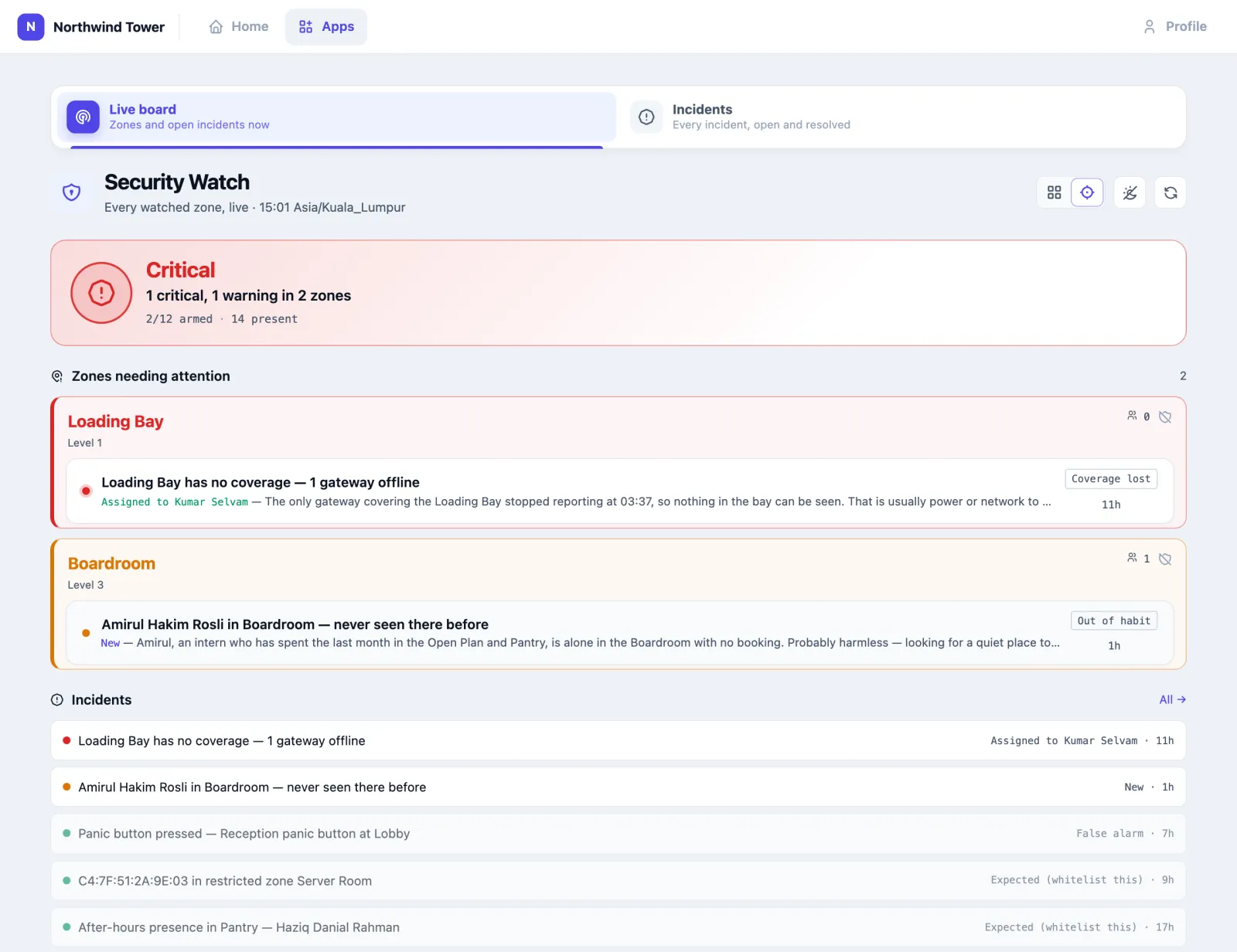
Open Security Watch. The board refreshes itself every minute; the Refresh button (top right) does it now. The two icons next to it switch between the two board modes; the app remembers your choice on that device.
Adaptive (the target icon) answers "is anything wrong?" first: a card that is green (All good), orange (Attention: warnings only) or red (Critical: any critical incident open), with how many zones are armed and how many people are present. Below it, Zones needing attention — only the zones with something open — then a one-line list of every open incident and anything resolved in the last 24 hours.
Traditional (the grid icon) shows three counters — Critical, Warning, New — a card for every watched zone, and the open incidents.
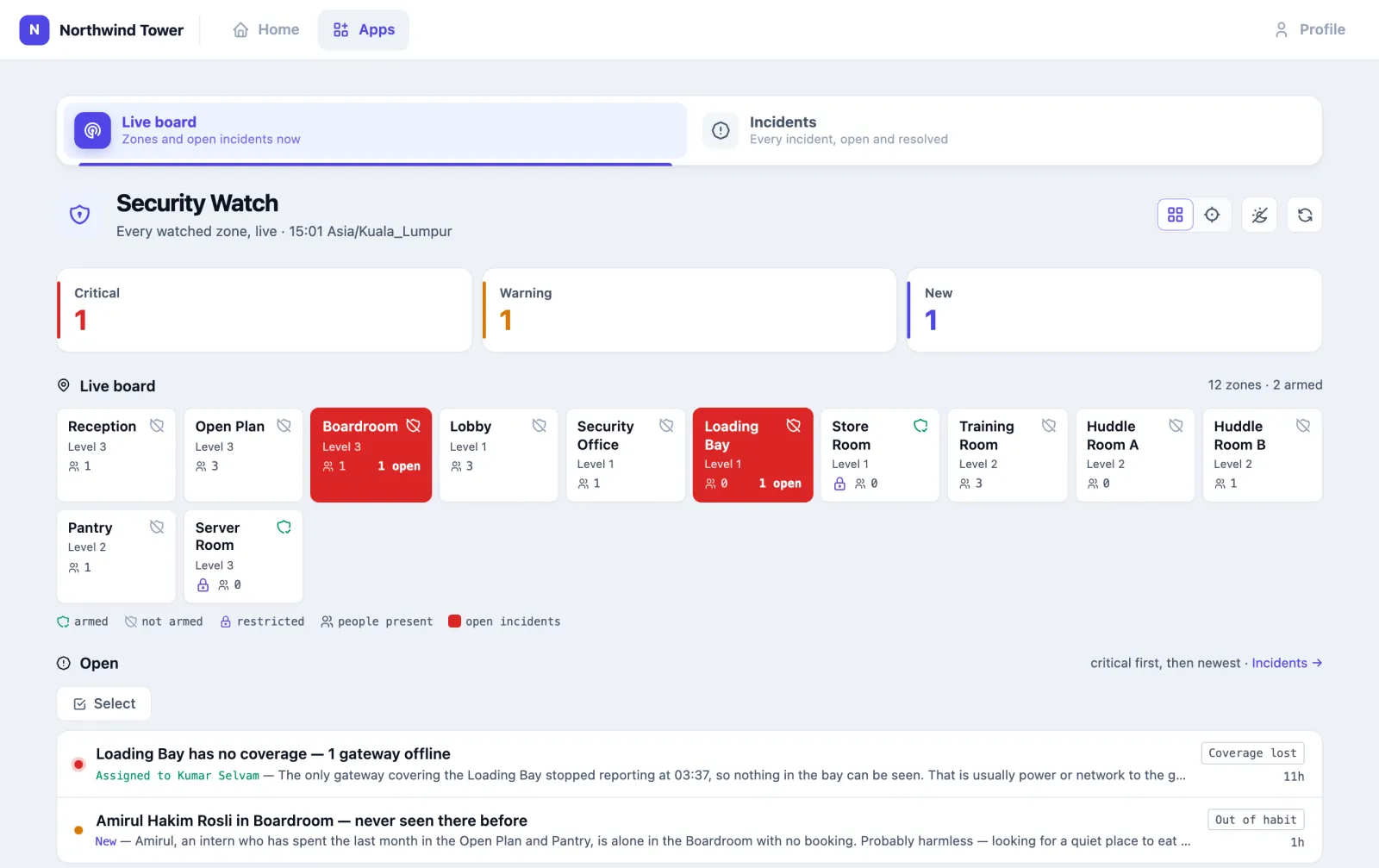
A zone card shows:
- the zone name and floor;
- a shield: green with a tick = armed now; crossed out = not armed. Hover over it (or press and hold on a touch screen) for the reason, such as armed window 19:00–08:00 or armed at all times;
- a lock if the zone is restricted;
- the people in it now (people only — badges bound to assets, and fixed sensors, are not counted);
- solid red with N open while it has an open incident, pulsing if one is critical.
"Not armed" across most of the board during the day is normal: armed is about the schedule.
Open incidents are listed critical first, then newest. Each line shows the title, its state — New, Acknowledged, Attending, Assigned to … or Assigned to me — the first words of the assessment, its type and its age.
If a red banner says Nobody will be told about incidents, push to guards is off (or no guard has the phone app with notifications on) and nobody is on the escalation list. Incidents still appear on the board, but no phone or inbox hears about them — not even a panic button. Tell your administrator.
How to handle an incident
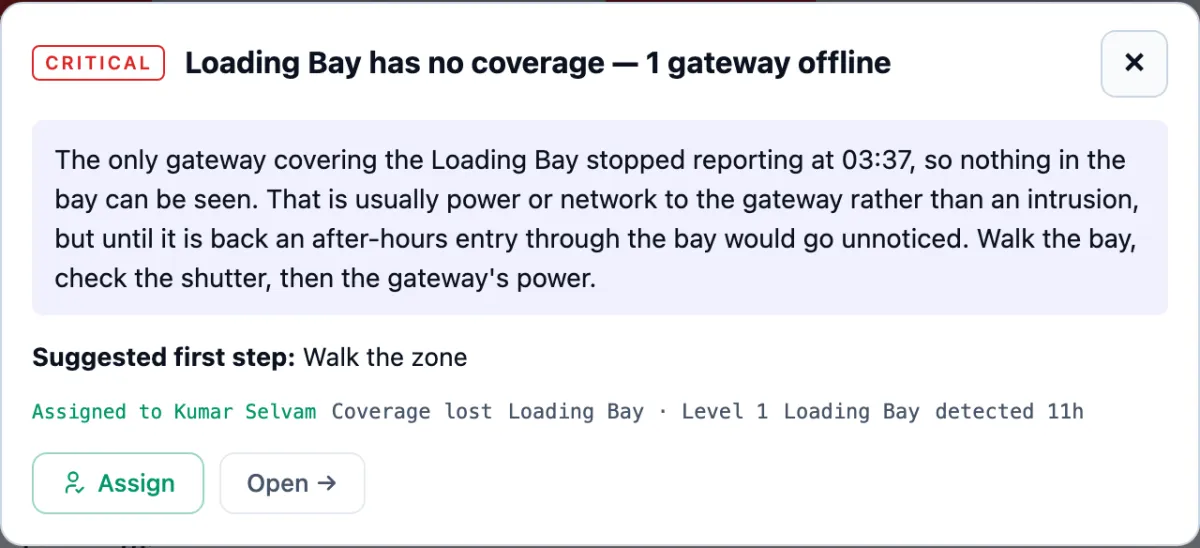
- Click an incident. A panel opens with the assessment, the Suggested first step, its state, type, zone and when it was detected.
- Press Acknowledge to tell everyone you have seen it. It is not closed.
- Do the suggested step, or what your procedure says. The suggestion is advice from a fixed list — Send a guard to the zone, Check the cameras for the zone, Walk the zone, Call the site contact, Start evacuation procedure, Expected — no action, consider whitelisting, No action needed.
- Press Assign to send yourself or a colleague (next section), or Open → for the full record.
The full record shows the same, plus:
- Evidence — what the detector saw: who or which device, the zone, times, signal strength, the gateways, the temperature. Times are in your organisation's time zone. A short list reads as words (IT, Security); a list of gateways or of the people present shows one per line, such as GW L1 Loading Bay · status: offline · last seen: Sat 3 Oct 03:37; yes/no values read Yes or No, and a stored code reads as words (Single press). The phone app shows the same.
- Timeline — every step: Detected, Assessed (the AI's explanation), Re-alerted, Acknowledged, Guard sent, Note, Resolved, Whitelisted, Reopened, with the time and who did it.
- A box What did you find? and Add note — notes go on the timeline.
- Resolve, Assign and Acknowledge at the top (Reopen once resolved).
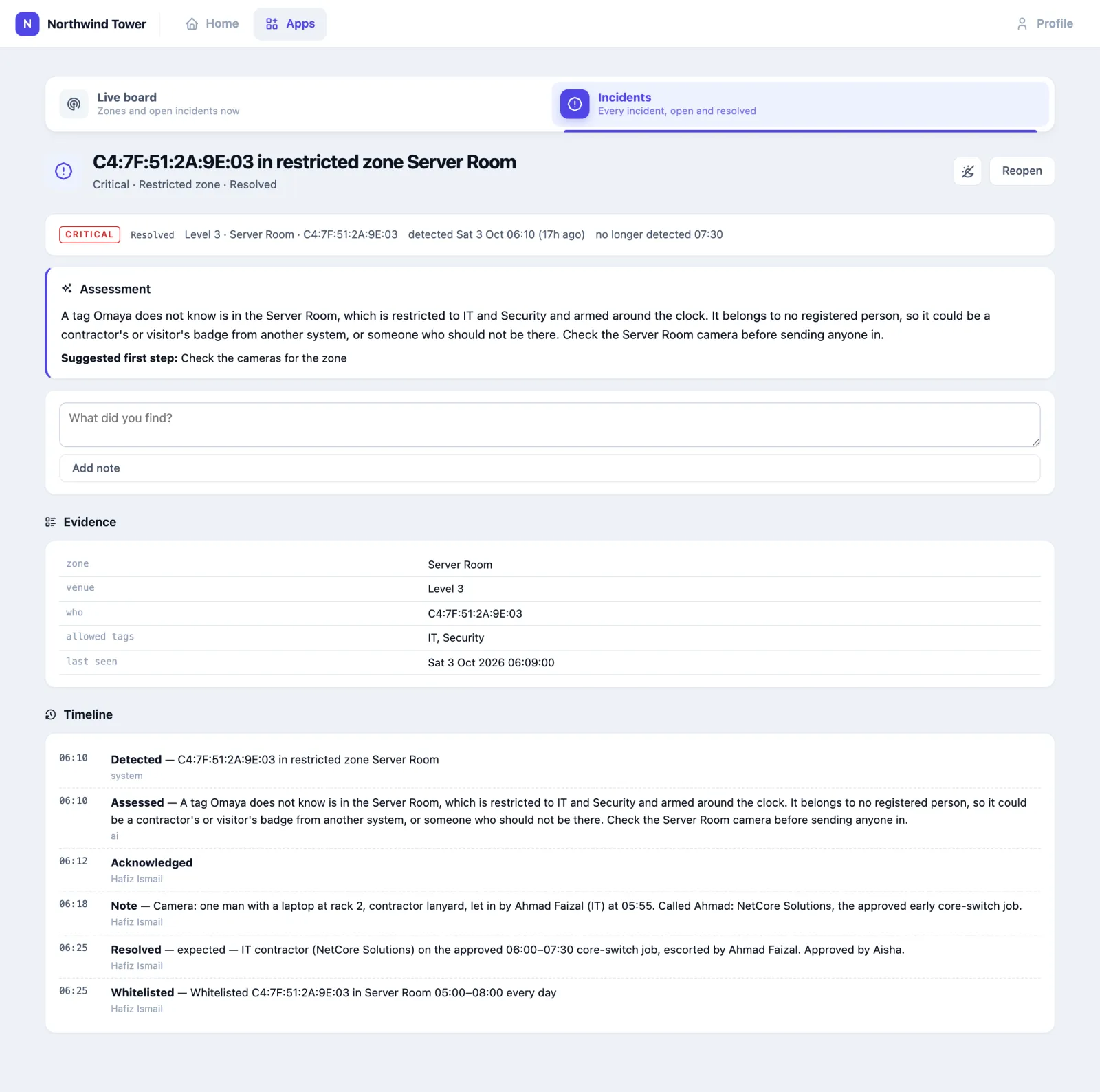
The Assessment is written by the AI from the evidence when the incident appears. It explains; it does not decide. If it is missing, AI is off for the app or for your organisation.
How to send a guard
Press Assign on an incident. Send a guard lists everyone who has the app, nearest to the incident first: In the zone, N m away or Same floor, N floors away, or No recent position, with the room they were last placed in and how many incidents they are already attending (free, attending 1…).
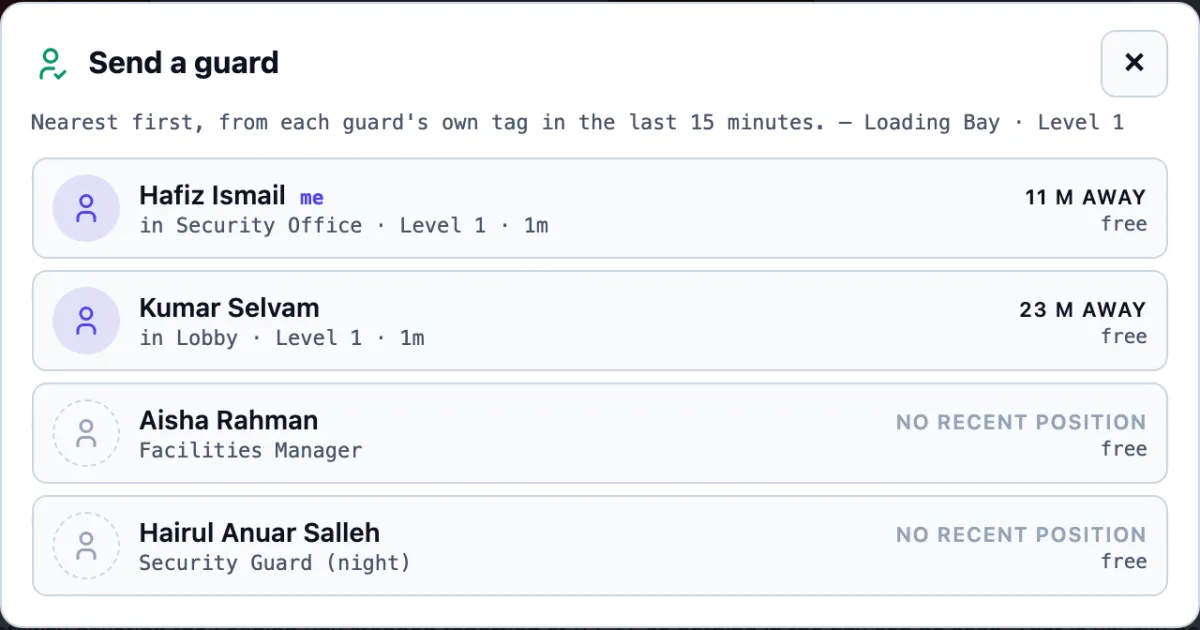
Pick a name. The incident becomes theirs: its state is Attending, they see Assigned to me and get a push, everyone else sees Assigned to …, and the timeline records who sent whom. Pick yourself (marked me) to say "I'm going".
Positions come from each guard's own badge in the last 15 minutes. A guard whose badge has gone quiet is still listed, last, as No recent position. Distances are straight lines between room centres, not walking routes.
How to resolve an incident
- On the full record press Resolve.
- Choose the Outcome:
- Genuine — it was real (a driver in the Store Room without permission).
- False alarm — nothing happened (a button knocked by the cleaner).
- Expected (whitelist this) — real, but normal (a contractor on an approved job, the pantry attendant restocking late).
- Test — a test press or a drill.
- Duplicate — already handled as another incident (the same press raised twice, two alarms for one event).
- Write what you found in What did you find? and press Resolve.

Expected means "don't tell me about this again"
Expected (whitelist this) adds a whitelist entry for whoever the incident was about, in that zone, from an hour before to two hours after the time it was detected, every day. The Server Room contractor at 06:10 is now whitelisted in the Server Room from 05:00 to 08:00 daily. Use it for a regular pattern, not a one-off you could not explain — and tell your administrator when a one-off contractor should come off the list. A panic press, a lost gateway or heat is never whitelisted; there is nobody to whitelist.
A resolved incident can be brought back with Reopen. If the same situation happens again after it was resolved — and the person was not whitelisted — it is a new incident.
How to review and close several at once
Open Incidents. Open lists everything not yet resolved, critical first; Resolved lists what was closed, most recent first, with the assessment.
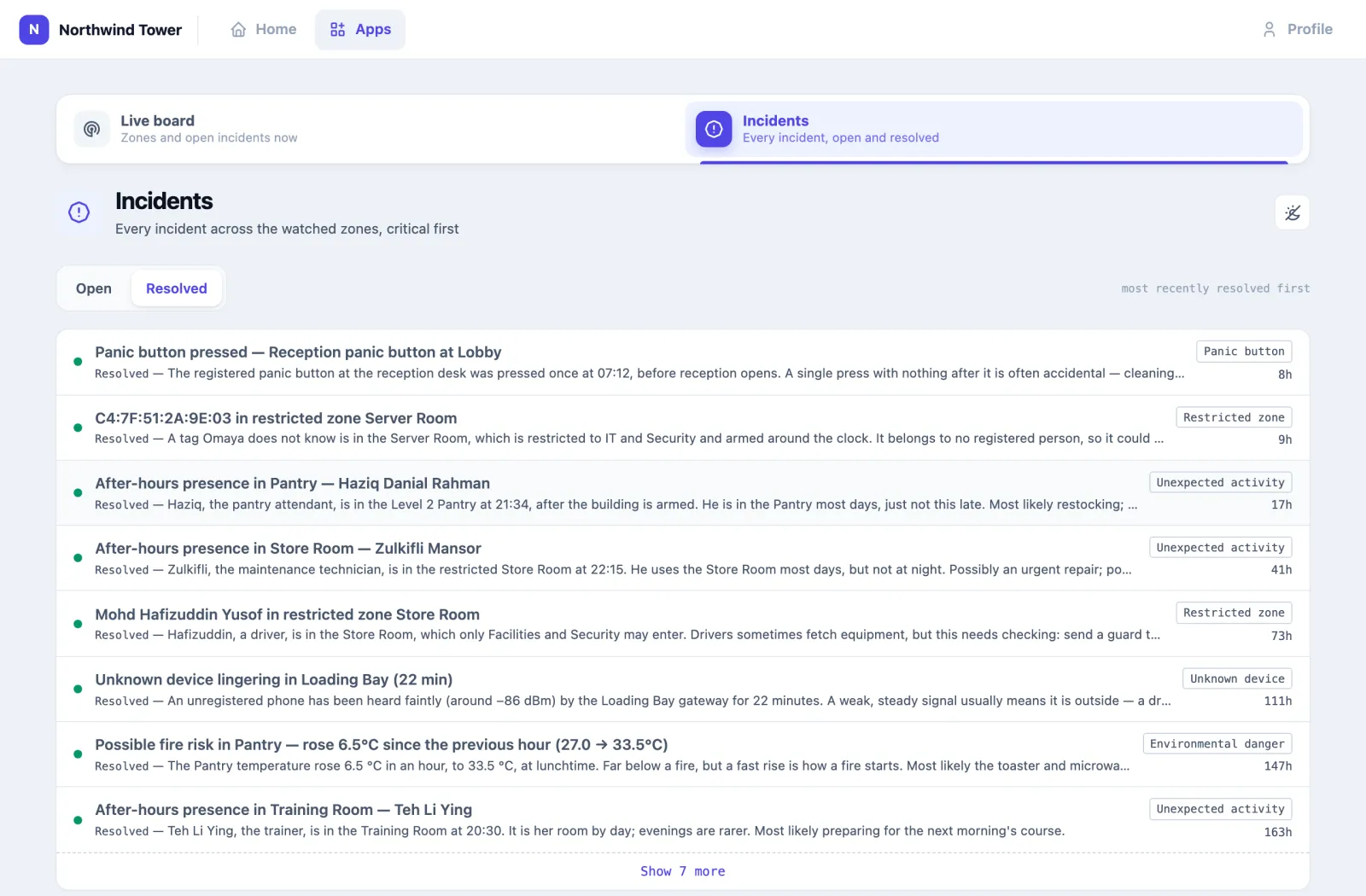
To close several with one outcome — the supervisor coming in to a board of overnight alarms that cleared by themselves:
- On Open, press Select. Tick the incidents, or press All.
- Choose the outcome (it starts at False alarm) and press Resolve selected.
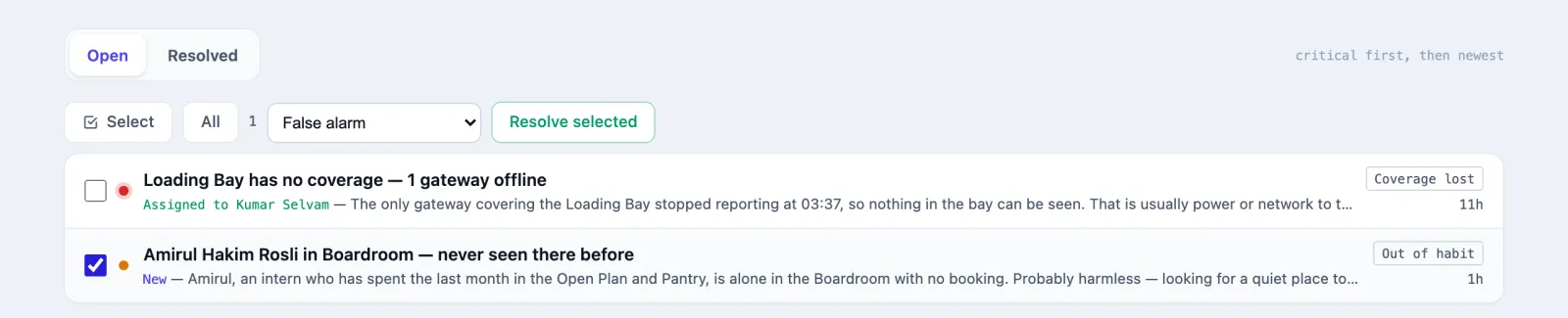
Each is resolved exactly as if you had done it one by one, with the same timeline entry and, for Expected, the same whitelisting.
How to read the reports
Reports sums up a date range for supervisors: how many incidents were raised and of what kind, where and at what hour; how long it took someone to pick up an incident (acknowledge it, or resolve it straight away) and to resolve it — the median, the slowest one in ten and the worst; what is still open; and the outcomes. A guard who sees only their own incidents sees only those here.
| Figure | How to read it |
|---|---|
| Picked up | A person acknowledged or resolved it. One the sweep closed as unattended was not picked up |
| False-alarm rate | False alarms out of incidents resolved as genuine, false alarm or expected. Tests and duplicates are left out |
| Panic buttons | Each button and the person carrying it now, its presses, and the presses nobody picked up |
| By guard | What each person picked up, was sent to and resolved, and how fast |
The administrator's Reports › Panic & Incident Response shows the same figures for the whole organisation, and Reports › Scheduled reports emails them on a schedule (see Scheduled reports in the apps). Rule & Alert Effectiveness counts an incident closed as unattended as acknowledged, so its figure for Security Watch is higher by those.
What it watches for
The checks run every five minutes on the watched zones. Each can be switched off by the administrator.
| Type on the incident | When | Severity |
|---|---|---|
| Panic button | A registered panic button is pressed with the press it is set for (or a worn button raises a man-down alarm), or a cellular badge raises SOS, Alert or man-down — one incident per alarm, kept current while it lasts and marked ended on the badge when it stops (PS101-M) | Critical, always |
| Button pressed | A button that is not registered as a panic button is pressed in a watched zone | Warning, never escalated |
| Unexpected activity | People in an armed zone (After-hours presence in …), or, in a zone with no armed hours, people at an hour it has been empty for weeks. Whitelisted people and assets are ignored | Critical if the zone is restricted, else warning |
| Restricted zone | A person or an unknown badge in a restricted zone who is not allowed there | Critical while armed, else warning |
| Unknown device | A Bluetooth device nobody registered, heard in a watched zone and staying there for at least five minutes | Warning |
| Coverage lost | Every gateway covering a watched zone is offline: the app says it cannot see, rather than reporting all clear | Critical while armed, else warning |
| Environmental danger | Temperature in a watched zone at or above 45 °C, or up 5 °C on the previous hour | Critical, always |
| Out of habit / Unusual use | Judged by AI — see below | Usually warning |
| Possible fall | A worn tag detected a fall or a man-down, and the person asked for help, did not answer Are you OK?, or could not be asked. Opens at once, not on the five-minute check — see Falls | Critical, always |
With the Warehouse app, two more appear: Warehouse: after-hours movement and Warehouse: goods overdue on a gate pass.
One incident per situation. While the same thing keeps happening it stays one incident. When it stops, the incident shows no longer detected but stays open until a person resolves it. A critical incident nobody has acknowledged after ten minutes is sent once more (Re-alerted on the timeline). An incident that has been no longer detected for twelve hours with nobody resolving it is closed by the app with the outcome Closed — unattended.
Out of habit
Omaya does not keep a list of which rooms each person may enter. Instead, when a person turns up in a room they have never or rarely been in over the last month (and they have at least five days of history), or a room is in use at an hour nobody has used it in weeks, the situation goes to the AI with the context: the person's usual rooms, the room's regulars, who else is there, whether there is a Meeting Room booking. Only if it judges a head of security would want to know does it become an incident, with the AI's reasoning as the assessment. Each situation is judged at most once a day. It applies to watched zones that are not armed at that moment; an armed zone already raises Unexpected activity.
Falls
When fall detection is on, a worn tag that falls, or stops moving for fifteen minutes, first asks its wearer "Are you OK?" on their phone. Only if they ask for help, do not answer in time, or cannot be asked does it come to you, as a critical Possible fall incident:

Handle it like any incident (above): Acknowledge, go, then Resolve. The evidence says who, which tag, where, how long it has been still, and why you were told (no answer, person asked for help or nobody to ask).
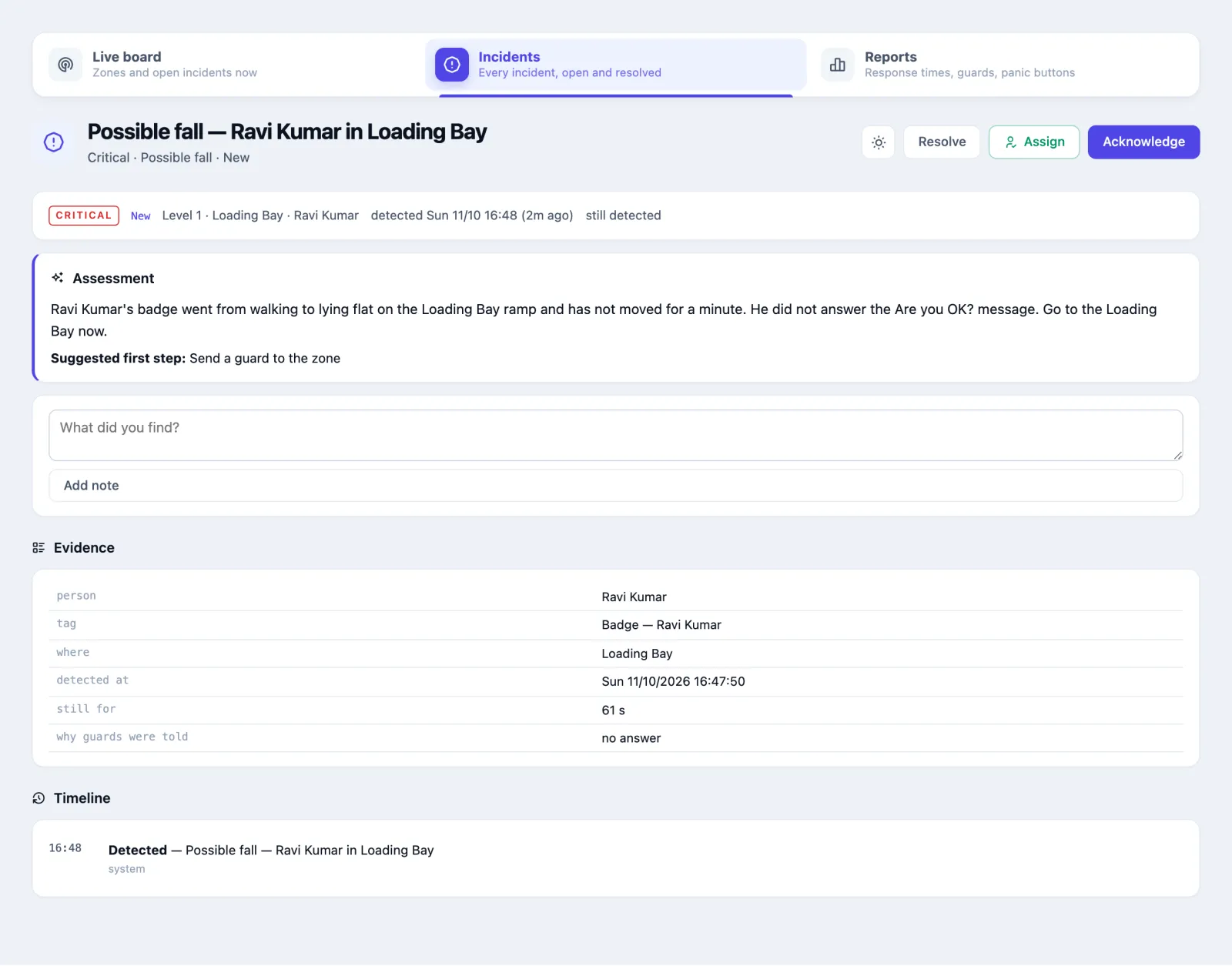
The outcome you choose is how the Fall & Man-down report knows whether it was real:
| Resolve as | Counts in the report as |
|---|---|
| Genuine | a real fall, whether or not they were hurt |
| False alarm or Expected | a false alarm: a dropped badge, someone lying down on purpose |
| Test | a test, left out of the accuracy figures |
The person answers from a page like this one, made for a phone, with no sign-in:
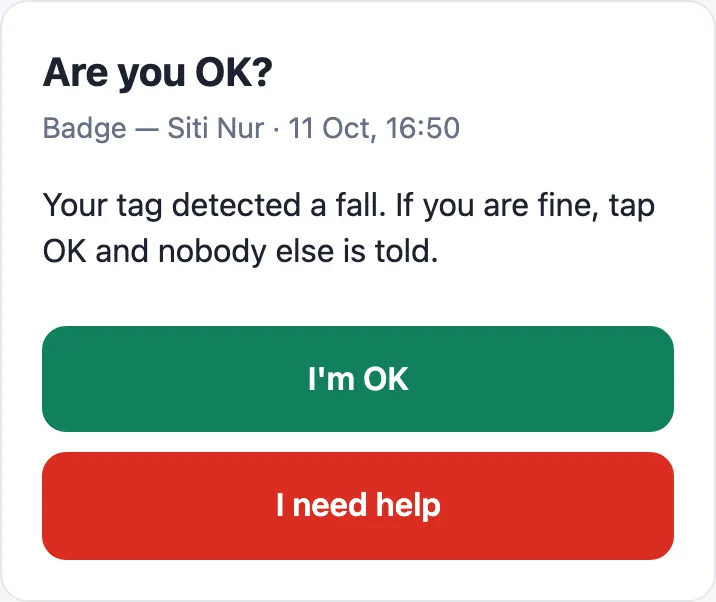
Who is asked, how long they have to answer, which tags are watched and where lying down is normal are set under System › Config › Fall detection — see Fall and man-down detection.
Using it in your organisation
Corporate office
Setting. Office floors used 08:00–19:00, a server room, a store room, cleaners in the evening. Who does what. One guard per shift watches the board on a desk screen and phone; the supervisor gets critical escalations by email and reviews the night each morning. Settings that matter. A custom armed window rather than 24/7; server and store rooms restricted and armed Always; cleaners whitelisted for their round. Tip. For the first two weeks, resolve honestly — False alarm versus Expected — and read the whitelist every Friday. The whitelist that builds up is a map of how the building is really used.
Hospital
Setting. Open 24 hours, so "after hours" means little; pharmacy stores, records rooms and plant rooms matter. Who does what. Security control watches the Adaptive board on a wall screen; porters and guards carry the phone app. Settings that matter. Watch only the sensitive rooms, restricted and armed Always; leave wards out. Panic buttons registered at nurse stations and reception. Tip. Use Assign for every panic press, even when you go yourself: the timeline then shows who responded and how fast, which is what an incident review asks for.
Logistics depot or factory
Setting. Loading bays, a yard, night deliveries, drivers who are not staff. Who does what. The gatehouse guard handles incidents; the shift manager is on the escalation list. Settings that matter. Loading bays watched with armed hours that match the delivery schedule; Unknown device at more than five minutes if lorries wait outside the shutter; the drivers' delivery slots whitelisted. Tip. Treat every Coverage lost as real until someone has walked the zone: a gateway unplugged at the bay is exactly what someone would do before using it.
Setting it up for your organisation
This part is for the administrator. The settings are in the admin console, under Your apps → Security Watch; guards cannot change them from the app.
What must exist first
- Zones for the places to watch, each with a gateway (the settings list shows how many each has in the Cov. column).
- Badges bound to person entities for staff, so incidents name people and out-of-habit can reason about them. Assets bound to their own entities are never counted as people.
- Operating hours on the venues, if you arm zones outside them.
- Panic buttons registered under Devices → Panic Buttons. A cellular badge such as the PS101-M needs only to be registered as a device: its SOS, Alert and man-down alarms are incidents without a routing.
- Each guard's app user linked to their own person entity, with a badge bound to it, so Send a guard can say where they are.
- AI set up for your organisation, for the assessments and out-of-habit.
Checklist
- Give the app to every guard and supervisor (app users → Security Watch).
- In Watched zones, tick the zones to watch. Tick Restricted for the sensitive ones and choose their Armed mode.
- Choose Armed hours for everything else.
- Add the regular after-hours people to the Whitelist.
- Under Who is told, switch on Push to guards' phones and add at least one escalation person.
- Press Save Security Watch settings.
- Last, turn the master switch on: Security Watch is ON. It is off by default; while off nothing is detected, nobody is told, and no AI is used — the guard app opens but stays quiet.
Settings
| Setting | What it changes |
|---|---|
| Security Watch is ON / OFF | The master switch for detection, notifications and AI |
| Watched zones (tick) | Which zones are looked at; nothing else is |
| Restricted | Only allowed people may be in the zone |
| Allowed tags | The entity tags whose people may enter a restricted zone (see the note below) |
| Armed per zone: Inherit, Always, Custom hours, Off | When this zone counts presence as an incident; Inherit uses the armed hours below |
| Armed hours: Outside each venue's operating hours, Always armed (24/7), Custom window | The default for every zone; a custom window may cross midnight and has its own days |
| Detectors | One switch per check: Panic button pressed, Unexpected / after-hours activity, Restricted zone entry, Unknown device lingering, Coverage lost (gateways offline), Environmental danger (heat / fire), Out of habit — judged by AI |
| Unknown device: min. minutes | How long an unknown device must stay before it is an incident (default 5) |
| Heat alert °C / Rise per hour °C | The temperature, and the rise in an hour, that count as possible fire (defaults 45 and 5) |
| Push to guards' phones | Every app user with Security Watch gets a push for each new incident |
| Escalate: critical incidents only / every incident | Which incidents also go to the escalation list |
| Escalate to (Add person; Email, SMS, WhatsApp) | App users or admins, and how each is reached. SMS and WhatsApp need a phone number on the person's profile |
| Telegram chat id | Also post escalations to a Telegram chat |
| Re-alert unacknowledged critical after (min) | Re-send a critical incident nobody acknowledged (default 10; 0 = never) |
| Close as unattended after (hours not detected) | Close incidents nobody resolved once cleared this long (default 12; 0 = never) |
| AI assessment on each incident | The explanation and suggested first step; uses your organisation's AI model and monthly cap |
| Whitelist — expected presences | A person (entity) or device — or any MAC — allowed in one zone or anywhere, between two times, on chosen days |
The same page lists Incidents — last 7 days and AI judgements — last 48 hours (what the AI was asked about out-of-habit candidates, its verdict and its reasoning), and, where OAIA is on, Ask OAIA to talk an incident through.
Allowed tags
A person may be in a restricted zone when the entity their badge is bound to carries one of the zone's Allowed tags (upper or lower case does not matter). A badge bound to nobody is never allowed. To let in one person without a tag, or only at certain times, use the Whitelist.
Questions and problems
Nothing ever happens. The master switch is off, no zone is ticked, or every zone's armed mode is Off.
Everything fires. The people who belong there are not whitelisted, or a zone is armed Always when you meant after hours. Resolve them as Expected — it whitelists them for that time of day.
An incident I resolved is still on the board. Check it is in Resolved; the board reloads every minute. A no longer detected incident is meant to stay until somebody resolves it.
The same contractor is now never reported. Somebody resolved them as Expected. Ask the administrator to remove the whitelist entry.
There is no assessment on an incident. AI is switched off for the app, or the organisation's AI is off or over its monthly cap. Everything else works.
Out of habit never raises anything. It needs AI, a person with at least five days of history, and a watched zone that is not armed at the time.
Every guard shows "No recent position". Their app users are not linked to a person entity with a badge, or their badges have not been heard in the last 15 minutes.
A zone reports nobody, all night. Check for Coverage lost: an empty zone and a blind zone look the same, and the app says which it is.
Nobody was told about a critical incident. Look for the red Nobody will be told banner, and ask the administrator to check Who is told.
I pressed Expected on a panic button. It closes the incident; nothing is whitelisted. A panic press is always raised.
On the phone
Guards mostly use Security Watch on the phone: the same board, swipes to acknowledge or attend, and pushes for new incidents. See Security Watch and Roll Call on the phone.