Appearance
TV Dashboard
TV Dashboard puts live building information on a screen: the TV in the lobby, the monitor in the operations room, the display above the cleaners' station. You build a board from widgets, seeing it as the TV will, and connect each screen with a short code it shows. Omaya then tells you which screens are on, lets you change what a screen shows from your desk, and emails your administrators if a screen goes off while it should be on.
Who uses it
RaviOperations LeadKumarSecurity SupervisorAishaFacilities Manager
A wall screen is read at a glance, from across a room, by people who did not choose to look at it. So there are two kinds of user: the people who build boards and look after the screens, and everyone who walks past.
| Role | What they do with TV Dashboard | At Northwind |
|---|---|---|
| Board owner | Builds boards, connects screens, chooses what each screen shows. Needs configure rights on TV Dashboard | Ravi Kumar (Operations Lead) |
| Security supervisor | Keeps an eye on the operations-room board and on which screens are on. With view rights only, he sees the screens and boards and opens a board's preview, but cannot change anything | Kumar Selvam |
| Administrator | Gets an email when a screen goes off during its hours, and when it comes back | Aisha Rahman |
| Everyone else | Reads the screen: visitors in the lobby, cleaners, guards | Visitors, staff, cleaners |
A day at Northwind Tower
| Time | What happens | How |
|---|---|---|
| 07:00 | The lobby TV wakes from its overnight clock screen: the board's screen hours start at 07:00. | Board settings |
| 07:20 | The lobby TV is still dark — the cleaners unplugged it. Aisha gets an email: TV screen off: Lobby TV. When the TV is plugged back in, a second email says it is back on. | When a screen goes off |
| 08:00 | Siti and Nurul start their round. The lobby board shows 3 washrooms clean and 3 due, from Toilet Hygiene. | |
| 09:00 | Jason books Huddle Room B. On the "What's on" board, Meeting rooms moves it from Free to In use until 09:45. | Widgets from your apps |
| 10:30 | Ravi hangs a new screen by the lifts on Level 3. He opens Omaya's TV page on it, types the code it shows into Connect a screen, names it Level 3 lifts and picks the By the meeting rooms board. | Connect a screen |
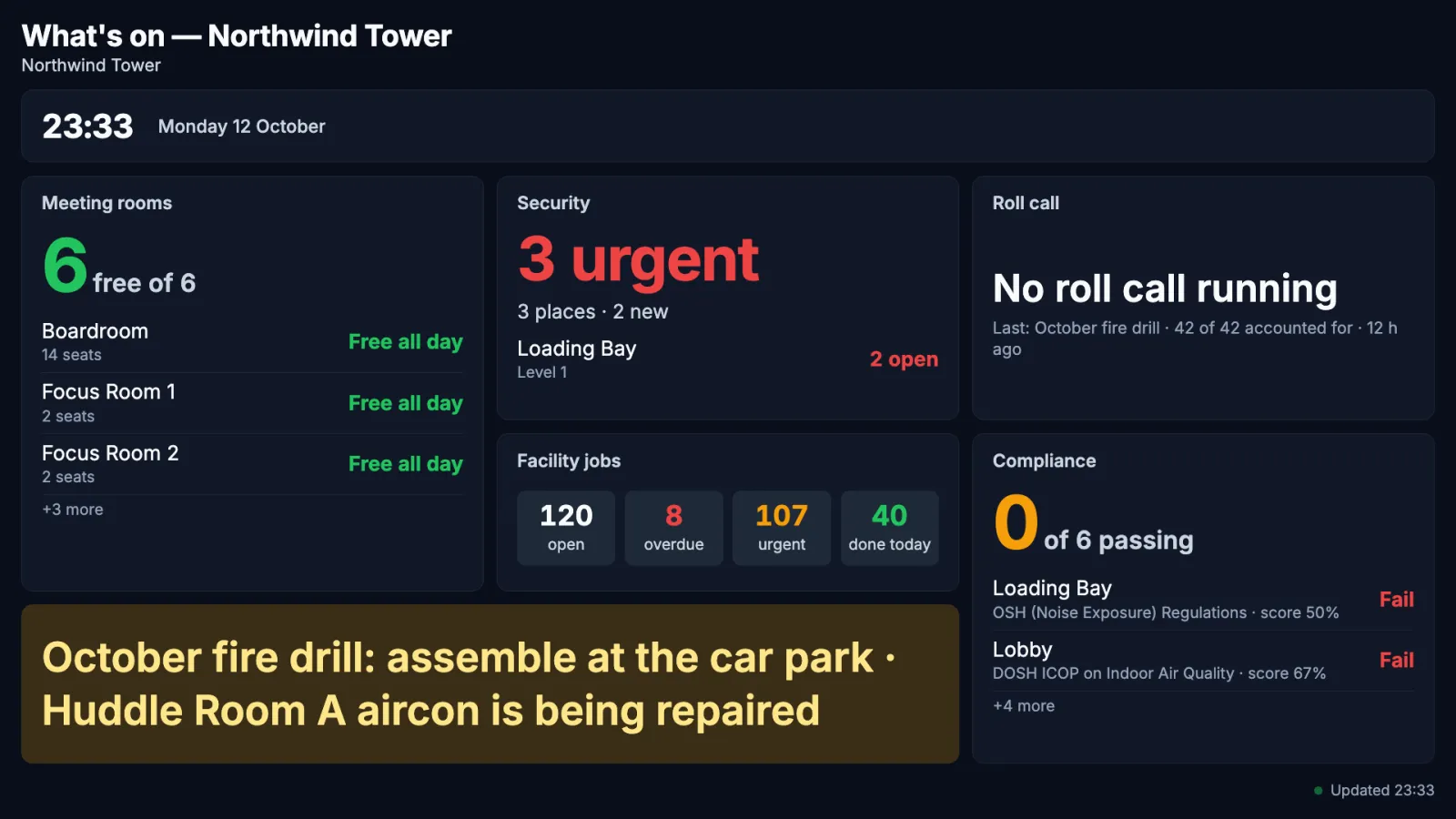
| 11:00 | Farah starts the fire drill. The Roll call widget turns red with the count of people not yet accounted for, and green when the last one is. | Widgets from your apps |
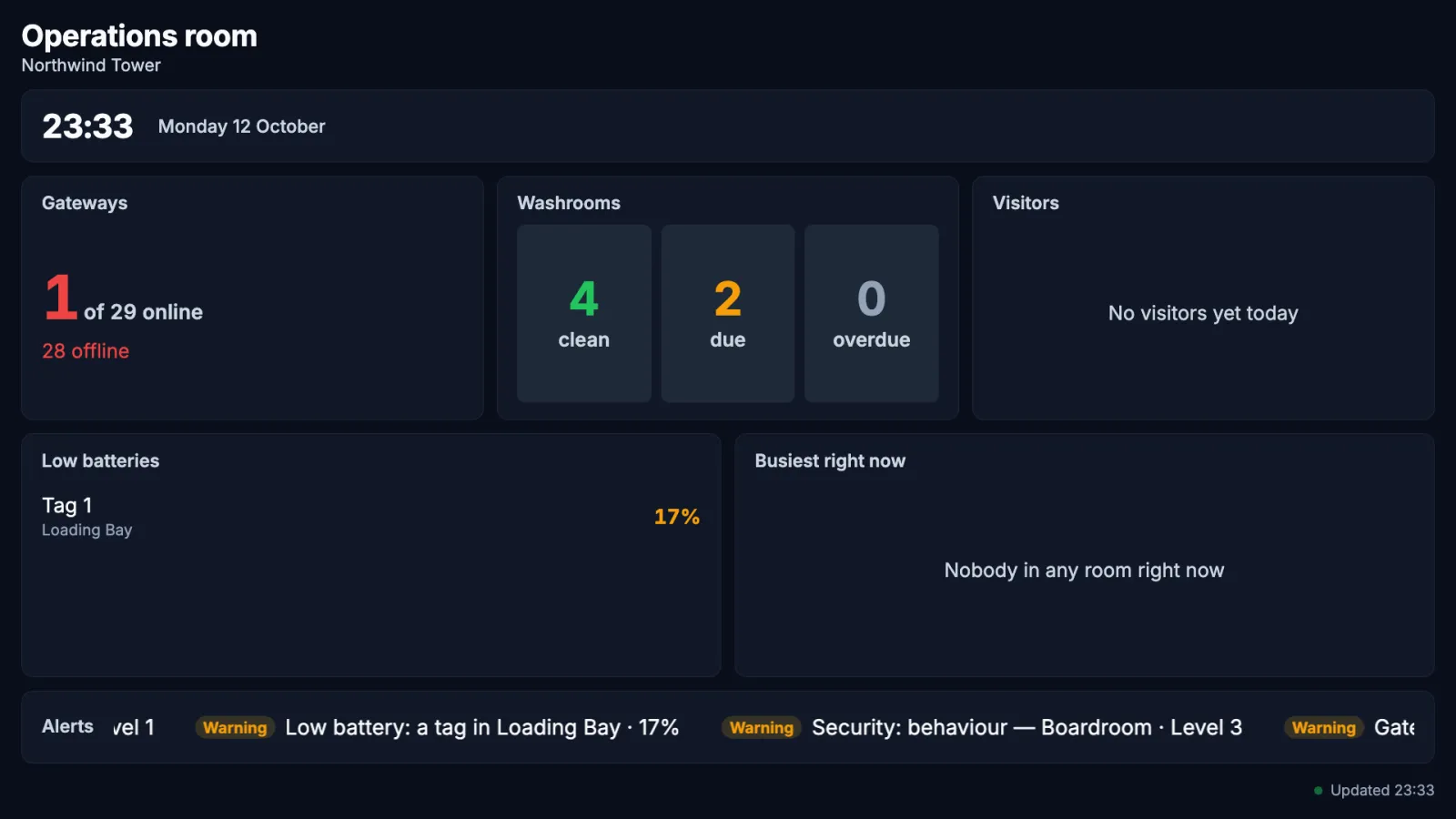
| All day | In the security office, the "Operations room" board shows gateway health, low batteries, the busiest zones and an alerts ticker. | Start a board |
| 19:00 | An event tonight: Ravi switches the lobby screen to the "What's on" board from his desk with Shows, and the TV changes within 20 seconds. | Screens & boards |
The Screens & boards page
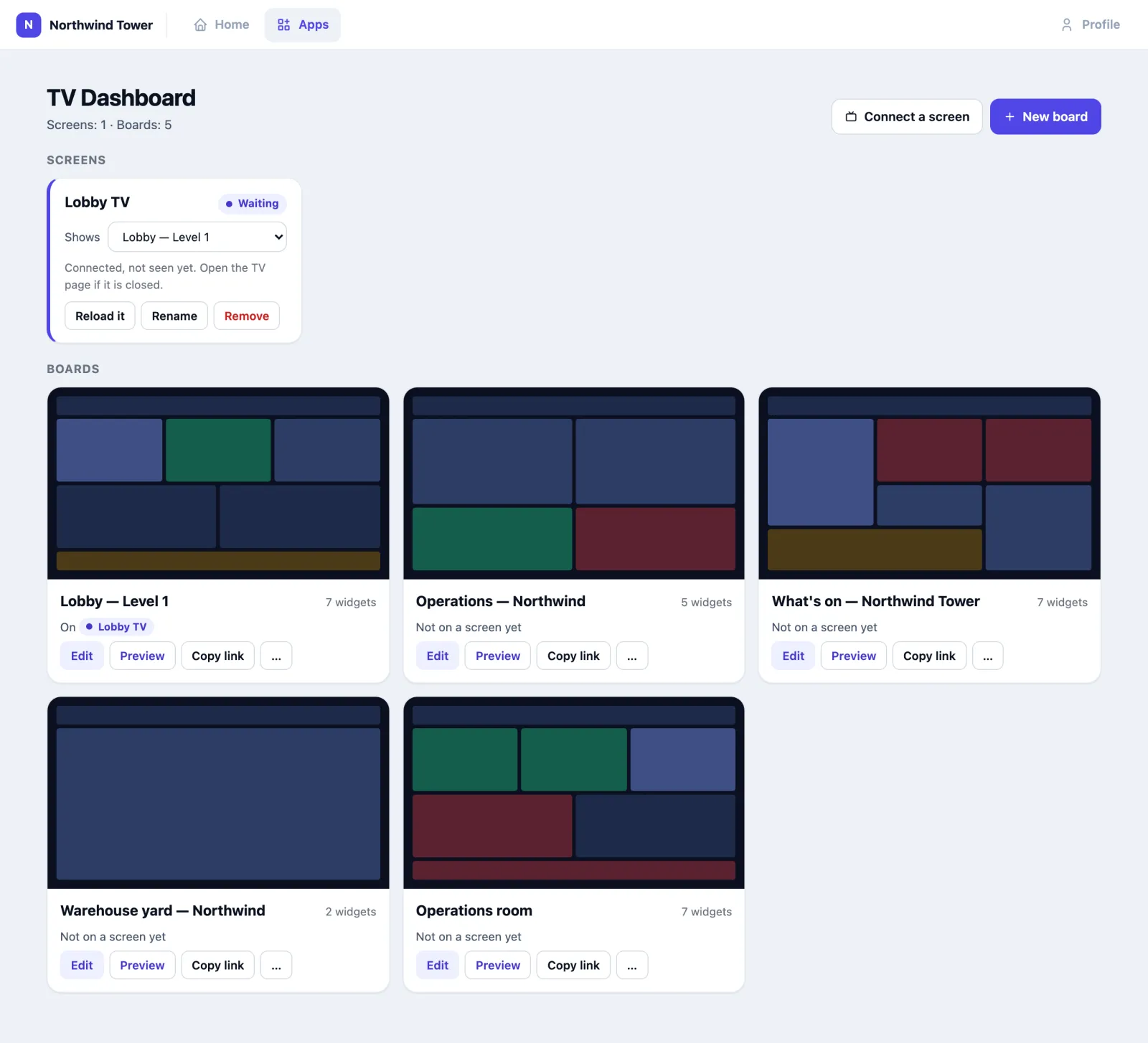
Open TV Dashboard from Apps. The page has two parts.
Screens lists every connected TV with its state:
| State | Meaning |
|---|---|
| On | The screen checked in recently; its size is shown |
| Off for … | It should be on (its board's screen hours have started) but has not checked in for a while. Administrators have been emailed |
| Asleep | Outside its board's screen hours, so it shows only a clock — not a fault |
| Waiting | Connected, but the TV page has not opened since. Open Omaya's TV page on that screen again |
For each screen, Shows changes the board it displays (the TV follows within 20 seconds), Reload it makes the TV reload the page, Rename and Remove do what they say. A removed screen goes back to showing a connect code.
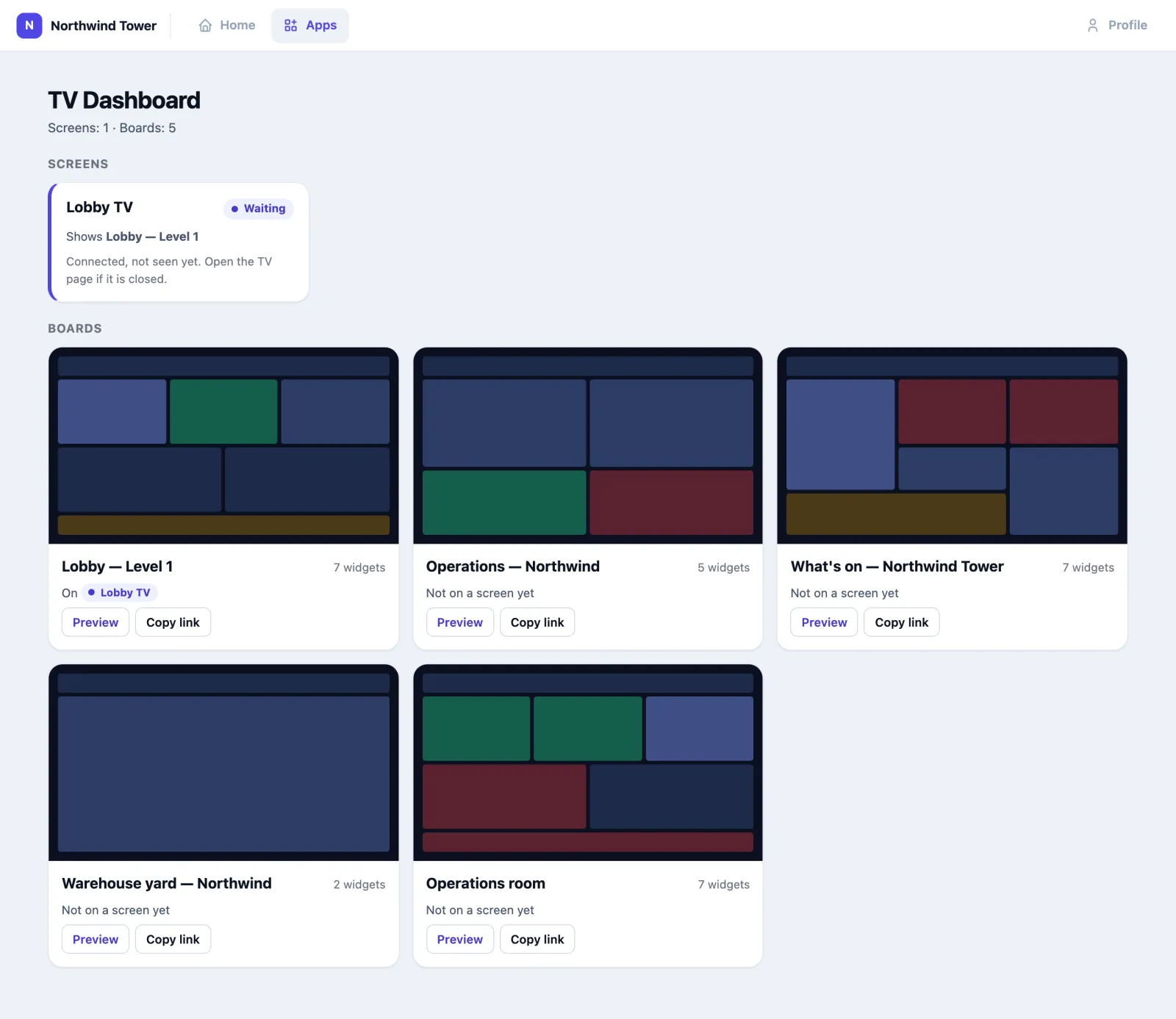
Boards shows every board as a small picture of its layout, how many widgets it has and which screens show it. Edit opens the editor, Preview opens the board full size in a new tab, Copy link copies its browser link, and … holds New link, Link expiry and Delete board.
How to start a board
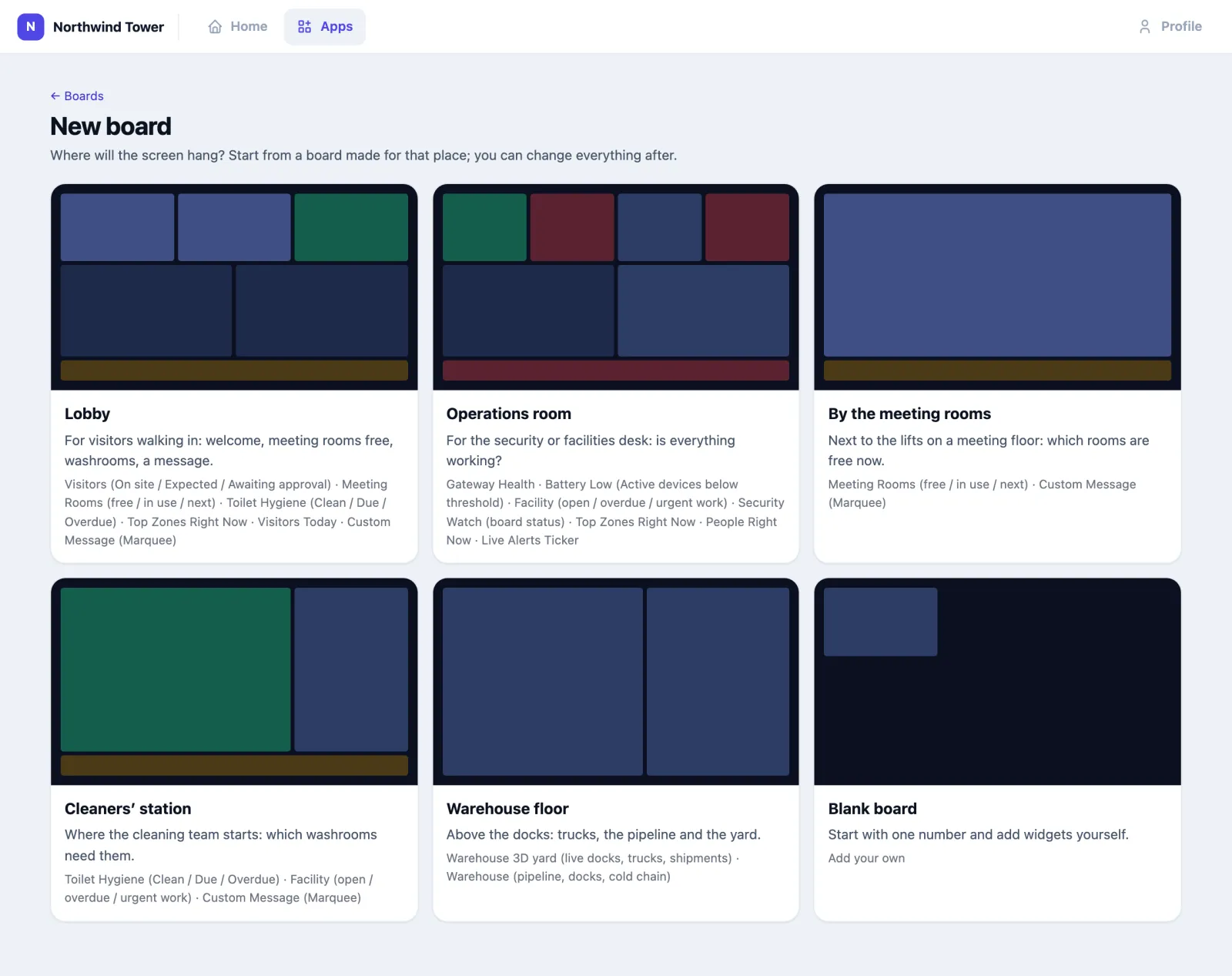
- On the TV Dashboard page, tap New board.
- Pick where the screen will hang: Lobby, Operations room, By the meeting rooms, Cleaners' station, Warehouse floor, or Blank board. Each comes with widgets chosen for that place. A template is only offered when your organisation has the apps most of its widgets need.
- The new board opens in the editor. Change anything you like, then Save.
How to arrange the widgets
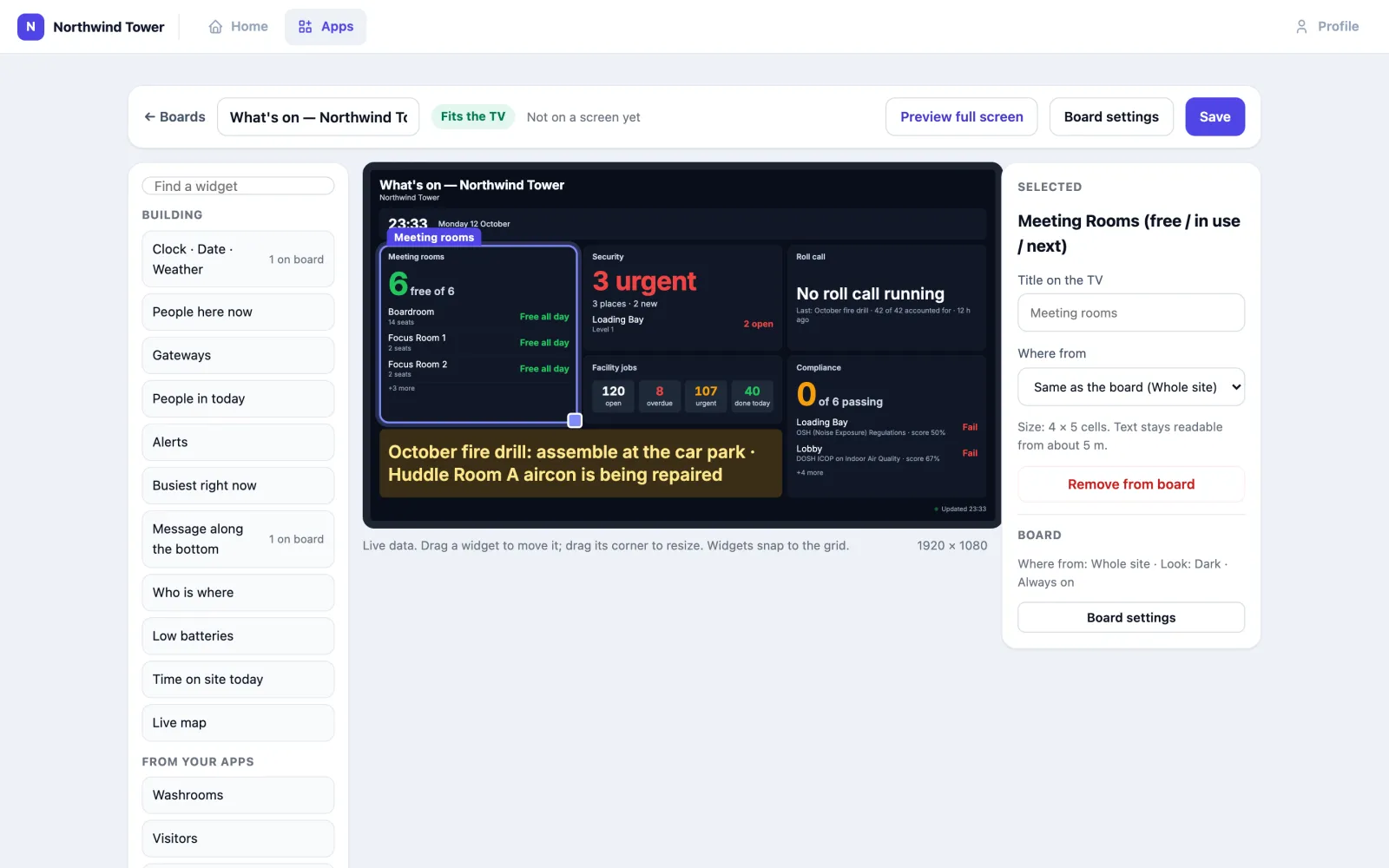
The editor shows the board exactly as a 1920 × 1080 TV will, with live data.
- Add a widget: drag it from the list on the left onto the screen, or click it to put it where there is room. Building widgets come first, then From your apps — only the apps your organisation has switched on. 1 on board says a widget is already used.
- Move a widget by dragging it; resize it by dragging its bottom-right corner. Widgets snap to the TV's grid, and one cannot be dropped on top of another (Something is already there).
- Change a widget by clicking it. The right-hand panel then offers Title on the TV, Where from (the board's place, the whole site, some floors or some rooms), and whatever else that widget takes — how many to show, a battery level, a floor for the 3-D widgets, particular people or devices. Remove from board takes it off.
- With a widget selected, the arrow keys move it, Shift and the arrow keys resize it, and Delete removes it.
- The badge at the top says Fits the TV or Some text is cut off: make a widget bigger — check it before you save.
- Nothing reaches the screens until you tap Save (or press Ctrl/⌘ + S). Not saved shows while you have changes. Screens showing the board then update by themselves.
Board settings
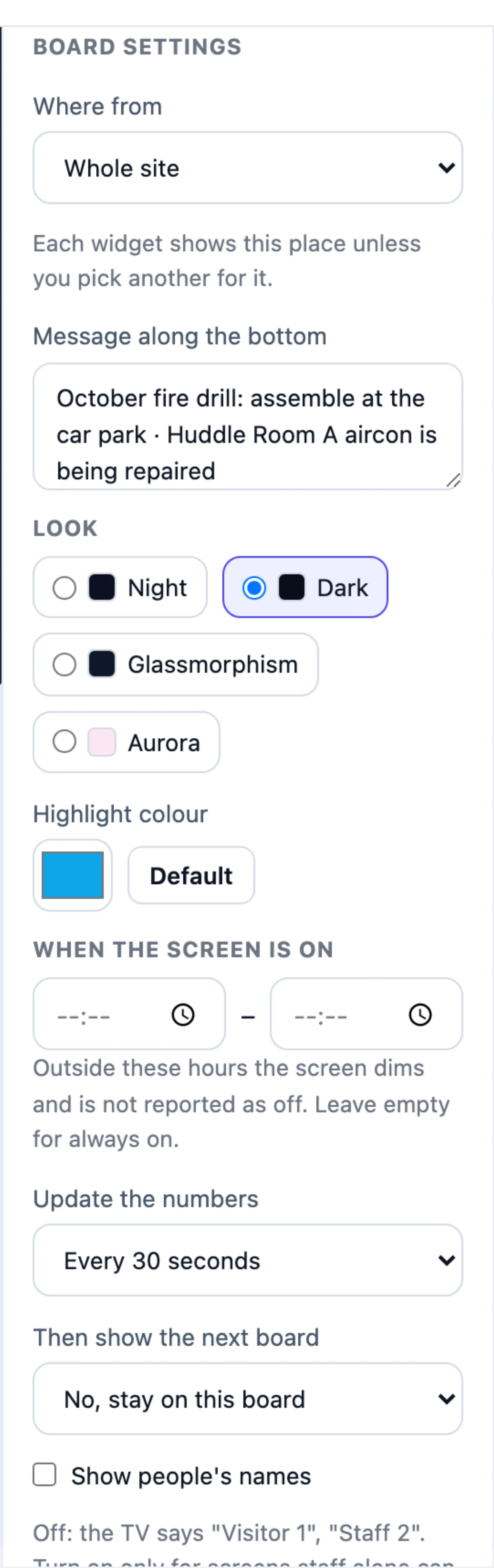
Board settings in the editor's top bar opens the board's own settings:
| Setting | What it does |
|---|---|
| Where from | The whole site, some floors or some rooms. Every widget uses this unless you pick another place for it |
| Message along the bottom | The text of the yellow message band. A board with a message but no message widget shows it as a band along the bottom |
| Look | Night (the default for new boards), Dark, Glassmorphism or Aurora |
| Highlight colour | Overrides the look's highlight colour (Night keeps its own). Default puts it back |
| When the screen is on | From and until. Outside these hours the screen shows only a clock and Back at 07:00, stops fetching data, wakes by itself, and is not reported as off. Leave both empty for always on |
| Update the numbers | How often widgets fetch new data, every 10 seconds to every 5 minutes. The clock always ticks every second |
| Then show the next board | After this long, a screen opened with a board's link moves on to your next board. Screens connected with a code stay on the board you chose |
| Show people's names | Off by default: widgets about people and tags say Visitor 1 or Staff 2 and the zone, never a name. Turn on only for screens that staff alone can see |
| Show Roll Call during an emergency | Shown when the Roll Call app is on. While a roll call runs, the whole screen shows it instead of the board: Go to: the gathering point, how many are accounted for, how many are still to find and the time — numbers only, never names. When it ends, the result stays up for ten minutes, then the board comes back by itself |
| Link for a browser | Copy link — for a screen you cannot connect with a code (see below) |
How to connect a screen
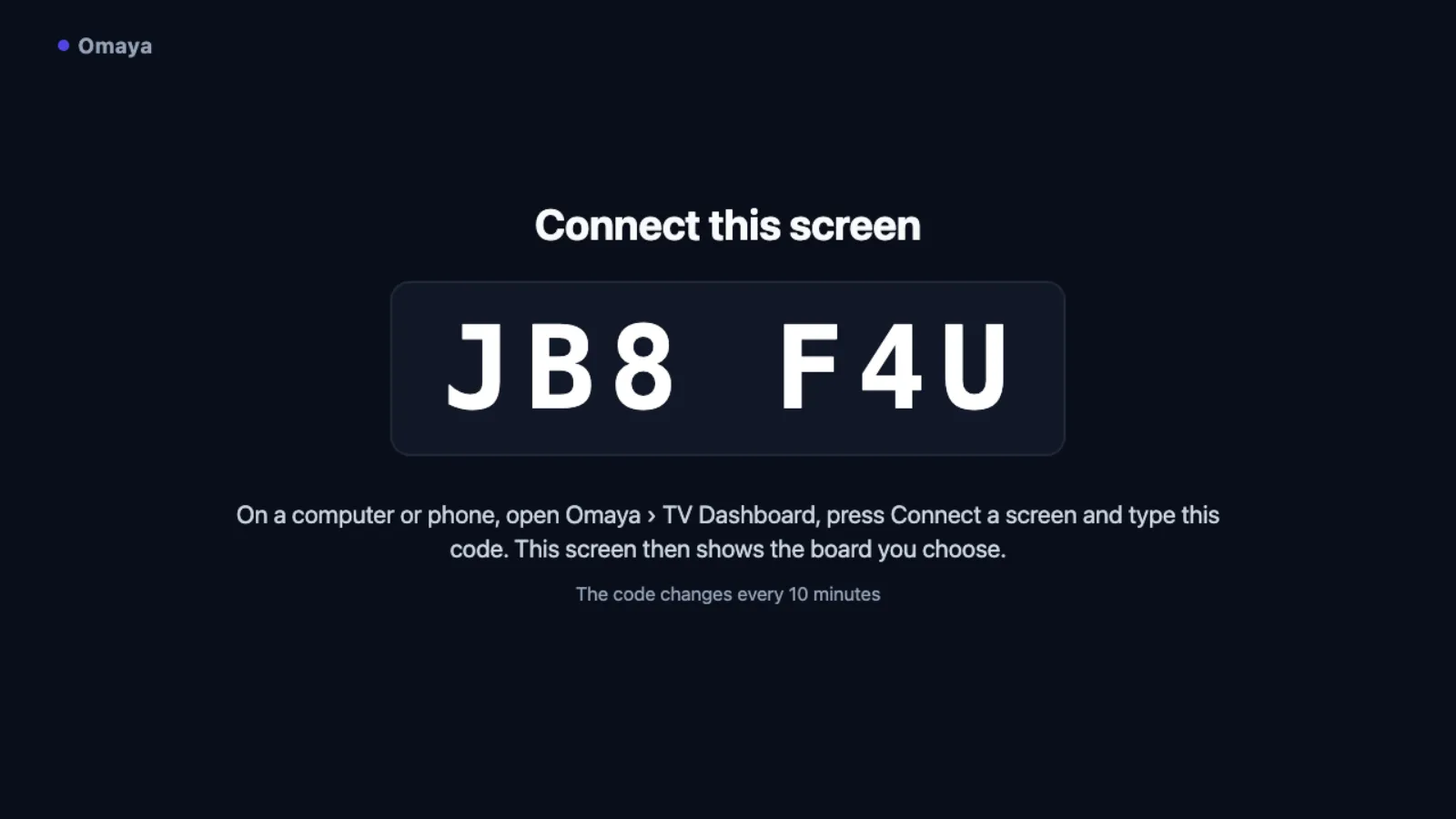
- On the screen, open the TV page in a full-screen browser: your Omaya address followed by /tv (for example
omaya4.synchroweb.com/tv). It shows a six-character code, which changes every ten minutes. - On your computer or phone, open TV Dashboard, tap Connect a screen, type the code (upper or lower case, spaces or dashes do not matter), give the screen a name you will recognise — Lobby TV, Level 3 lifts — and pick what it Shows. Tap Connect.
- Within a few seconds the TV says it is connected and shows the board. From now on you change what it shows from the Screens & boards page; nobody needs to touch the TV again. It remembers its connection after a power cut.

The code only works for your organisation's boards, and repeated wrong codes are refused for a while, so a code cannot be guessed.
Screens you cannot connect with a code
Some screens only take a fixed web address. For those, copy the board's link (Copy link on its card, or Link for a browser in the editor) and open it on the screen. Such a screen shows the board but is not listed under Screens, so Omaya cannot tell you if it goes off. A few additions to the link change how it behaves:
| Add to the link | Effect |
|---|---|
?rotation=30 | Cycle through your boards every 30 seconds on this screen, whatever the boards' own settings say |
?screensaver=1 | Dim the screen after ten minutes without input — for a touch screen people use, not a wall TV |
?kiosk=0 | Keep the mouse pointer visible — for a board open on a desk |
When a screen goes off
Every connected screen checks in with Omaya while it is showing a board. Every five minutes Omaya looks for a screen that should be on — its board's screen hours have started — but has not checked in for ten minutes. When it finds one:
- the screen shows as Off for … on the Screens & boards page;
- your organisation's administrators get one email, TV screen off: (screen name) — the people under Organisation → Notifications, or every active administrator with an email address when that list is empty;
- when the screen checks in again, one more email says it is back on.
A screen outside its hours, one that has never opened the TV page, or one that has been removed is never reported. There is one email per outage, however long it lasts.
The link is the key
Anyone with a board's link can see the board, with no sign-in. Treat the link like a key to whatever the board shows.
- New link (in the board's … menu) makes a new link and stops the old one at once. Do it when a screen opened with the link is retired or the link has gone somewhere it should not. Screens connected with a code are not affected.
- Link expiry (same menu) makes the link stop working after a number of days — for example a board made for a two-week exhibition. Leave it empty to remove the expiry. Links never expire unless someone sets it.
- Because nobody signs in, a board shows the same thing to everyone who sees it.
The widgets
The editor lists widgets by the short title they show on the TV. Every widget can be given a title of your own with Title on the TV.
| Widget | Shows | You can set |
|---|---|---|
| Clock · Date · Weather | The time and date in your organisation's time zone. With a clock widget on the board, the header leaves out its own clock | — |
| People here now | How many people are in the scope now, from the same counts as the Right Now page: people-counting sensors where a zone has them, tagged people elsewhere | Where from |
| Busiest right now | The zones with people in them now, busiest first, against capacity where set. Empty zones are not listed | Where from, how many to show |
| Gateways | Gateways online, stale and offline, and the percentage online. A gateway that has dropped out twice or more in the last 7 days is named with its state now and how many times it dropped, so one that keeps dropping shows even while it is online | Where from |
| Low batteries | Active devices below a battery level | The level (20 % by default), particular devices |
| Open right now | Doors open, leaks, air-con on, sensors tampered with and power on battery, each with how long it has lasted — leaks first, then the longest. Nothing open when all is shut | Where from |
| People in today | Tagged people Omaya saw in the scope today, with the past week as bars. For the whole organisation, one venue or one zone it is the same number as Reports › Footfall and the dashboard. This is not the Visitor app | Where from, particular people or tags |
| Alerts | Open alerts — low batteries, gateways offline, zones over capacity — scrolling | Where from |
| Who is where | Where particular people or assets are now | Which people, assets or tags |
| Time on site today | Who has spent longest where today | Which people or assets, how many to list |
| Live map | A floor as a 3-D model with live tags and sensors on it | Which floor |
| Message along the bottom | The board's message in a yellow band | (the message is a board setting) |
Widgets from your apps
Each of these reads one app, and is offered only when your organisation has that app switched on. If the app is later switched off, a board that already has the widget keeps it and the widget says the app is off. Like every widget, they never name a person — only rooms, zones, counts and states.
| Widget | Shows | You can set |
|---|---|---|
| Visitors | From Visitor Management: on site now, expected today, awaiting approval, and how many arrived today. No names | — |
| Washrooms | From Toilet Hygiene: washrooms clean, due and overdue | Where from |
| Meeting rooms | From Meeting Room: how many rooms are free, then every room, free ones first — Free until 15:00 or In use until 11:30. A meeting the room's sensor noticed without a booking counts as in use | Where from (pick the rooms or the floor) |
| Facility jobs | From Facility Management: open jobs, overdue, urgent or high priority, done today. Cleaning jobs are left out — they have the Washrooms widget | Where from |
| Security | From Security Watch: the board's colour and headline — 3 urgent, 1 warning, or All clear — and the places with open incidents. Who an incident is about is never shown | Where from |
| Roll call | From Roll Call: during a drill or evacuation, big and red — present, not yet accounted for, excused and expected, the running time and the gathering point. It turns green when everyone is accounted for. With nothing running, the last one and how it went | — |
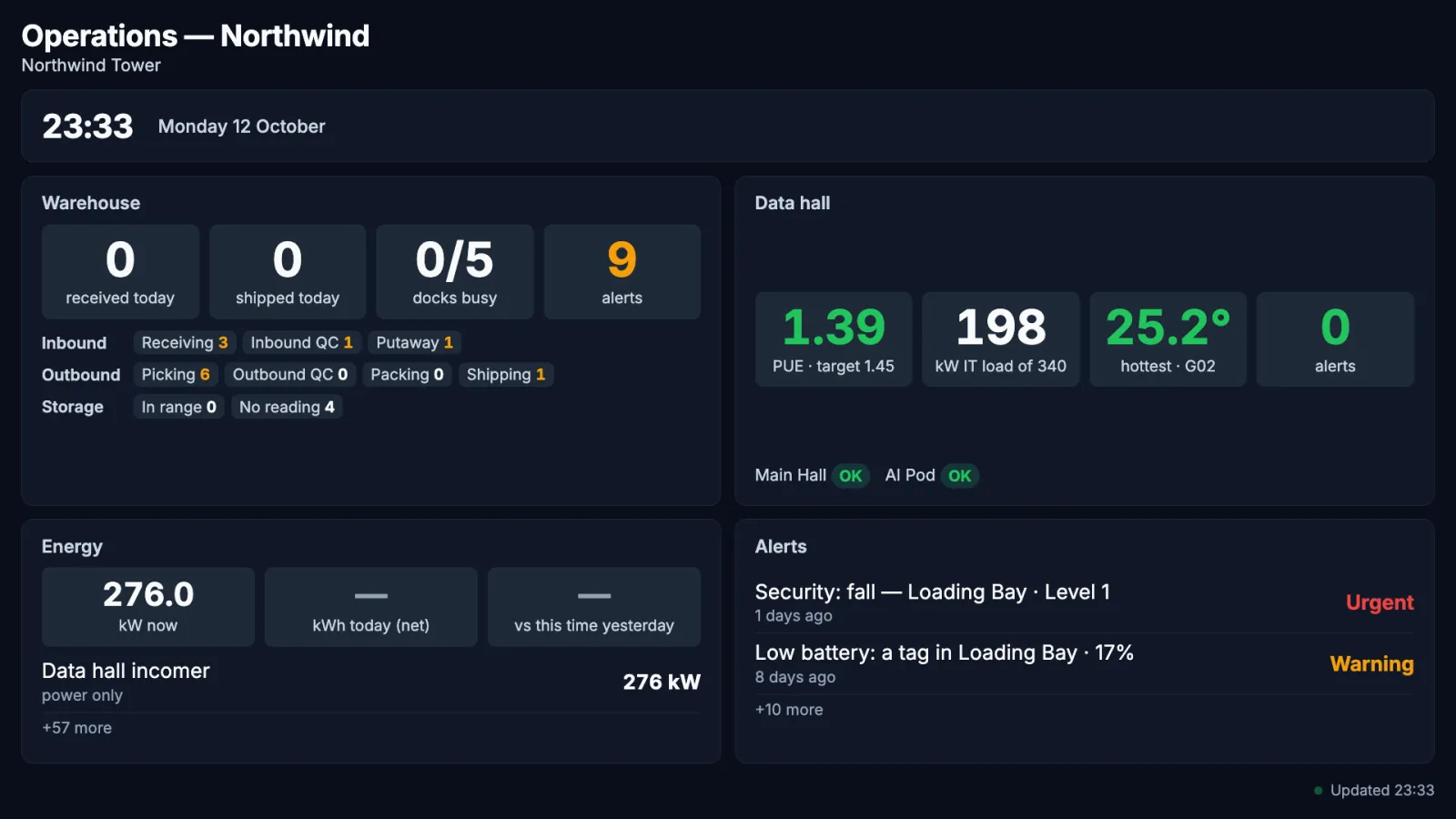
| Warehouse | From Warehouse: units received and shipped today, docks with a truck, open alerts, every stage of the inbound and outbound pipeline, and storage areas in or out of their range | — |
| Warehouse yard | From Warehouse: the Live map's 3D view of one floor, turning slowly — racks, docks and yard, forklifts and tagged pallets moving, a truck at each busy dock. Along the bottom, one shipment at a time with its steps and times | Which floor (otherwise the first floor with Warehouse areas) |
| Data hall | From Data Centre: PUE against your target, IT load against capacity, the hottest rack's inlet temperature, active alerts, each hall's state and any UPS on battery. For a control-room screen with every rack, use the Data Centre app's own wall screen | — |
| Energy | From Energy Monitoring: every meter that reported in the last half hour, busiest first, with its power now and energy used today (and its cost, when a rate per kWh is set). A headline — kW now, kWh today, cost today and the change on this time yesterday — is the Energy app's net total over the meters you pick, or with none picked over every reporting meter | Particular meters, how many to list |
| Compliance | From Compliance Reports: how many spaces pass, then each one with its standard's name, result and score, failures first | — |
Where the Energy headline comes from
With no meters picked, the headline adds the top-level meters that reported in the last half hour, minus any meter marked as generating power: a sub-meter is already inside the meter that feeds it, as set under the meter hierarchy in Energy's settings. If no meter there has a parent, adding every meter would count a main incomer and its boards twice, so the widget shows no headline until you either set the hierarchy or pick meters. Picked meters follow the same rule: a picked sub-meter whose parent is also picked is not added again, and a picked generating meter is subtracted. A meter whose own kWh counter did not move today, or that sends power only, is counted from its power readings instead, the same estimate the Energy page marks with ≈.
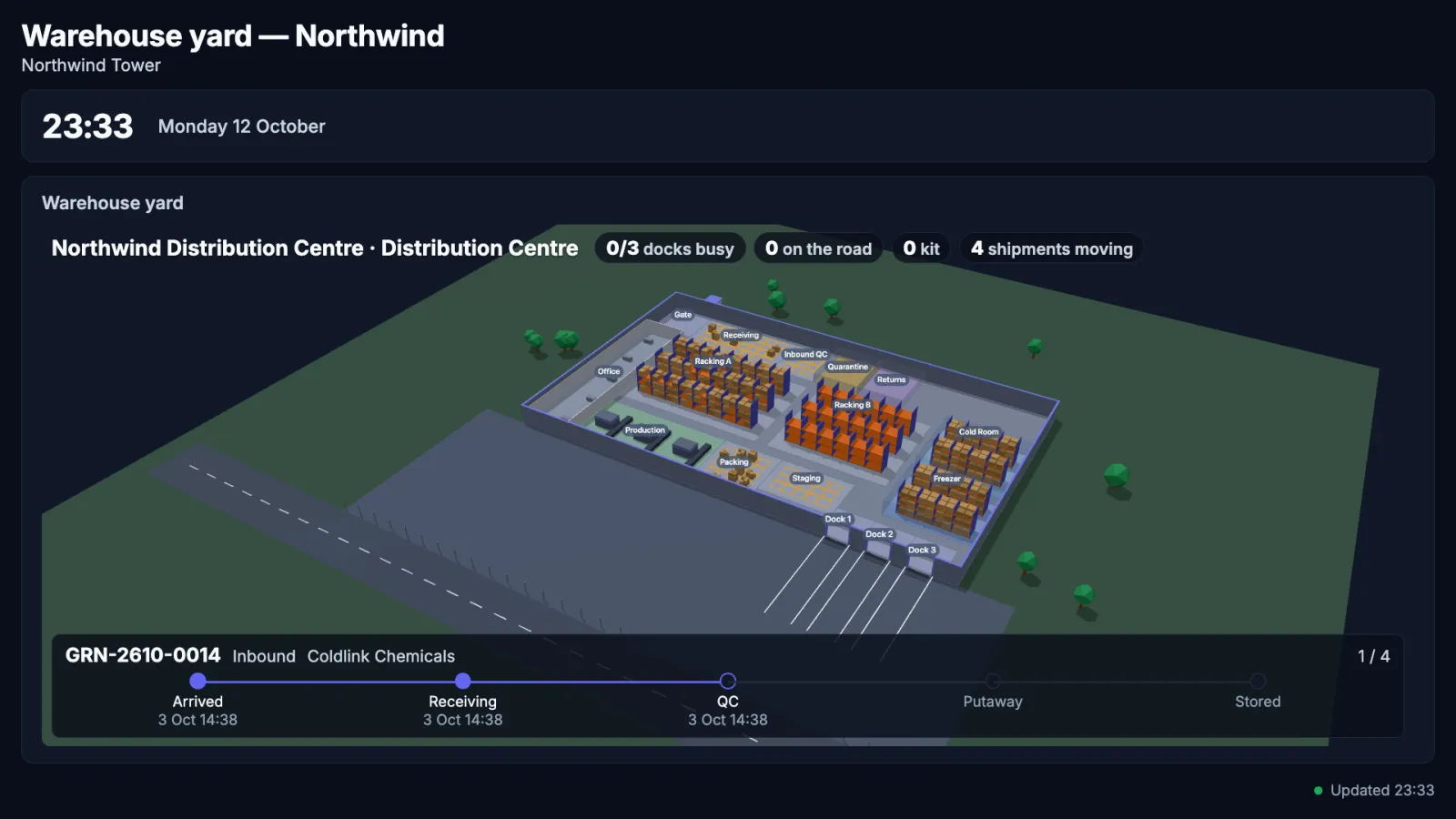
The Live map needs a floor that has been drawn (walls and rooms) in the floor plan Designer; on a floor that has not, it shows an empty slab.
Using it in your organisation
Corporate office lobby
Setting. One TV behind the reception desk, seen by visitors and staff. Who does what. The facilities team owns the board and the screen; reception tells them what to put in the message. Settings that matter. Start from the Lobby template; Where from set to the office floors (not the car park or plant rooms); When the screen is on matching the building's hours; names off. Tip. Keep it to six widgets. If people have to stand and read, the board has too much on it — the editor's Fits the TV badge is a good first check.
Hospital or clinic facilities office
Setting. A monitor in the facilities office and one in the housekeeping room. Who does what. The facilities manager builds two boards — Operations room for engineering, Cleaners' station for housekeeping — and connects both screens. Settings that matter. Update the numbers every 30 seconds; Low batteries at 25 % so tags are changed before they die; no screen hours, since the hospital never closes — so a screen that goes dark at 03:00 is reported. Tip. One email per outage goes to the administrators; add the facilities manager to Organisation → Notifications so the person who can plug it back in hears first.
Exhibition or event hall
Setting. Screens at the entrance for a two-week trade show. Who does what. The events team builds a board for the show and connects the screens; afterwards they Remove the screens. Settings that matter. Message along the bottom with the day's programme; People here now for the halls; if a screen can only take a link, a Link expiry for the day after the show. Tip. Set the expiry when you create the board, not when the show ends: nobody remembers afterwards.
Setting it up for your organisation
What must exist first
- A screen with a browser in full-screen (kiosk) mode, with its own power saving turned off, and on a network that reaches your Omaya address.
- Whatever the widgets read: people counting needs counting sensors or tags; the washroom widget needs Toilet Hygiene; the visitors widget needs Visitor Management; the 3-D widgets need a drawn floor.
- People with the app: give TV Dashboard under Apps → app users. People who build boards and connect screens need configure rights; with view rights only, a person sees the screens and boards and can preview a board, but cannot change anything.
- Who hears about a screen going off: the list under Organisation → Notifications (otherwise every active administrator with an email address).
Checklist
- Decide which screens you have and what each audience needs to know.
- Start one board per place from a template; cut it down in the editor until it Fits the TV.
- Set When the screen is on and the look; leave names off for any public screen.
- Open /tv on each screen and connect it with its code; name it after where it hangs.
- Check each screen from where people stand.
- Make sure Organisation → Notifications has the right people for screen-off emails.
Questions and problems
A widget shows zero or is empty. The data it reads is missing, not broken: a people counter over zones nothing counts shows 0; Busiest right now lists only zones with people in them. Check Where from and the data source.
A widget is greyed out and says Data delayed. It could not fetch fresh data for three refreshes. The rest of the board keeps working; it recovers by itself when the connection does.
The screen shows only a clock and "Back at …". It is outside the board's screen hours. It wakes by itself.
The editor says Some text is cut off. A widget has more to show than room to show it. Make that widget bigger, or ask it to show fewer items.
A screen shows Off for … but the TV is on. The TV cannot reach Omaya — check its network — or it has left the TV page. Tap Reload it; if it stays off, open /tv on it again (it reconnects by itself if it still remembers its connection, otherwise it shows a new code).
A screen shows Waiting. It was connected but the TV page has not been open since. Open /tv on that screen.
I changed the board but the TV still shows the old one. Did you Save? Then give it a minute; the TV checks for changes by itself. Reload it forces it.
The code is refused. Codes change every ten minutes; type the one the TV shows now. After several wrong codes, wait ten minutes.
The board does not rotate. Rotation only applies to screens opened with a link, not to screens connected with a code: choose the board for each connected screen instead.
The link says it has expired or been disabled. The link's expiry has passed or someone made a New link. Copy the current link onto that screen, or connect the screen with a code.
There is no Connect a screen, New board or Edit button. You can look but not change: ask your administrator for configure rights on TV Dashboard.
A widget I expected is not in the list. It belongs to an app your organisation has not switched on — the Warehouse widget needs the Warehouse app, and so on.
On the phone
TV Dashboard is not in the Omaya Mobile app, but its page works in a phone's browser: you can see which screens are on, change what a screen shows, reload a screen or connect a new one. The editor is easier on a computer.