Appearance
Toilet Hygiene & Utilization
A fixed cleaning rota sends a cleaner to a toilet nobody has used and leaves alone the one four hundred people have just walked through. Toilet Hygiene cleans by what actually happens instead: the door counter says how many people went in, guests rate the toilet from a QR code, and every toilet gets a dirty score. Jobs go to the cleaners' phones, and a cleaner's badge staying in the toilet long enough closes the job by itself.
It is for the cleaners who do the work, the supervisors who keep the jobs moving, and the managers who want to know whether the toilets are good enough. Every time in the app is your building's local time.
Who uses it
SitiCleanerNurulCleanerRaviOperations LeadAishaFacilities ManagerDanielTechnician
| Role | What they do with Toilet Hygiene | At Northwind Tower |
|---|---|---|
| Cleaner | Opens My work on the phone, walks to the toilet at the top of the list, marks jobs done, adds photos and remarks | Siti Nur (Level 3 and L2 Male), Nurul Huda (Level 1 and L2 Female) |
| Cleaning supervisor | Watches Work orders and Live, chases late jobs, moves a job to someone else, sets the schedules | Ravi Kumar, Operations Lead |
| Facilities manager | Reads Reports and each toilet's page: trends, guest ratings, how fast jobs get done; changes toilet settings | Aisha Rahman |
| Technician | Looks at a toilet's page and guest complaints when something is broken rather than dirty | Daniel Lim |
| Guest or visitor | Scans the QR poster on the door and rates the toilet, with no login | Anyone in the building |
| Administrator | Marks zones as toilets, puts people on the cleaning roster, links their badge and app login (admin console) | Aisha, on the admin side |
A person on the cleaning roster only ever sees My work and the cleaners' version of the schedule board. If they open any other page of the app, it takes them back to My work. Everyone else who has the app sees all of it.
A day at Northwind Tower
Northwind has six toilets: a male and a female toilet on each of Levels 1, 2 and 3, coded L1-M, L1-F, L2-M, L2-F, L3-M and L3-F. Each has a door counter. Levels 1 and 3 are cleaned every 2 hours from 08:00 to 17:00, Level 2 every 3 hours, Monday to Saturday. L3-M is the busiest toilet in the tower, so its schedule always sends a cleaner and it also has the busy-hour auto clean on.
| Time | What happens | How |
|---|---|---|
| 08:00 | Siti and Nurul start the cleaning round. My work puts L3 Male at the top of Toilet traffic — Go here next, 42 visits since its last clean last night. Siti walks in; her badge claims the job, and after six minutes inside it closes by itself, confirmed by her badge. | My work |
| 10:00 | Nurul is called to the Loading Bay to take in a supplies delivery before she reaches L1 Female. The 10:00 job there is sent again, nobody comes, and it is marked Missed. It shows red on Ravi's board. | What happens to a job nobody does |
| 11:00 | The fire drill: both cleaners go to the car park with everyone else and Roll Call counts them. The 11:00 cleans on Level 2 wait until they are back. | |
| 11:40 | A guest scans the poster in L2 Male and gives it 2 stars: No toilet paper — "No tissue in the second cubicle." That raises an urgent job, due in 15 minutes. Siti restocks it in 13. | Guest feedback |
| 12:00 | The 12:00 L3 Female clean waits for Siti's lunch break. She does it at 13:00, so the board marks it Late. | The daily board |
| 14:20 | A 1-star review in L2 Female — bad smell, sticky floor. Nobody picks the urgent job up; it is re-sent. Ravi sees it at the top of Needs attention and moves it to Nurul with Reassign. | Work orders |
| 15:00 | L3 Male is busy again: 42 visits since Siti cleaned it at 12:18. Siti walks in; Live shows her there and how long she still has to stay for it to count. Nurul's badge is down to 17%; Live flags it for charging. | Live |
| 16:30 | Ravi opens Reports for the last 14 days: guests mostly complain about smell in L3 Female, and most people come around 12:00, so he plans a clean just before. | Reports |
| All day | The lobby TV shows how many washrooms are clean, due and overdue. | TV Dashboard |
How to work through My work (cleaners)
Open Toilet Hygiene on your phone. You land on My work.
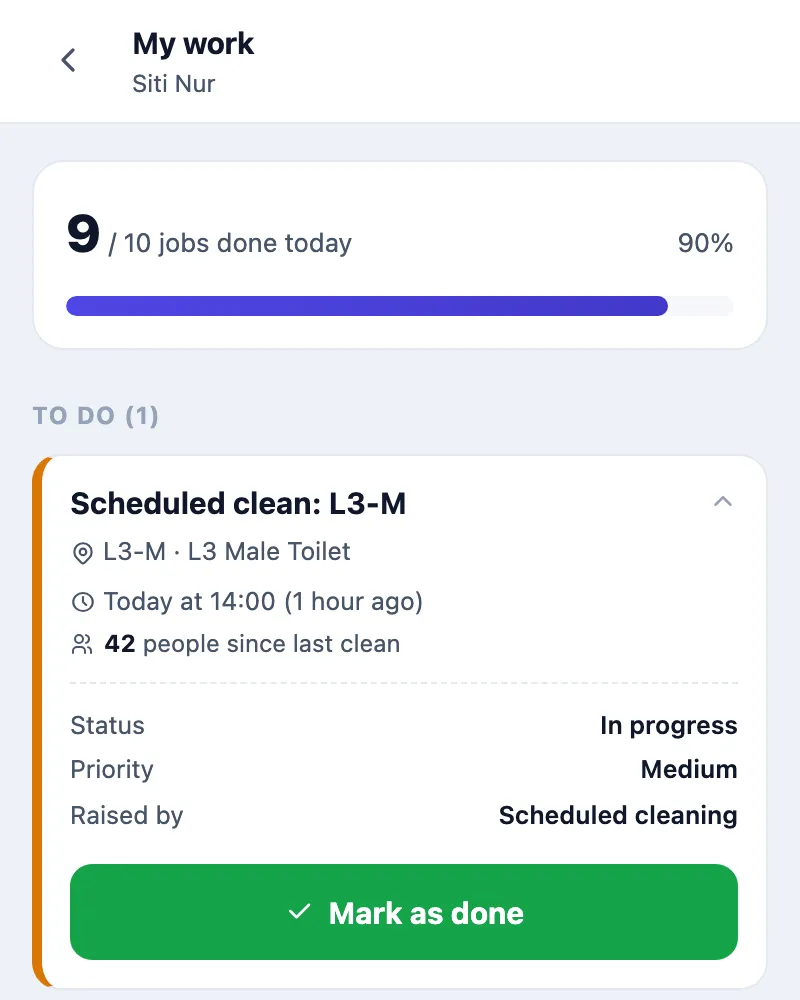
From top to bottom:
- Jobs done today: how many of today's jobs are done.
- To do: the jobs that are yours, urgent first. Each shows the toilet, how many people used it since the last clean, and when it was raised. Tap a job to see its Status, Priority and what Raised by it.
- Unclaimed nearby: jobs nobody has taken yet. There is no claim button — walking into the toilet is the claim. Once you are inside, the card says You're here and that the job will be assigned to you shortly; once you have stayed about as long as one clean takes, it moves to your To do. If another cleaner is already there, the card says so, and you only need to go if they need a hand.
- Cleaning schedule: how many of today's scheduled cleans are done, and the next one due. Tap it for the schedule board.
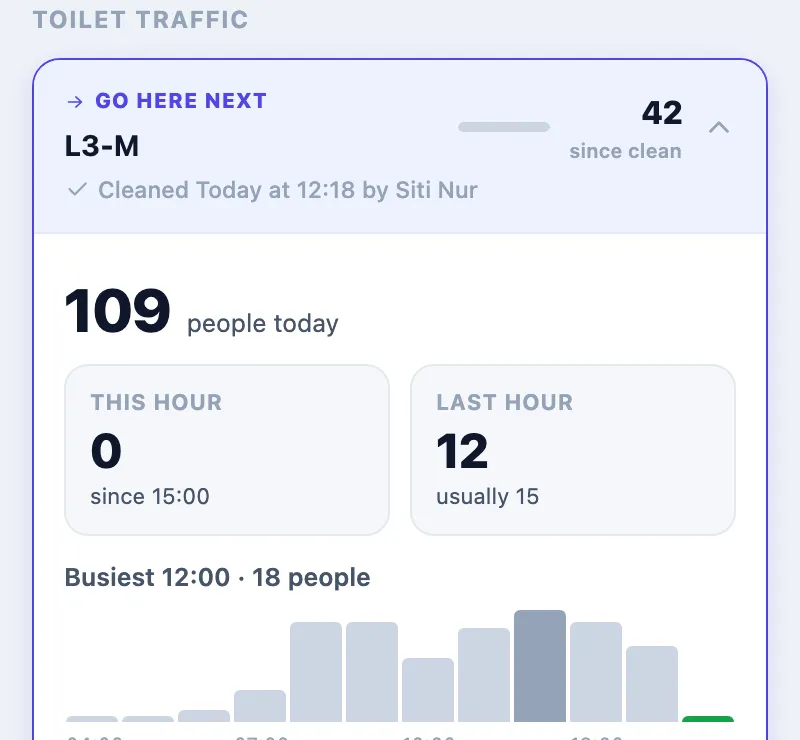
- Toilet traffic: every toilet, sorted by how many people have used it since its last clean. The top one is marked Go here next. Tap a toilet to see people today, This hour and Last hour against the usual, a 12-hour chart, and who cleaned it last. Counter off or No counter means the numbers cannot be trusted or do not exist for that toilet.
- Done today: what you finished, with tag-verified next to the ones your badge confirmed.
Closing a job
With your badge (the usual way). Stay in the toilet for the toilet's clean time (One clean takes about, 5 or 6 minutes at Northwind). When you leave, the job closes by itself and is marked tag-verified. You do not have to touch the phone. If you leave before the time is up, the job is put back to open with a note that the visit was too short.
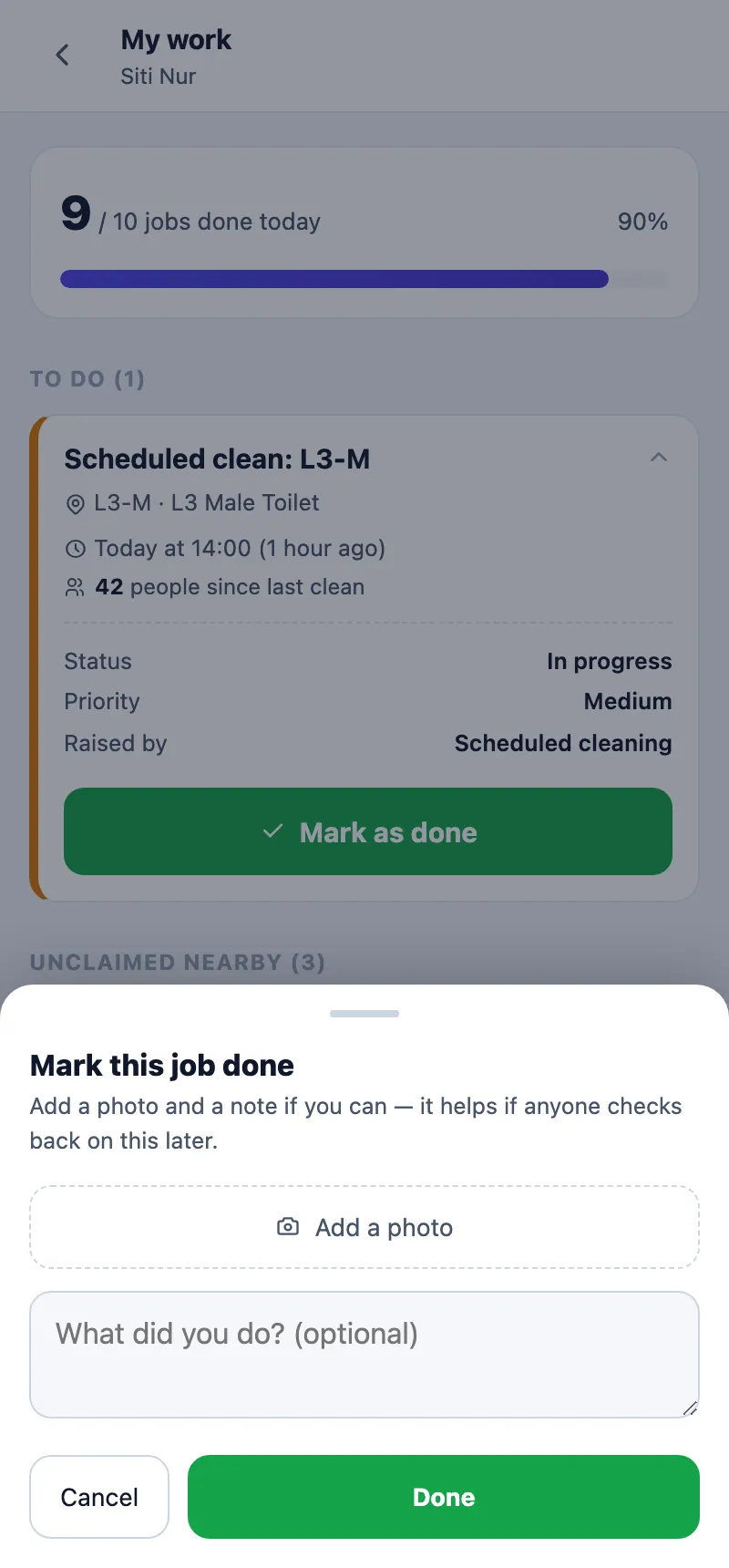
By hand, for example when your badge is charging:
- Open the job under To do and press Mark as done.
- Press Add a photo if you can, and write in What did you do? (optional).
- Press Done.
Closing early, where the toilet allows it (Cleaners can close a job early in the toilet's settings). When the toilet needs less than a full clean, you do not have to wait out the clean time:
- Go to the toilet. Once your badge has been seen there, the job under Unclaimed nearby shows You stayed 3 of 10 min and a Close job button.
- Press Close job and pick why: Already clean, Light clean only, Called away or Other. A photo and a note are optional.
- Press Close job.
The job is saved as Closed early, with the minutes you stayed and your reason. The schedule board shows it that way and the admins who were told about the job get "Closed by Siti after 3 of 10 min. Reason: Already clean." A job closed as Called away does not reset the toilet, so it can raise the next job.
Any clean, by badge or by hand, resets the toilet: its dirty score starts again from the time part and the count of visits since the last clean goes back to zero.
The cleaners' schedule board
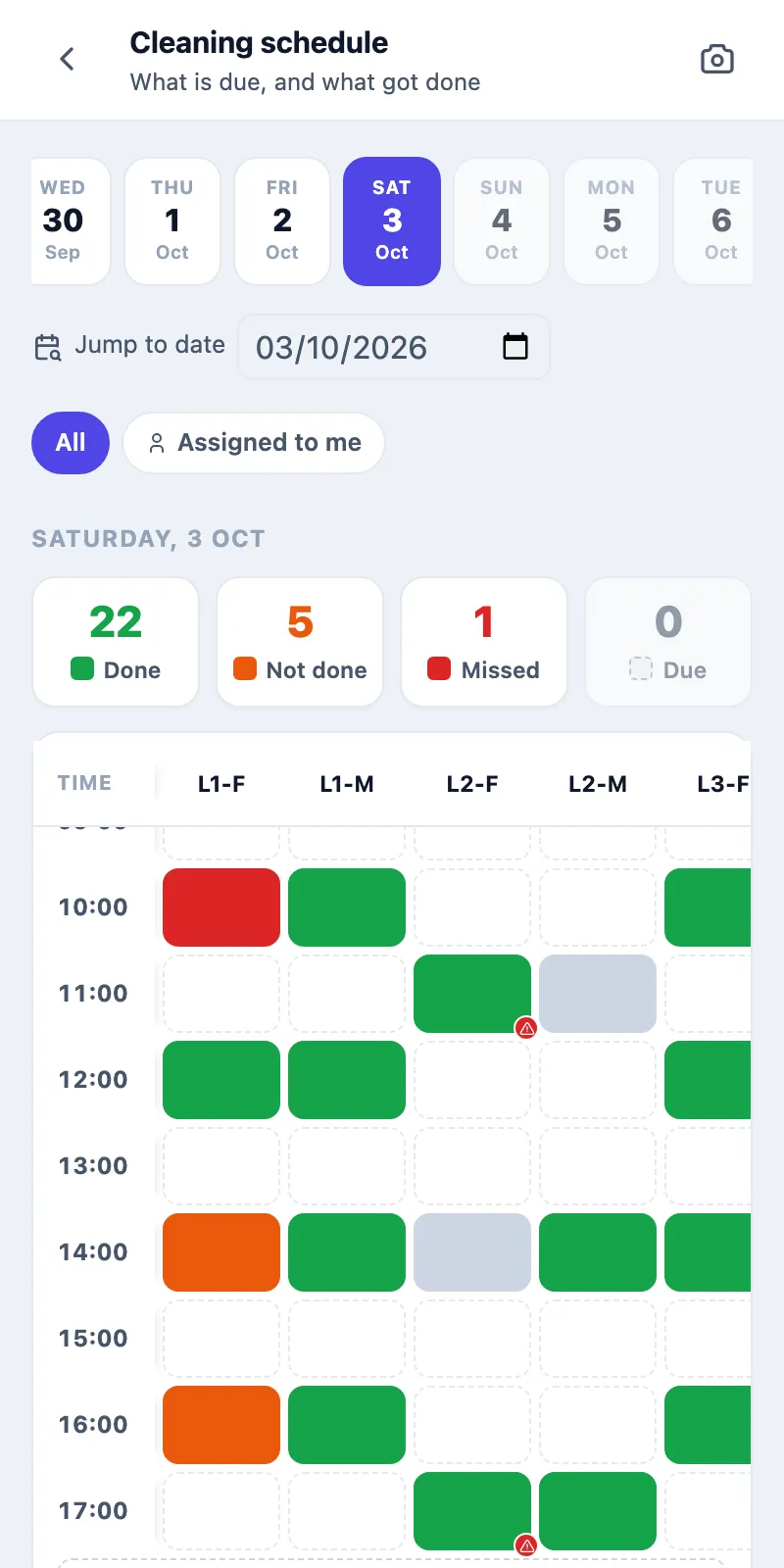
Tap Cleaning schedule on My work, or go to Schedules. You see the day hour by hour with the toilets across the top; All or Assigned to me filters it. The camera icon opens the photos. Tap a coloured slot to see the job behind it, and add photos or a remark to it. You can post on today and yesterday only.
How to keep the jobs moving (supervisors)
Open Work orders. It is built around what you can act on.
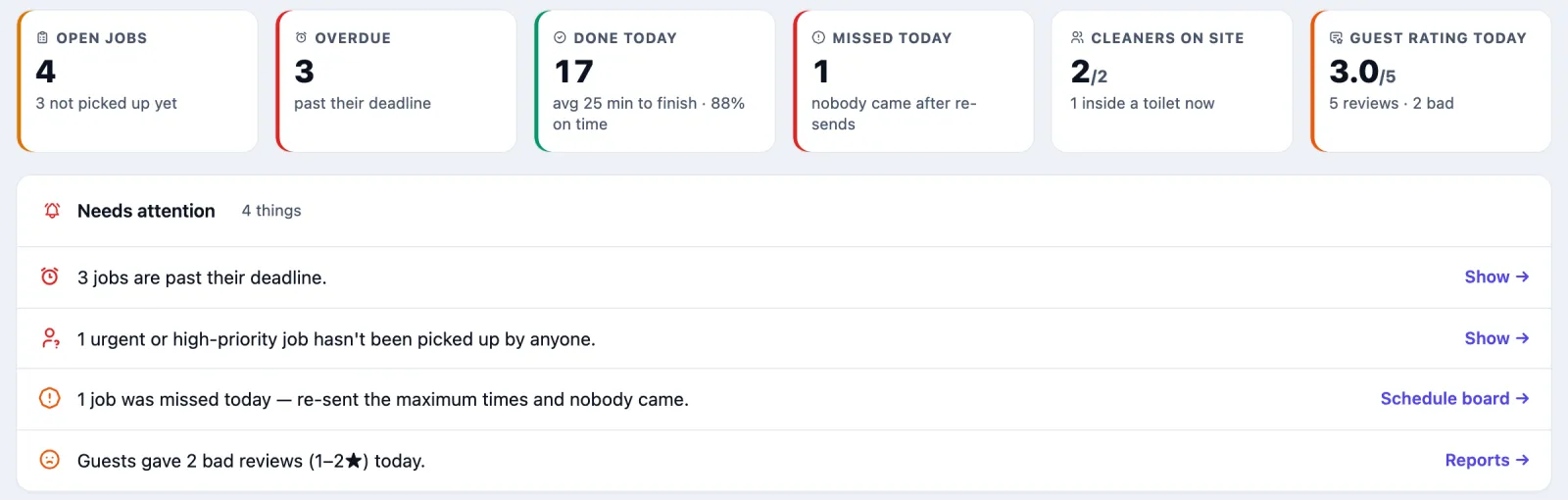
- The tiles: Open jobs (and how many nobody has picked up), Overdue, Done today (with the average time to finish and the share on time), Missed today, Cleaners on site and Guest rating today.
- Needs attention: the few things to deal with, each with a link. It can list jobs past their deadline, urgent or high jobs nobody has picked up, open jobs with no cleaner on site, toilets at 60 or more with no open job, jobs missed today, bad reviews today, and cleaners whose badge has no app login.
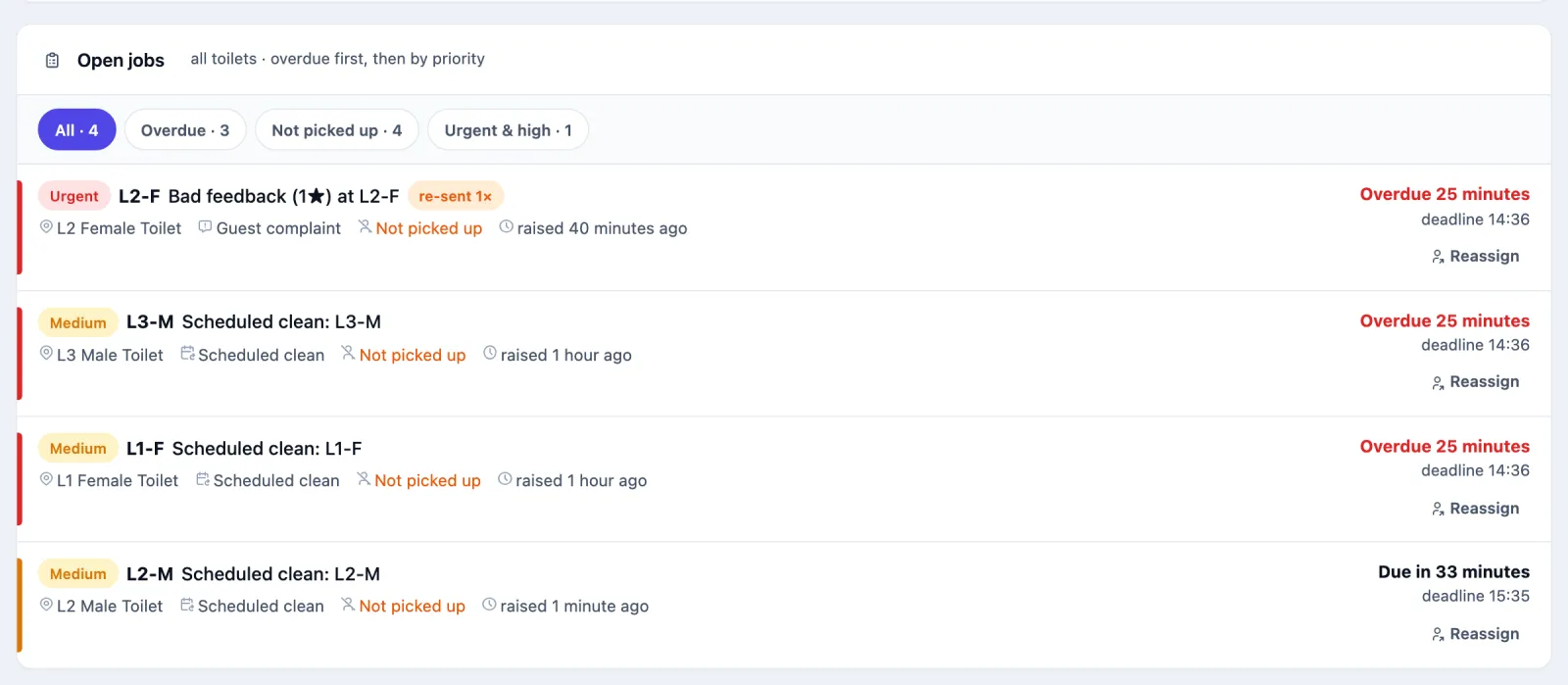
- Open jobs: every open job across all toilets, overdue first, then by priority. Each shows the toilet, what raised it (Scheduled clean, Guest complaint, Busy-hour auto clean and so on), who has it or Not picked up, and the deadline. re-sent 1× means nobody turned up and the system sent it again. Filter with All, Overdue, Not picked up or Urgent & high.
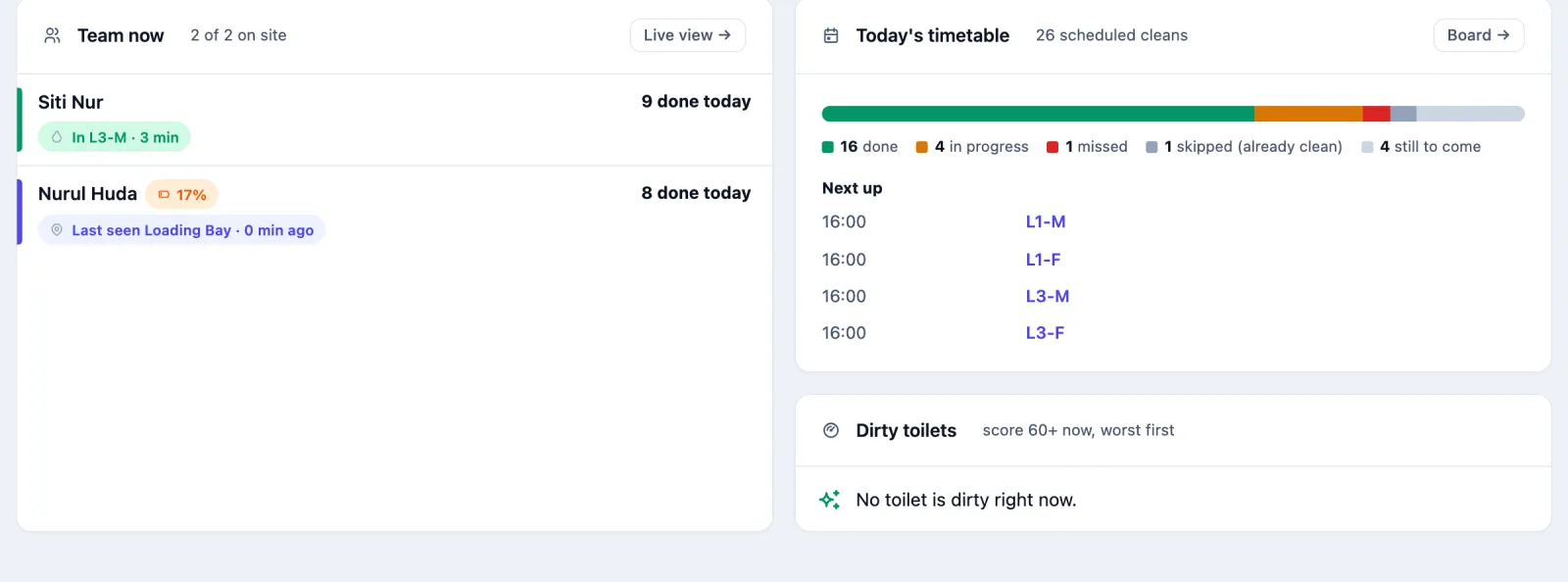
- Team now: each cleaner, where they are and how many jobs they finished today. Today's timetable: today's scheduled cleans as done, in progress, missed, skipped (already clean) and still to come, and the next few due. Dirty toilets lists any toilet at 60 or more, worst first.
Moving a job to someone else
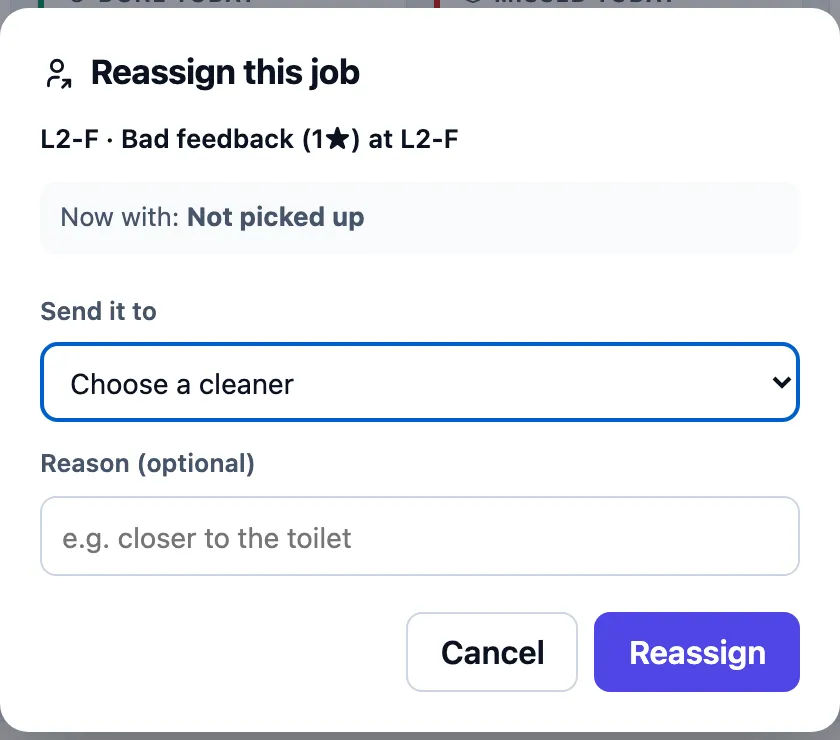
- In Open jobs, press Reassign on the job.
- Under Send it to, choose a cleaner. Cleaners who are away are shown but cannot be picked.
- Add a Reason (optional), such as "closer to the toilet", and press Reassign.
Normally you do not need to: every new job goes to every cleaner's phone at once, and whoever walks into the toilet takes it. Reassign is for when you want one person to have it.
What happens to a job nobody does
| When | What the system does |
|---|---|
| A job is open and nobody has started it | After Reassign after (30 minutes unless the toilet says otherwise) it sends the job to the cleaners again. |
| A cleaner had the job but has not been seen in the building lately | The job goes up one priority step and is sent again. |
| This has happened Give up after times (3 unless the toilet says otherwise) | The job is marked Missed. It leaves the open lists, but a cleaner can still finish it. |
| A job passes its deadline | Once per job: an alert on the toilet's activity, the priority raised one step, the job re-sent, and a notification to the supervisors. |
| A cleaner's badge leaves before One clean takes about | The job is put back to open, with a note that the visit was too short. |
That table is the default, Every cleaner. A toilet can instead have its own steps, set on its edit page under Who gets notified:
- Choose Choose people, step by step.
- Step 1 · When a job is raised: tap the cleaners (or All cleaners) and the admins to tell.
- Add step for each next step and set If no one responds within (minutes). Each step can tell any number of cleaners and admins.
- Set mark the job Missed after for the time after the last step, and tap the admins to tell when that happens (admins only; it starts with the last step's admins).
A job moves to the next step only while no cleaner has responded: no badge has reached the toilet, and nobody has started or finished it in My Work. Any cleaner can still do the job, even one not in the current step. Admins are Toilet Hygiene users who are not cleaners; they get a push on their phone at each step they are in, and when the job is marked Missed. A person whose phone has notifications off shows a bell with a line through it, and gets nothing until they allow notifications in the app. With steps, a job past its deadline still goes up to urgent, but is not sent again by itself. Steps are for cleaning jobs only: an electrical, plumbing, maintenance, inspection or restocking job at the toilet (a cleaning rule can raise those) goes to its own role as before. A cleaning rule's Always send this cleaner is ignored for cleaning jobs at a toilet with steps; the rule's form shows the toilet's step 1 instead. The daily board shows each step: who it went to, how many phones took it, and who came next.
Notifications are written in each person's own language: English, Bahasa Melayu or 简体中文, whichever they use the app in (chosen on their Profile). One job can send a Malay alert to a cleaner and an English one to an admin. Someone who has not chosen a language gets English. See every notification on the toilet's edit page shows the messages in the language you are reading the page in.
How to see where cleaners are
Open Live. It updates itself every few seconds.
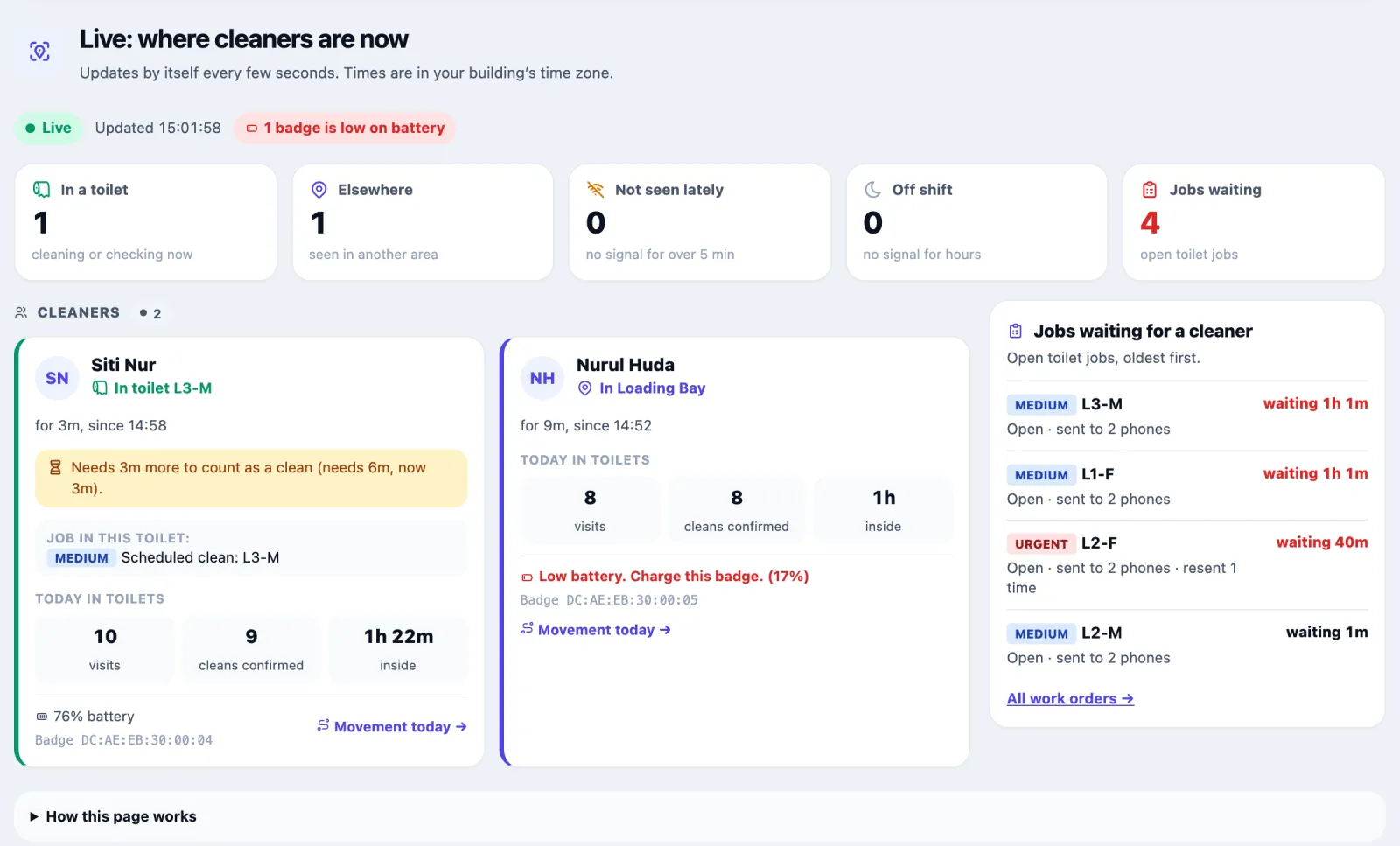
| Tile | Means |
|---|---|
| In a toilet | The badge was picked up in a toilet in the last 5 minutes |
| Elsewhere | Seen in another area of the building |
| Not seen lately | No signal for over 5 minutes |
| Off shift | No signal for hours (6 by default) |
| Jobs waiting | Open toilet jobs |
Each cleaner's card says where they are and since when. While they are in a toilet it says what the visit will turn into, for example how much longer they must stay for it to count as a clean. A badge under 20% battery is flagged so it can be charged. Movement today opens the cleaner's trail. Jobs waiting for a cleaner lists open jobs, oldest first, with who they were sent to and how often.
Where a cleaner went
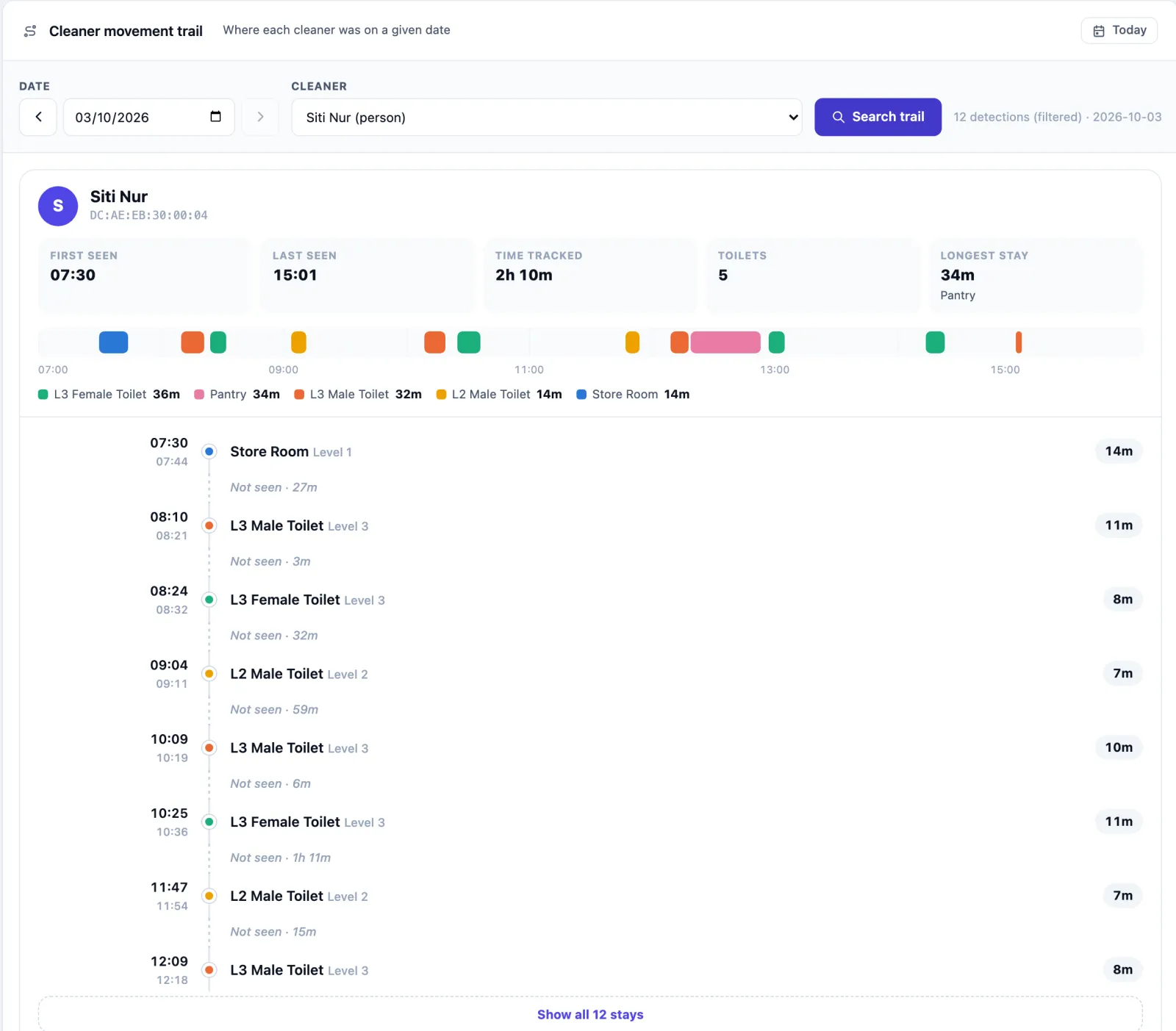
- Open Staff, then Where they went (or press See where they went on a cleaner's card).
- Pick a Date (the arrows step a day back or forward) and a Cleaner.
- Press Search trail.
You get the day as a coloured strip and a timeline: each stay with its place and length, the gaps where the badge was not seen, and First seen, Last seen, Time tracked, Toilets and Longest stay.
How to read the toilets
Open Toilets. A banner at the top says whether everything is clean, how many toilets are getting dirty or need cleaning now, and whether any jobs look stuck. Below it are the counts, the guest rating for 30 days, and Busiest toilets since their last clean — the number the busy-hour auto clean watches, against each toilet's threshold.
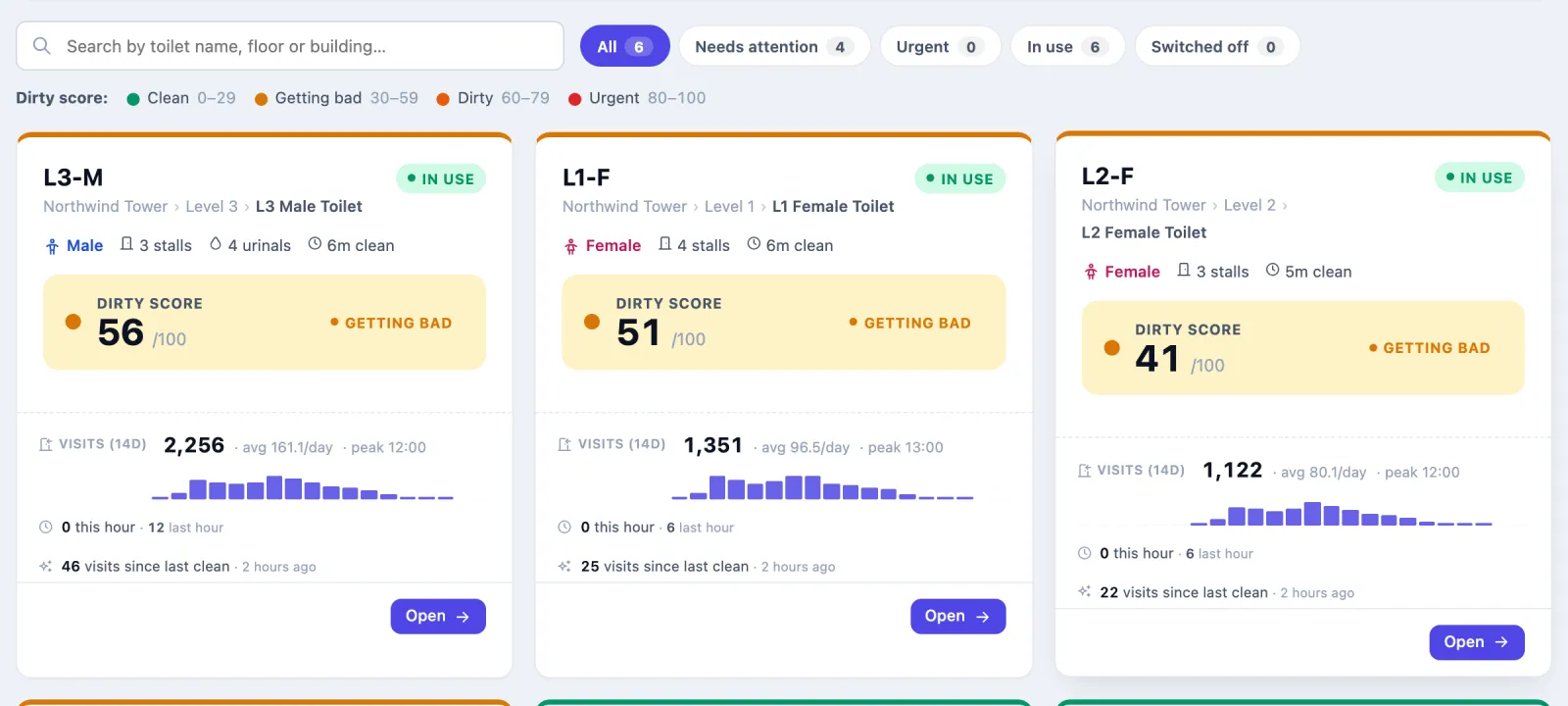
Search by name, floor or building, filter with All, Needs attention, Urgent, In use or Switched off, and press Open on a toilet.
One toilet's page
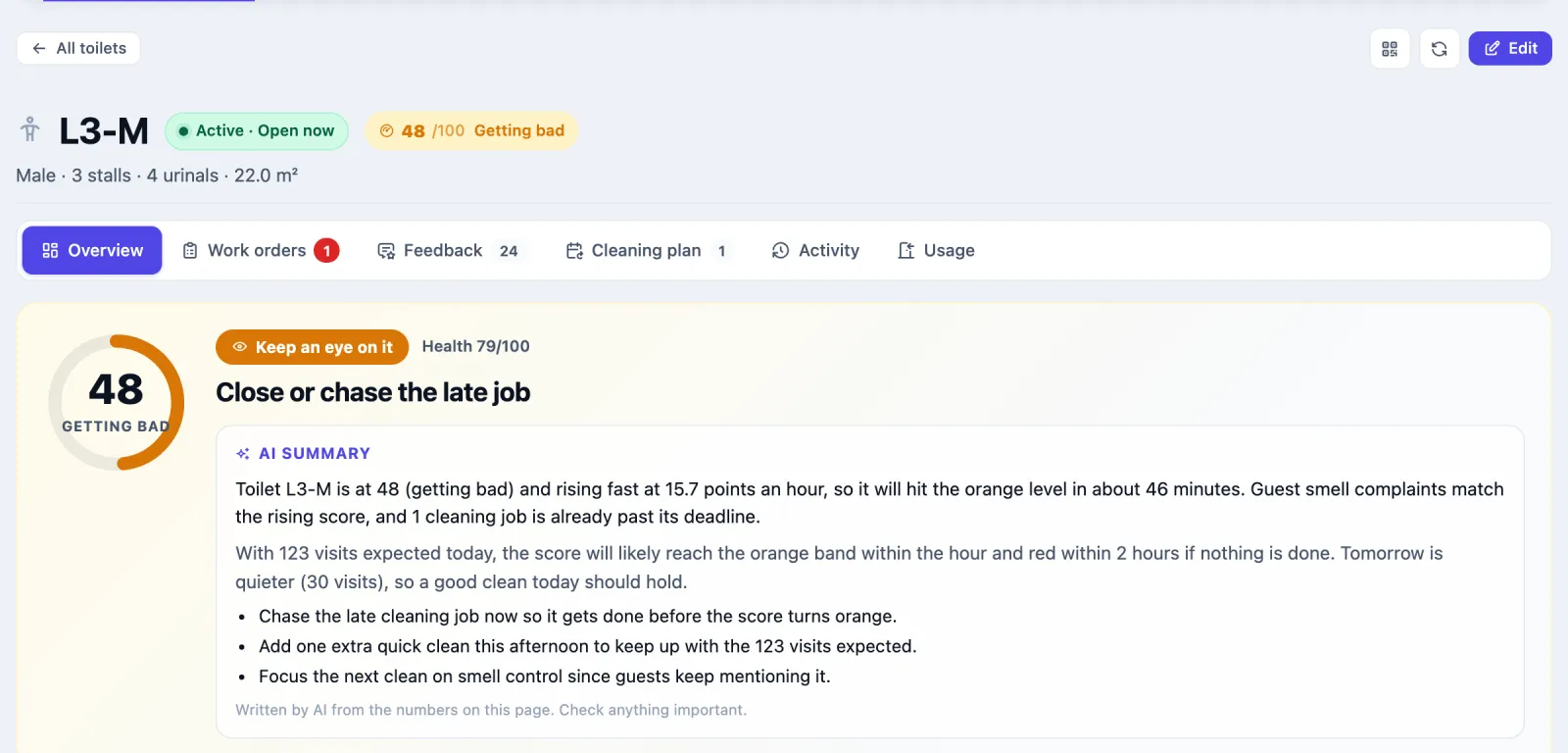
The header shows the code, whether it is in use and open now, and its dirty score. The QR icon opens the toilet's feedback poster; Edit opens its settings.
| Tab | What it shows |
|---|---|
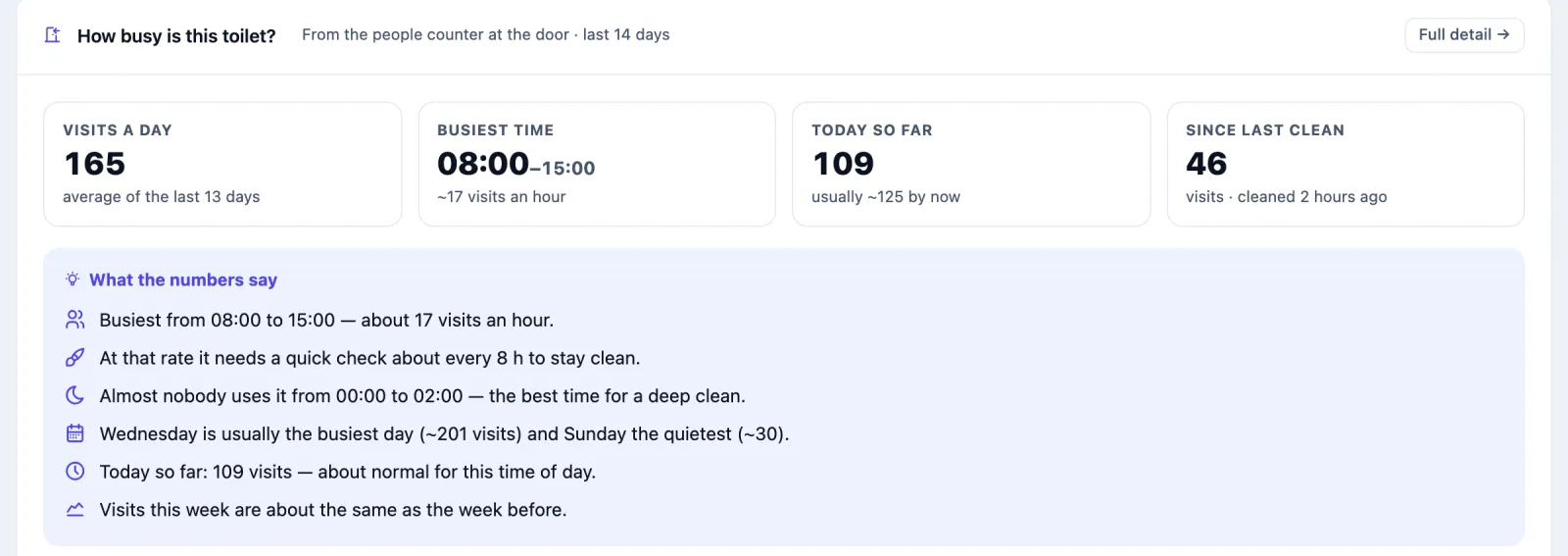
| Overview | How is it doing?: the score and a verdict (All good, Keep an eye on it, Needs action or Switched off). If your organisation has AI turned on, an AI summary written from the numbers on the page. What to do: a short list with a button for each item, such as Send a cleaner now, Add a routine cleaning schedule or Turn on auto-clean for busy hours. Going well, the Dirty score, last 24 h chart, What happens next (forecast from the last 14 days of visits), How busy is this toilet?, recent activity and guest feedback. |
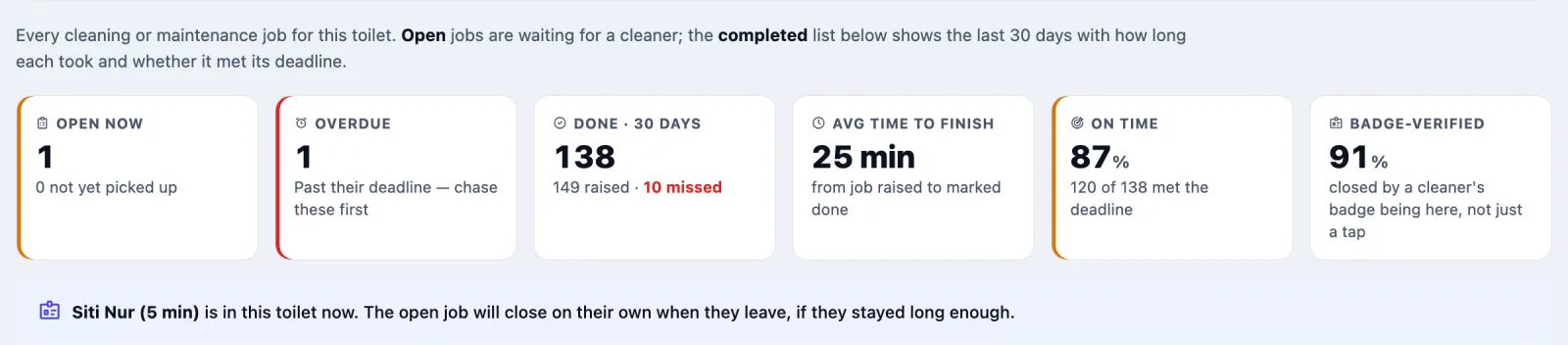
| Work orders | Open jobs, with seen, mark done and delete on each, and the jobs closed in the last 30 days: how long each took and whether it met its deadline. |
| Feedback | Guest ratings, bad reviews, what guests complain about, and the Feedback QR poster. |
| Cleaning plan | Everything that decides when this toilet gets cleaned: its schedules and what each decided, the busy-hour auto clean, guest complaints, today's timetable, Service standards, Opening hours, Assigned cleaners and Stalls. |
| Activity | The score over 24 hours and a log of the last 14 days, filtered by cleaning jobs, guest reviews, alerts or problems only. |
| Usage | Door-counter visits by day and hour, with the peak hour and day. |
How to read the daily board
Open Schedules → Daily board. It shows one day, hour by hour, with the toilets down the side. Pick a day from the strip or Jump to date. The four counts across the top — Done, Not done, Missed, Due — also work as filters, and Anyone and Any status narrow it further.
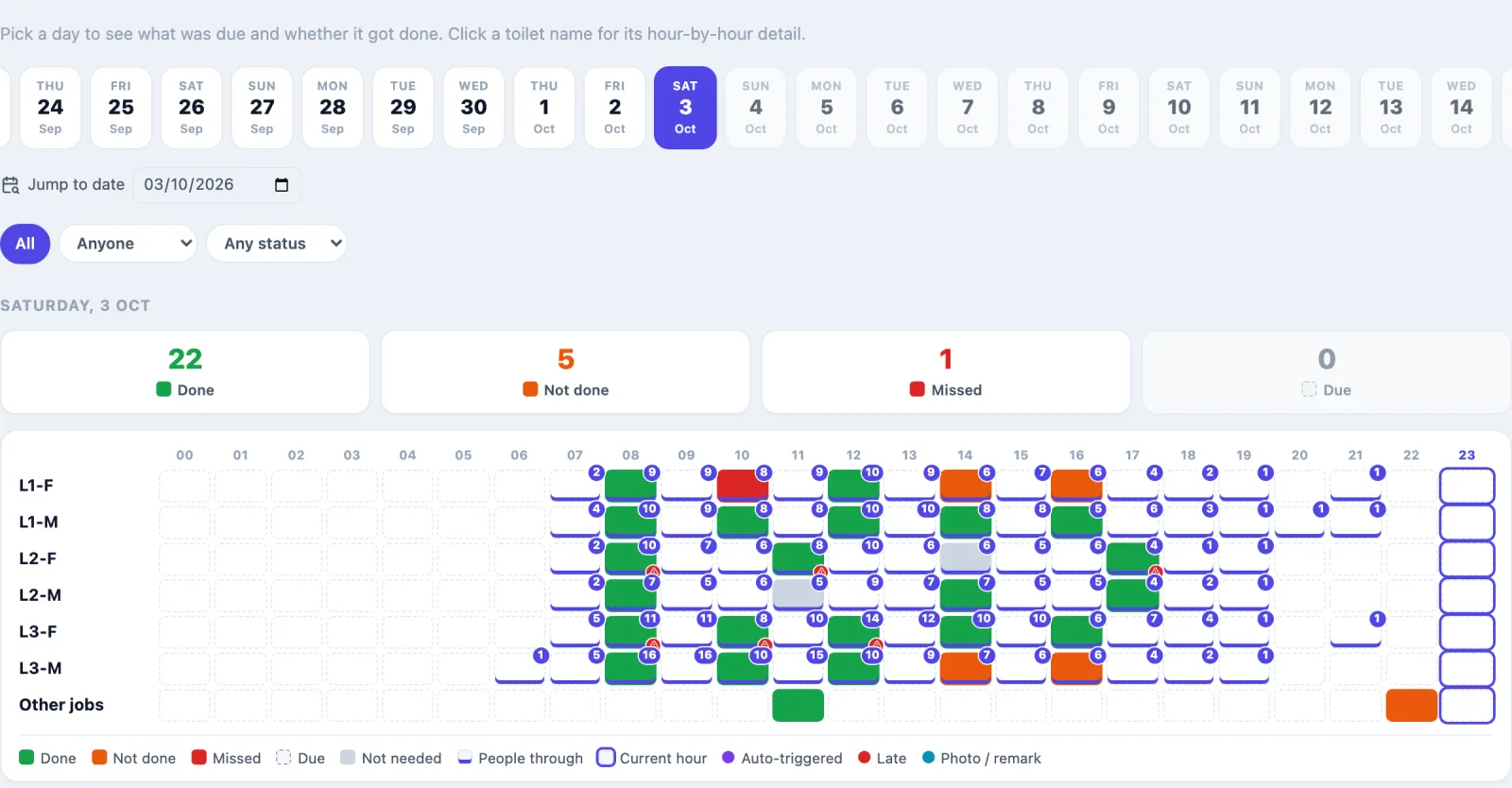
| On the board | Means |
|---|---|
| Done | The job was finished. |
| Not done | A job was sent and is still open. |
| Missed | Nothing was sent within 20 minutes of the slot, or the job was re-sent the maximum number of times and nobody came. A cleaner can still finish it. |
| Due | Still to come. |
| Not needed | The schedule checked and skipped: the toilet was still clean, or a job was already open. |
| Other jobs | Jobs outside the schedule, such as a busy-hour auto clean or a bad review. |
Markers on a slot show Auto-triggered (busy-hour), Late, Photo / remark, the number of people through that hour (People through) and the Current hour.
Press a slot to see What happened: the schedule's check (the dirty score against the skip limit), who the job was sent to, any re-sends, who did it, and whether their badge confirmed it. Press a toilet's name for its day hour by hour.
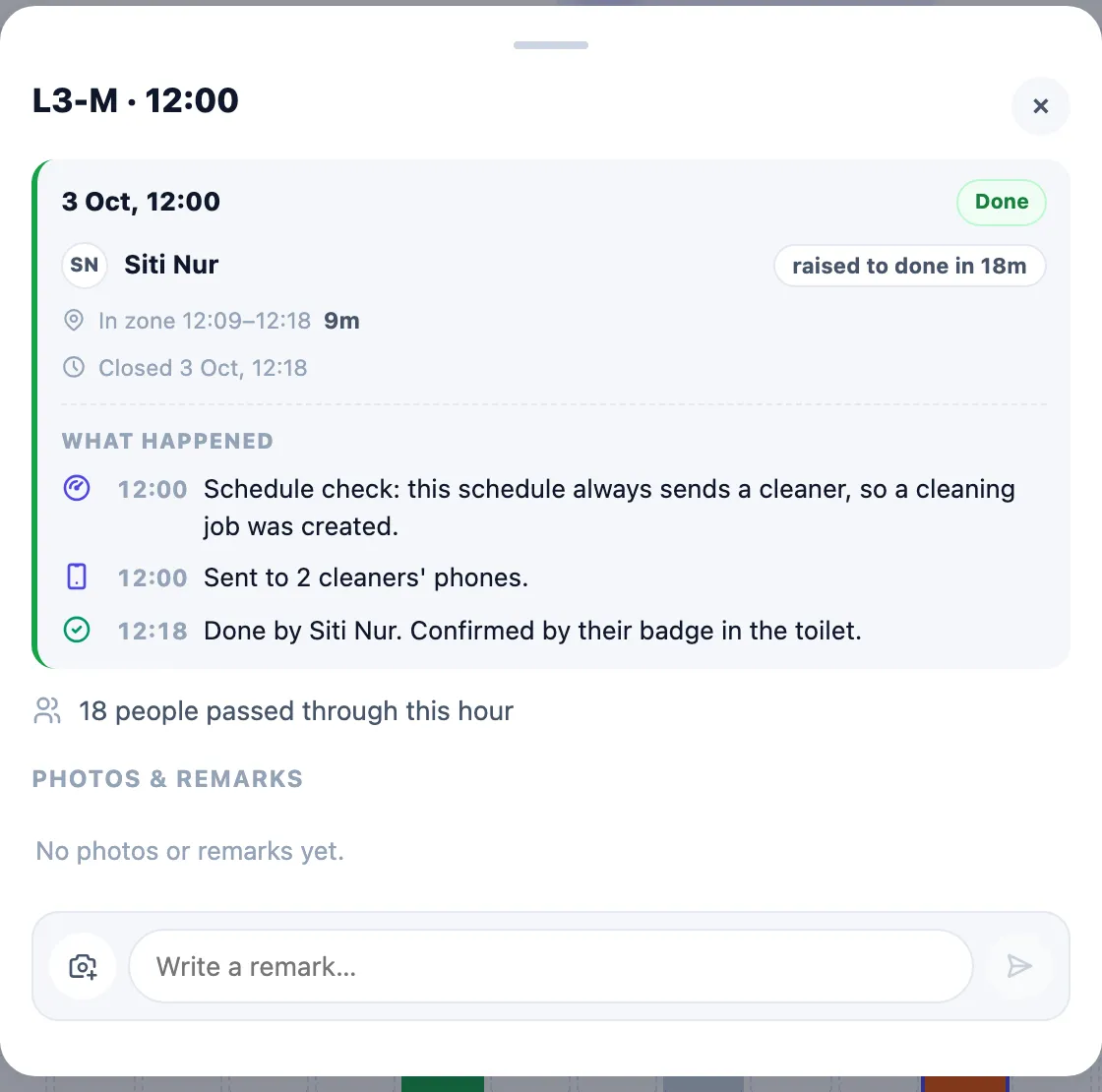
Photos and remarks. In a slot's detail, under Photos & remarks, add a photo (JPEG, PNG or WebP, under 8 MB, up to 8 per job) with the camera button, or type in Write a remark… and send it. A remark or photo on an hour with no job is kept as a note; it never counts as a clean. Schedules → Photos shows the photos from every toilet, grouped by day, for the last 1, 3, 7, 14 or 30 days, with All photos or My photos, and Open this hour jumps back to the board.
How to set up a cleaning schedule
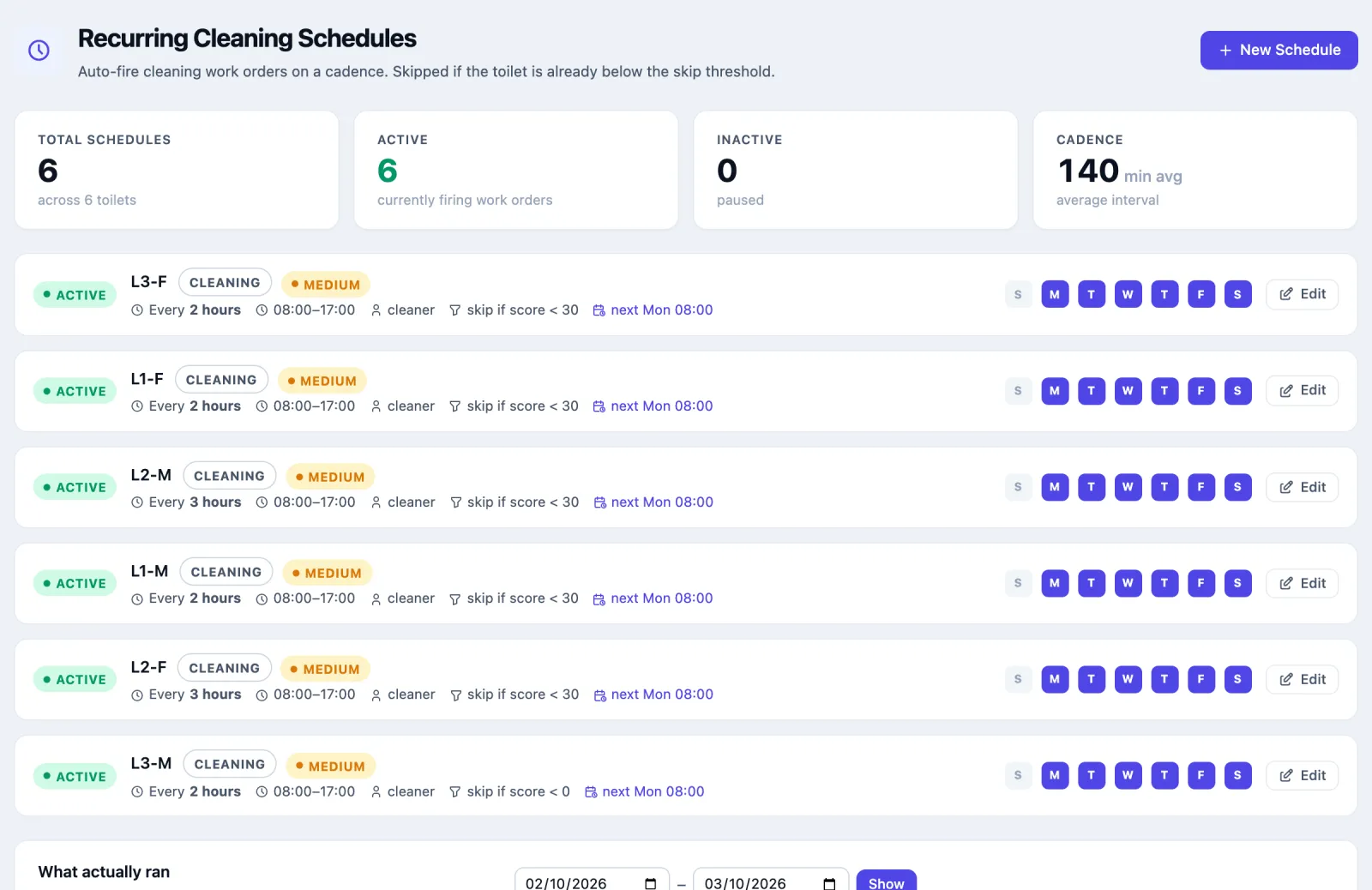
A schedule sends a cleaning job to a toilet at regular times, and can skip the visit when the toilet is still clean.
Open Schedules → Cleaning rules and press New Schedule. (On a toilet's Cleaning plan tab, Add schedule does the same with the toilet chosen.)
Which toilet? Pick the toilet.
How often? Pick 30 min, 1 hour, 2 hours, 3 hours, 4 hours, 6 hours, 8 hours or 12 hours, or type your own number of minutes (5 to 1,440).
When? Set From and Until, or press All day or Daytime (08:00–22:00). Under On these days pick the days, or press Every day, Weekdays or Weekends. Leaving them all off also means every day.
Skip if it is still clean? Choose one:
Option What happens at each cleaning time Always send a cleaner A job is sent whatever the score. Skip while it is still clean (recommended) Skipped if the dirty score is below 30. Only once it gets dirty Skipped if the dirty score is below 60. Custom: skip if the dirty score is below Skipped below your number. 0 means never skip. The coloured scale shows which scores are skipped.
The cleaning job: set the Priority. Always send this cleaner is optional and only lists cleaners set up the older way (see Setting up cleaners). Under More options you can change the type of job, who can do it, and the minute past the hour it runs at.
Check What this schedule will do on the right: the schedule in one sentence, cleans a day and a week, and the times.
Leave Schedule is on switched on and press Create schedule.
Cleans start at the From time and repeat at the interval up to Until: a 3-hour schedule from 08:00 to 17:00 runs at 08:00, 11:00, 14:00 and 17:00. The times stay the same every day, however late a clean was done. Minute past the hour, under More options, moves them to that minute: with 30, the same schedule runs at 08:30, 11:30 and 14:30. Check the times in What this schedule will do.
The form also warns you that the window cannot cross midnight (for a 22:00–06:00 night shift, make two schedules) and when no cleaning time falls inside the hours. To pause a schedule without losing it, edit it and switch off Schedule is on.
Schedules are checked every five minutes, so a job can appear a few minutes after its slot.
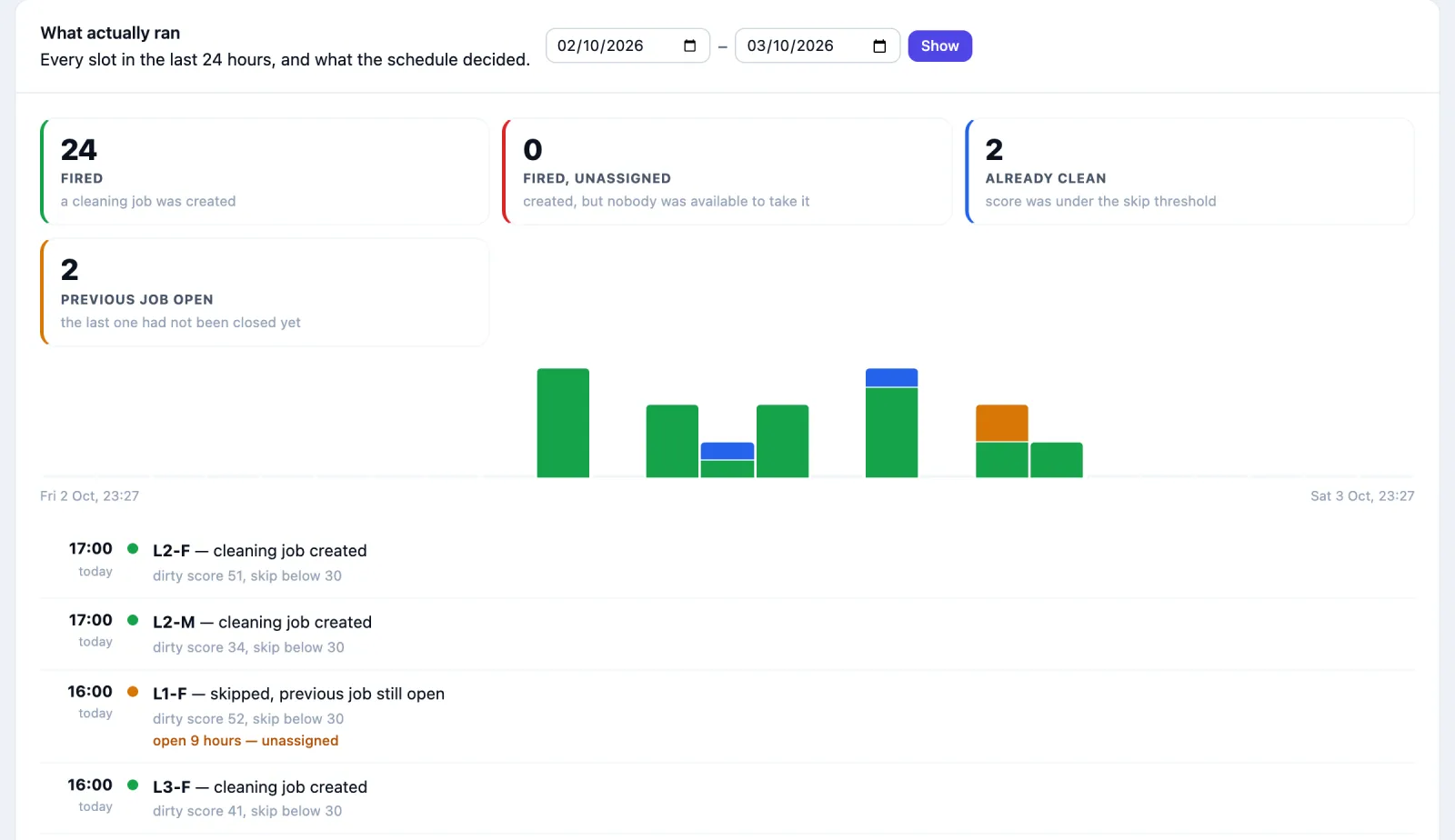
What actually ran, below the list, shows every slot over the last 24 hours (or the dates you choose) and what the schedule decided: Fired, Fired, unassigned (created, but nobody was available), Already clean or Previous job open.
How guest feedback works
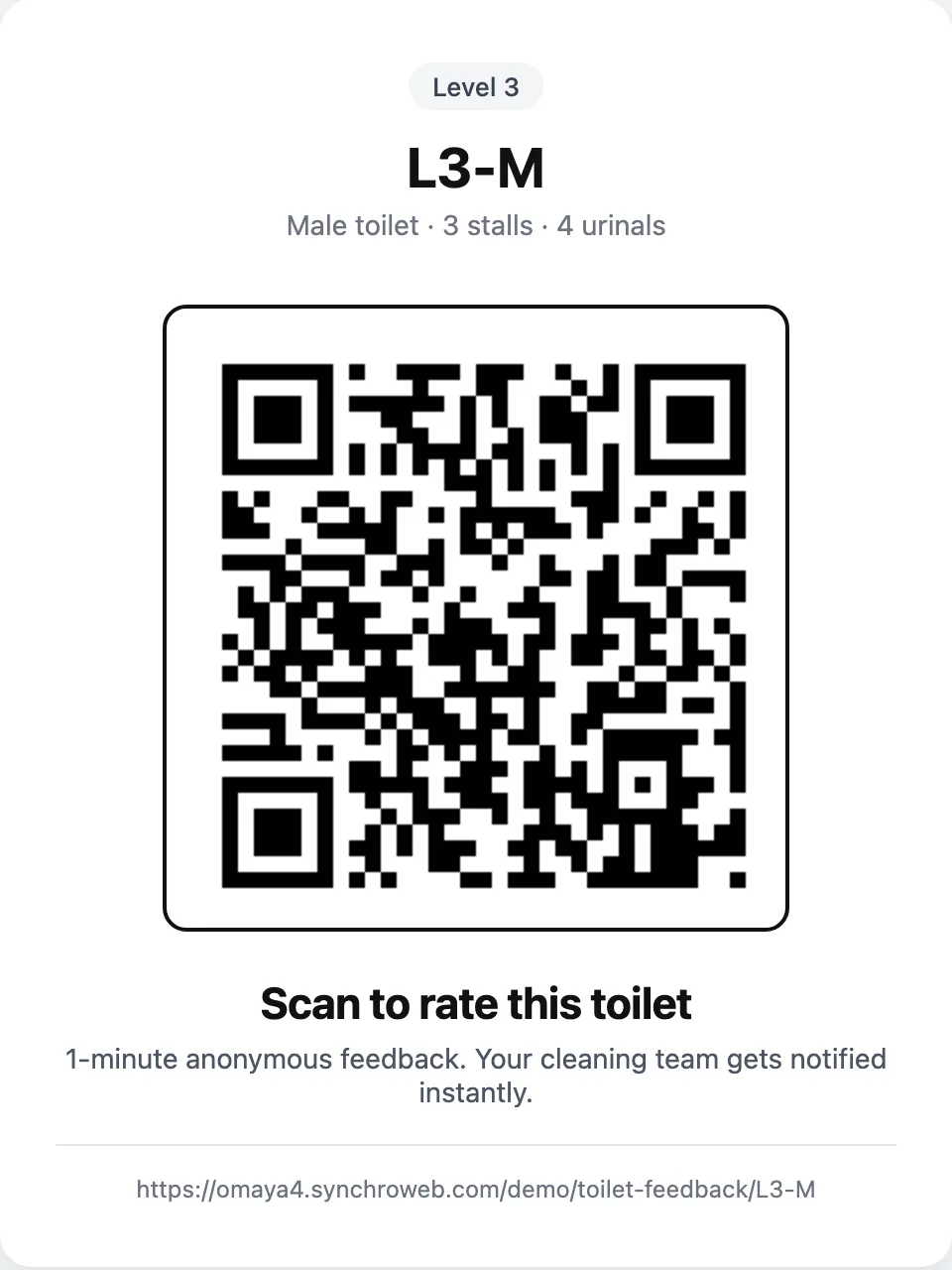
Each toilet has a printable poster with a QR code: the QR icon on the toilet's page, or Feedback QR poster on its Feedback tab. Press Print on the poster.
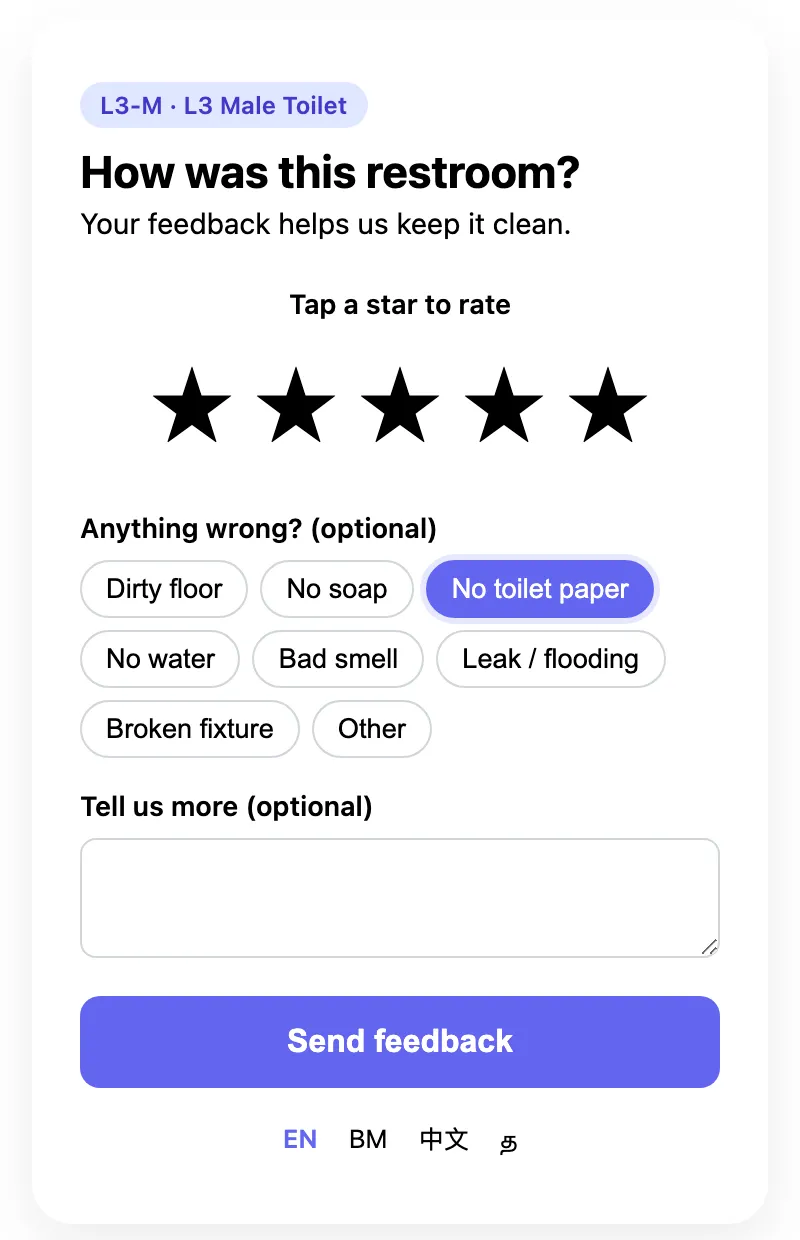
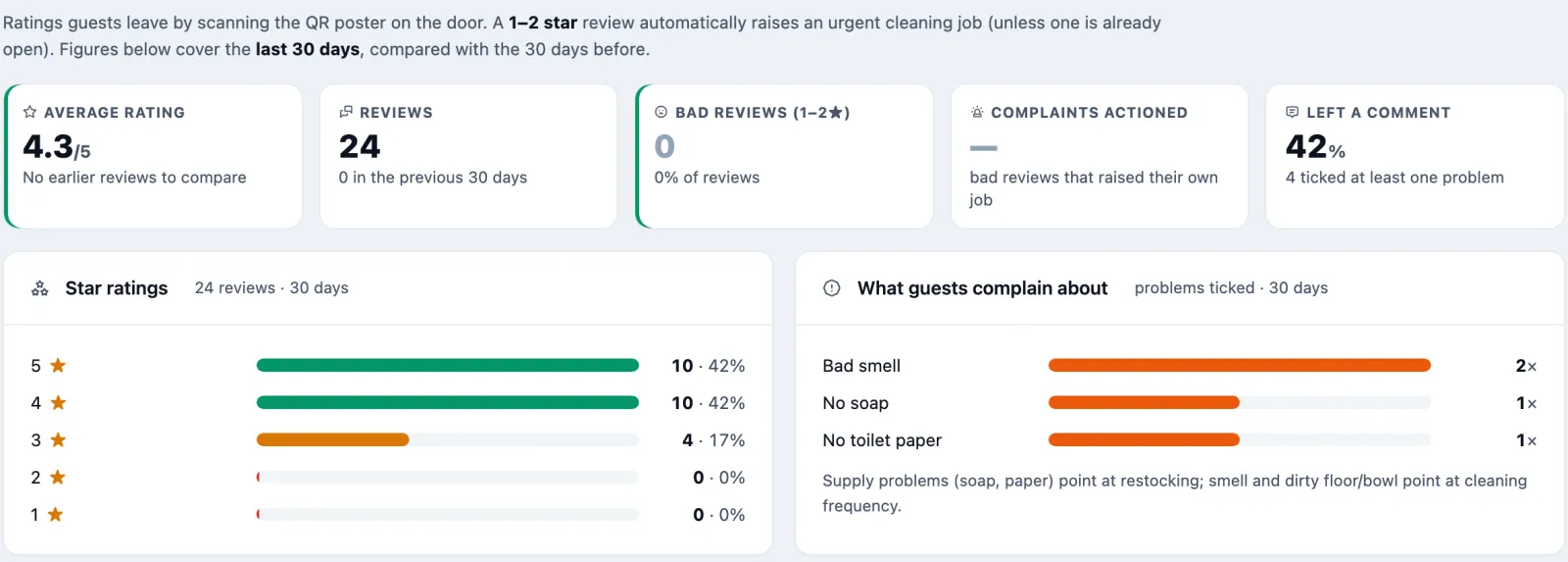
Guests scan it and see How was this restroom?. They tap one to five stars, tick what was wrong under Anything wrong? (optional) — Dirty floor, No soap, No toilet paper, No water, Bad smell, Leak / flooding, Broken fixture or Other — add a comment, and press Send feedback. No login and no app. The page follows the phone's language, and EN, BM, 中文 and Tamil switch it by hand. One phone can send one review a minute.
A review of 1 or 2 stars can raise an urgent cleaning job, due in 15 minutes and sent to the cleaners' phones straight away. This is off until you turn it on for each toilet, in Edit → Advanced settings → Send a cleaner after a 1–2 star guest review. No job is raised if one was already opened for that toilet in the last hour. Every review is kept either way, for 120 days, and shows in Reports.
How to read the reports
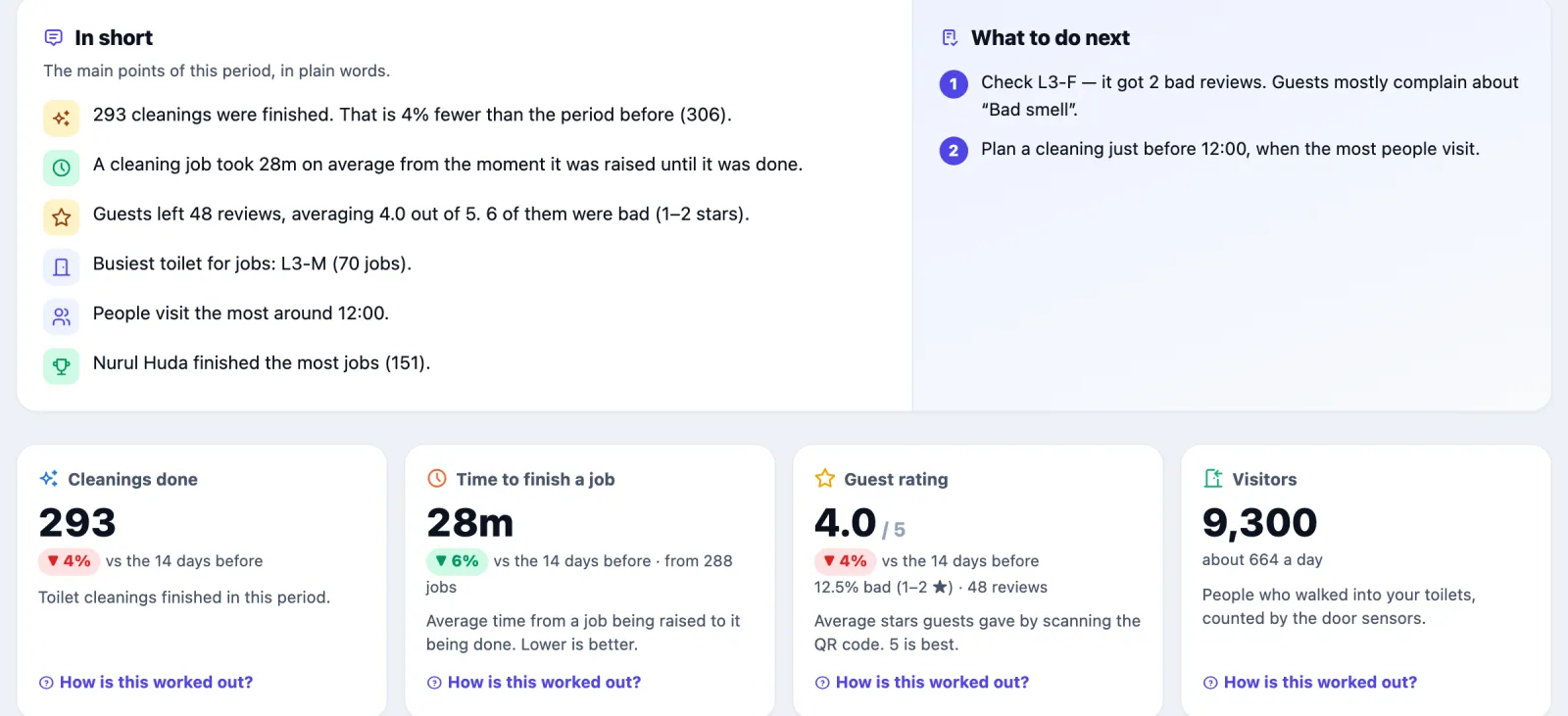
Open Reports and pick a period: Today, 7 days, 14 days, 30 days, 90 days, or your own From and to dates, then Show. Every figure is compared with the same number of days just before, and each has a How is this worked out? link.
Reports has one tab per topic, in a second row under the menu. The period you pick stays the same when you switch tabs.
| Tab | What it tells you |
|---|---|
| Overview | In short and What to do next in plain sentences, then the headline numbers: Cleanings done, Time to finish a job, Visitors, Guest rating. See details on a number opens its tab |
| Visitors | How many people went into the toilets over time. See Visitors below |
| Cleaning | Cleanings per day, time to finish per day, how long cleaners stay inside a toilet, Where jobs came from and Toilets with the most jobs (a toilet high on that list may need more scheduled cleans) |
| Service level | Whether a cleaner arrived within the toilet's Job is late after time, how long they took to arrive, and how long they cleaned. See Service level below |
| Cleaners | Per cleaner: jobs given, done, urgent, finished on time, auto-confirmed; and team availability when cleaners have admin accounts |
| Guest reviews | Ratings, bad reviews, what guests complain about, reviews per toilet, latest comments |
| Downloads | Spreadsheet (CSV) files for the same dates; see below |
On time means finished before the job's deadline. A job without a deadline is on time if it was finished within the toilet's Job is late after time. A visit the system recorded by itself is never late, because nobody asked for it.
Visitors
Visitors counts people walking into the toilets, from the door sensor at each toilet. Sensors elsewhere in the building are not counted. Pick All toilets or a single toilet at the top.
- The headline numbers: people who went in (compared with the period before), a day on average, the busiest day, the busiest time of day and, for all toilets, the busiest toilet.
- People going in is the trend chart. Show by sets the size of each bar: Hour (ranges up to 14 days), Day, Week (14 days or more, weeks start on Monday) or Month (60 days or more). Switch between Bars and Line, and for all toilets between All together and Each toilet. The dashed line is the average.
- When people come: the average for each hour of the day and each day of the week. Clean just before the busy ones.
- Visitors per toilet: each toilet's share, a day on average and its busiest time. Tap a toilet to see only its trend.
- Numbers by period: the chart as a table, with Download CSV. Below it, the full day-by-hour table (ranges up to 62 days).
Averages count every day in the range, including days the toilets were closed.
Service level
Service level answers two questions for every cleaning job that was raised: did a cleaner get there in time, and how long did they clean? The time allowed is each toilet's Job is late after setting, counted from the moment the job was raised.
- Time to arrive: from the job being raised until a cleaner's badge was first inside the toilet for at least 2 minutes. A shorter visit can be a badge passing the door, so it shows as First seen but does not count as arriving.
- Cleaning time: all the time the badge was inside the toilet for that job.
- Arrived on time: of the jobs where someone arrived or nobody came, the share where a cleaner arrived within the time allowed.
- Jobs within time (still open, time not up), cancelled, and not measured (closed with no cleaner stay recorded, for example closed by hand) are listed but not counted in the rate. Cleans the system recorded by itself are left out, because nobody raised them.
The tab shows the headline numbers, a day-by-day chart, the figures per toilet and per cleaner, and every job with its times, with Download CSV.
Finished on time on the Cleaners tab is a different measure: whether the job was closed before its deadline.
Downloads
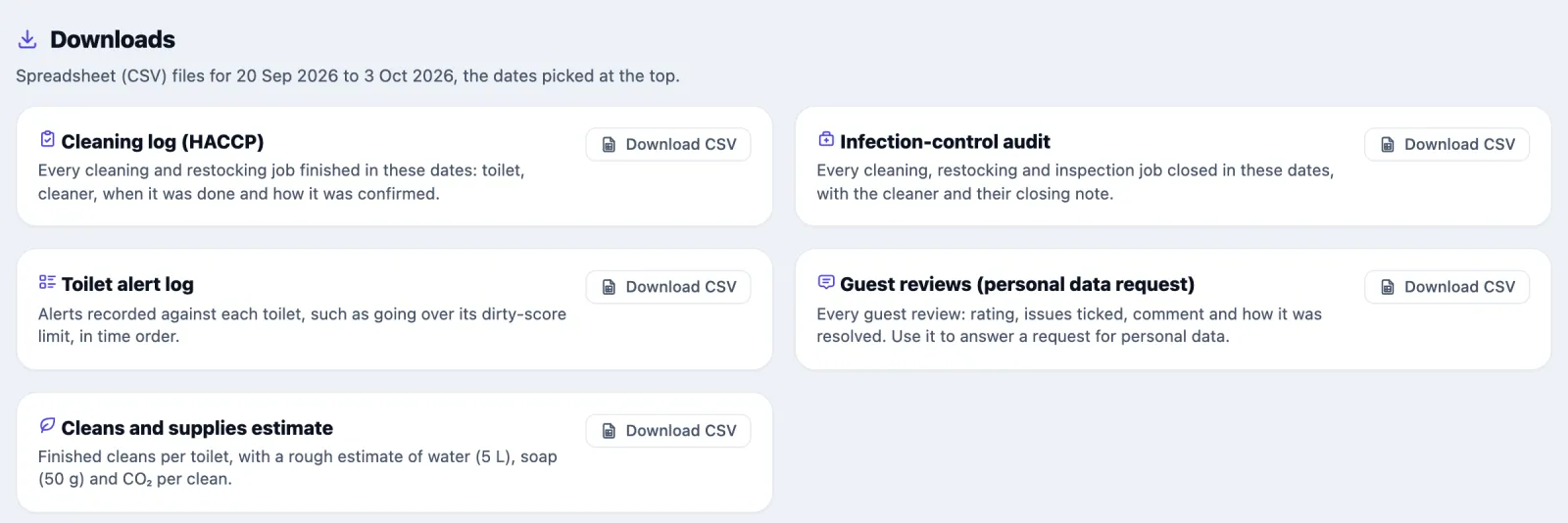
Downloads has a Download CSV button for each of five files, all for the dates picked at the top.
| File | What is in it |
|---|---|
| Cleaning log (HACCP) | Every cleaning and restocking job finished in those dates: toilet, cleaner, when it was done and how it was confirmed |
| Infection-control audit | Every cleaning, restocking and inspection job closed in those dates, with the cleaner and their closing note |
| Toilet alert log | Alerts recorded against each toilet, such as going over its dirty-score limit |
| Guest reviews (personal data request) | Every guest review: rating, issues ticked, comment and how it was resolved |
| Cleans and supplies estimate | Finished cleans per toilet, with a rough estimate of water (5 L), soap (50 g) and CO₂ per clean |
Because toilets are zones, they also appear in Omaya's own reports, such as Space Utilisation, Enter / Exit and Environment.
Emailed on a schedule
Whoever can change this app's settings can have the cleaning and feedback summary emailed daily, weekly or monthly, from Reports › Scheduled reports in the app, to the app's users or any address. See Scheduled reports in the apps.
The dirty score
Every minute each toilet in use gets a score from 0 (just cleaned) to 100 (very dirty). The toilet's Edit page explains it under How is the dirty score calculated?, and the schedule form under How is the dirty score worked out?.
| What adds points | Up to | How | Needs |
|---|---|---|---|
| Time since the last clean | 25 | 25 × minutes since the last clean ÷ Normal time between cleans, capped at 25. Never cleaned = 25. While the toilet is closed = 5. | Always counted |
| Visitors in the last hour | 20 | 1 point for every 2 people over the last 60 minutes | A people counter |
| People inside right now | 15 | 1 point per person | An occupancy sensor |
| Bad smell or water leak | 10 | 10 if ammonia is over 5 ppm or a leak is detected | An air or leak sensor |
| High humidity | 10 | 10 if humidity is over 75% | A humidity sensor |
| Cleaner taking too long | 10 | 10 if a cleaner's badge has been inside more than twice One clean takes about (at least 10 minutes) and is still there | Always counted |
| Bad feedback | 5 | 5 if any guest gave 1 or 2 stars in the last 24 hours | Always counted |
| Scheduled clean missed | 5 | 5 if, inside a schedule's days and hours, nothing was cleaned or sent for longer than its interval plus Job is late after | Always counted |
The score is the points earned as a share of the points this toilet can earn:
dirty score = points earned ÷ points possible × 100
Points possible only counts the signals the toilet has a working sensor for, so a toilet is not held low just because it has no humidity sensor. A toilet with no sensors at all can earn 45 points (25 + 10 + 5 + 5).
Worked example. A toilet with only a people counter, Normal time between cleans 60 minutes. Points possible = 25 + 20 + 10 + 5 + 5 = 65. Forty-five minutes after the last clean, with 16 visitors in the last hour: 25 × 45 ÷ 60 = 19 points for time, 16 ÷ 2 = 8 for visitors, 27 in all. 27 ÷ 65 × 100 = 42, "Getting bad".
Without any sensors, time is nearly all there is: even at the full 25 time points a toilet only reaches 25 ÷ 45 × 100 = 56. A schedule set to skip below 60 would never send a cleaner to such a toilet unless a missed clean or a bad review adds points.
| Score | Band |
|---|---|
| 0–29 | Clean |
| 30–59 | Getting bad |
| 60–79 | Dirty |
| 80–100 | Urgent |
The score colours the screens but does not send anyone by itself. Jobs come from schedules, the busy-hour auto clean, bad reviews and rules.
Busy-hour auto clean
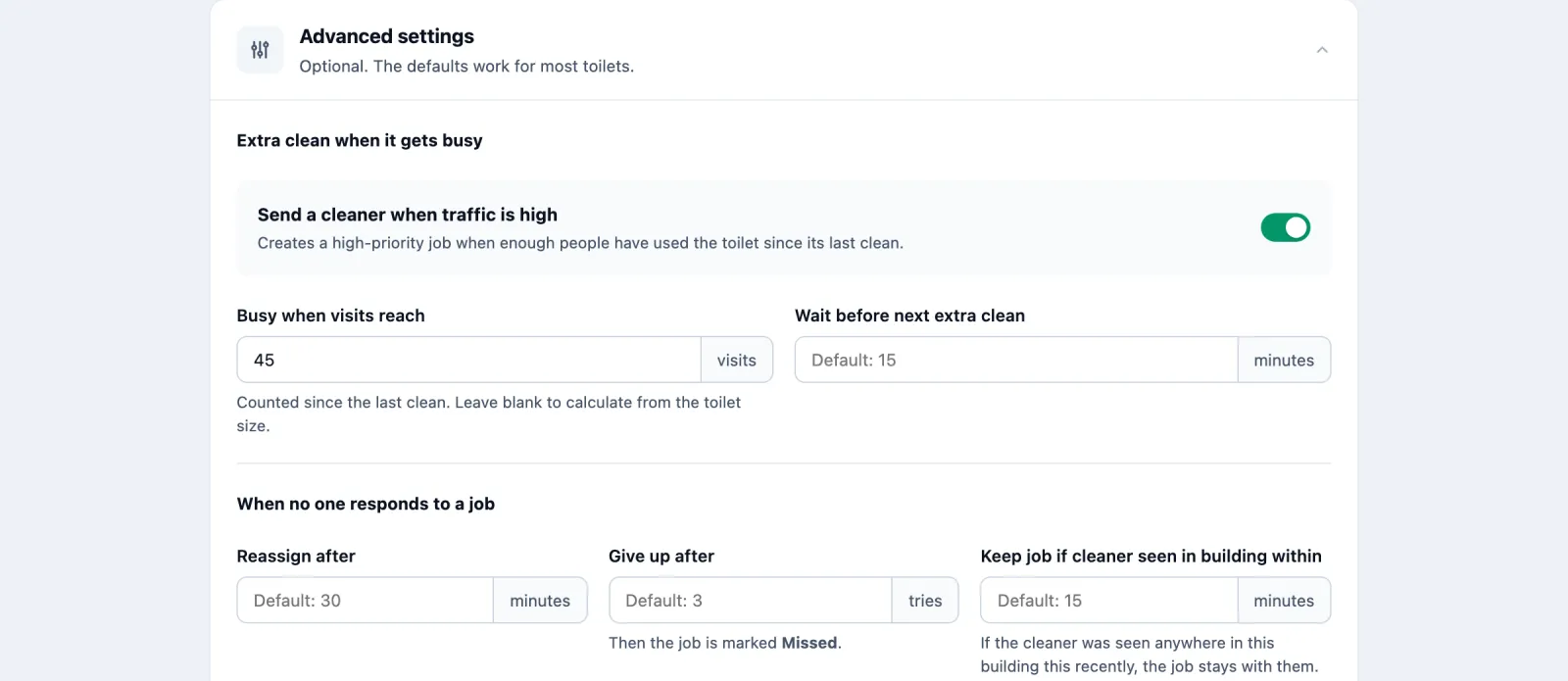
The dirty score rises gradually, so a rush can take a while to show. The busy-hour auto clean reacts straight away: when enough people have used the toilet since its last clean, it raises a high-priority cleaning job, titled with that count (for example "Auto-triggered high-traffic clean (47 visits since the last clean)"). It checks every time the door counter records a visit, and every minute as a back-up.
It is off until you turn it on for each toilet, in Edit → Advanced settings → Send a cleaner when traffic is high. The toilet's Cleaning plan tab shows the threshold in use, how it was worked out, this hour's and last hour's visits, and when it last fired.
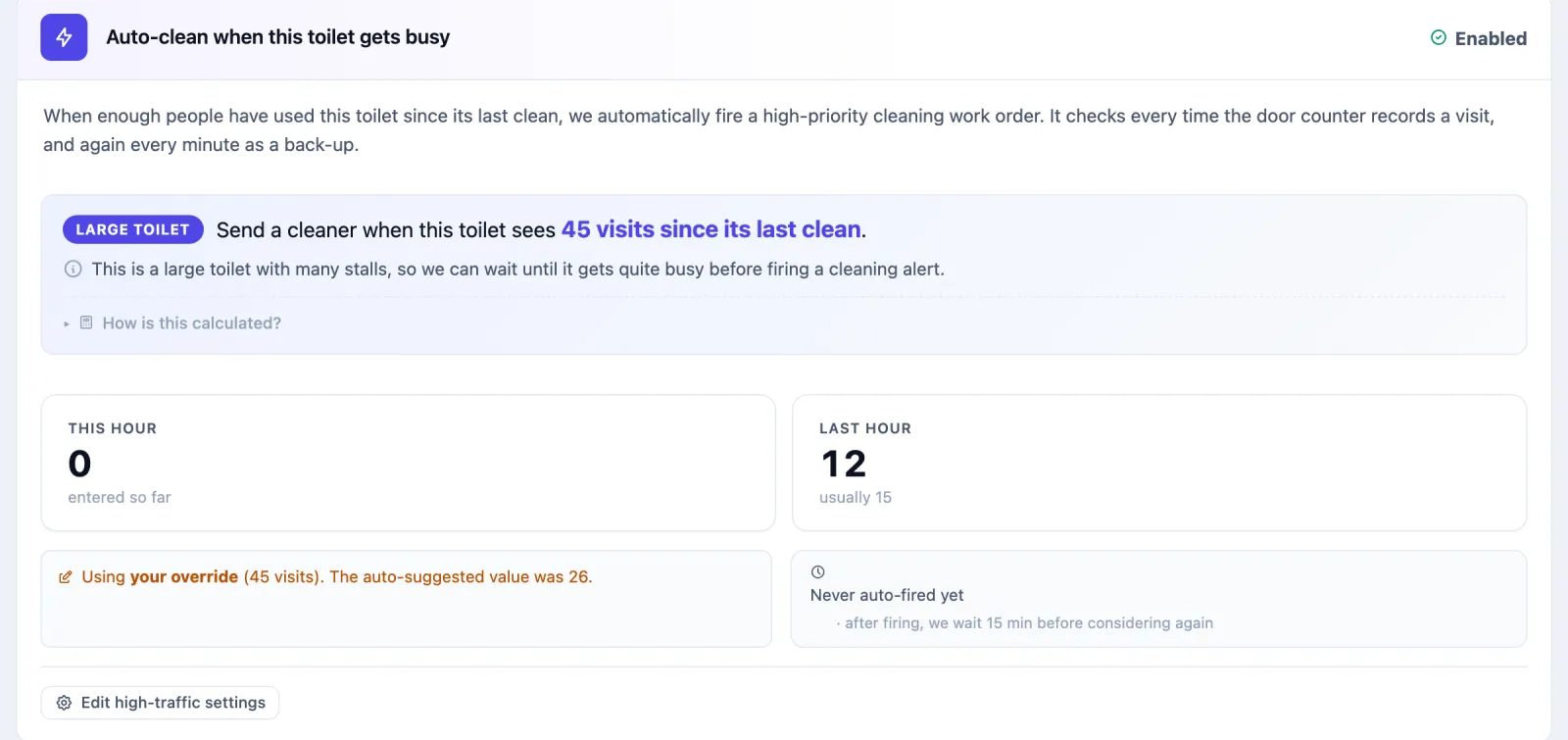
The threshold is suggested from the toilet's size: each cubicle is taken as able to handle 6 visits an hour, each urinal 12, and each square metre of floor 1. The auto clean fires at 30% of that total, and never below 15 visits. For L3 Male, 3 cubicles, 4 urinals and 22 m² give 18 + 48 + 22 = 88, and 30% of 88 is about 26. Type your own number in Busy when visits reach to override it.
It does not fire when the toilet is switched off or closed, when a high or urgent job is already open for it, when a cleaner's badge is in the toilet, or within Wait before next extra clean (15 minutes by default) of the last time it fired. The count starts again at every clean.
Extra cleans for a dirty score or a bad review
Two more switches sit under the busy-hour one in Edit → Advanced settings. Both are off until you turn them on, toilet by toilet.
- Send a cleaner when the dirty score passes its limit. When the toilet's score reaches its Dirty score limit (set under Cleaning on the same page), a high-priority job titled, for example, "Dirty score 76 reached its limit of 75" is sent to the cleaners. The score is checked every minute, so any limit works. Like the busy-hour clean, it does not fire when the toilet is closed or switched off, when a cleaning job is already open for it, when a cleaner's badge is in the toilet, or within Wait before next extra clean of the last time it fired.
- Send a cleaner after a 1–2 star guest review. A 1 or 2 star review from the QR poster raises an urgent job due in 15 minutes, sent straight away, unless a job was opened for that toilet in the last hour.
Jobs from either switch go to every cleaner's phone like any other, and count in Reports → Service level.
A stall occupied too long
Somebody in a stall for far longer than usual is either a stuck door or a person who needs help. The Stalls card, at the bottom of a toilet's Cleaning plan tab, watches each stall you list and raises a job when one stays occupied past its limit.
To add a stall (managers only):
- Open the toilet and go to the Cleaning plan tab.
- Under Stalls, type a Name, for example "Stall 1".
- Pick the Type: Stall or Urinal.
- Pick the Sensor: a presence sensor inside the stall, or a door contact on its door. Only sensors in this toilet's zone are offered.
- Set the Limit (min), from 5 to 240. The default is 20.
- Press Add.
Each stall then shows what it is doing Now:
| State | Meaning |
|---|---|
| Occupied | The presence sensor sees somebody, or the door contact reads closed. Shows for how long. |
| Free | The presence sensor sees nobody, or the door is open. |
| No reading | The sensor has sent nothing for 30 minutes, or sends neither presence nor door readings. |
| Out of order | The stall is out of use and is not watched. |
A door contact counts closed as occupied, so a stall whose door is normally left shut is better watched with a presence sensor.
When a stall has been Occupied for longer than its limit, Omaya raises one high-priority inspection job, due in 15 minutes: "a stuck door, or somebody who needs help". Stalls are checked every five minutes, and a stall has at most one open job at a time, not one per check. The trash button on a stall's row removes it and stops its watch.
Check it worked: within a few minutes of adding a stall, its Now column shows Occupied or Free rather than No reading.
Using it in your organisation
Corporate office tower
The setting. Six to forty toilets over several floors, busy at arrival, lunch and after big meetings; a small in-house or contract cleaning team.
Who does what. Two or three cleaners each own a few floors and work from My work; a facilities or operations lead watches Work orders twice a day and reads Reports weekly. Receptionists rarely touch it.
Settings that matter. A schedule per toilet every 2 hours in office hours with Skip while it is still clean; the busy-hour auto clean on the toilets next to meeting floors and the cafeteria; Normal time between cleans close to the schedule interval; Monday to Friday (plus Saturday if the building opens).
Tip. Put the QR poster at eye level inside the door, not on the outside. People rate the toilet as they leave it, and the "No toilet paper" and "No soap" ticks turn into a restocking round rather than a full clean.
Hospital or clinic
The setting. Public toilets near outpatient clinics and wards, open long hours, with infection-control expectations and auditors who ask for proof.
Who does what. Housekeeping supervisors per block use Live and Work orders; cleaners work from My work with badges; the infection-control nurse reads the toilet pages and the guest complaints.
Settings that matter. Always send a cleaner on the busiest clinic toilets, so the record shows a clean at every slot whatever the score; short Job is late after (15–20 minutes); Give up after kept at 3 so missed cleans surface the same day; badges on every cleaner so most cleans are tag-verified.
Tip. Badge-verified on a toilet's Work orders tab is the number auditors care about: it shows the clean was done by someone physically there for the full clean time, not just a tap on a phone. Ask cleaners to add a photo when they mark a job done by hand.
Shopping mall or transport hub
The setting. Large toilet blocks with peaks that follow trains, flights, film showings or sales; a big contract cleaning team; complaints on social media.
Who does what. A cleaning supervisor per zone works from Live and Reassign; cleaners go wherever Go here next points; centre management reads Reports and the guest ratings.
Settings that matter. The busy-hour auto clean on every high-traffic block, with the suggested threshold to start with; schedules with Only once it gets dirty so quiet toilets are not cleaned for nothing; Wait before next extra clean raised to 20–30 minutes on the busiest blocks so one rush does not raise three jobs.
Tip. Watch Toilets with the most jobs in Reports for two weeks before adjusting. A toilet that keeps firing the busy-hour clean needs a shorter schedule interval, not a higher threshold.
Setting it up for your organisation
This part is for whoever sets the app up. Most of it is done once.
What must exist first
- A zone per toilet, drawn in the floor-plan editor, with its zone type set to Toilet. Everything hangs off the zone: visits, sensors, badges and jobs.
- Something that counts visits: a people counter on the door, linked to the toilet's zone. Without one the score is driven by time alone, the busy-hour auto clean never fires, and the forecasts stay empty.
- People and badges: each cleaner as a person under Entity with a badge (a BLE tag) linked, and an app login. See people and assets.
- Optional sensors: an occupancy sensor, an ammonia or leak sensor and a humidity sensor each add to the dirty score when present. A missing sensor is left out of the score; it does not count as zero.
Checklist
Mark the zones as toilets. Go to Apps → Module settings → Toilet Hygiene & Utilization (or Apps → Your apps and the settings icon on the Toilet Hygiene card). In Mark a Zone as Toilet, find the zone and press Mark as toilet.
Add each toilet's profile. In Needs profile, press Add profile, or in the app open Toilets and press New Toilet. Under Location on floor plan, pick the zone (only toilet zones without a profile are listed), fill in the form, and press Create toilet.
Put the cleaners on the roster. On the same admin settings page, in Cleaners, mark each cleaner's person as a cleaner. Then under Apps → App Users, create or edit their login, set Linked entity to that person, and tick the Toilet Hygiene app.
Check the team. In the app, open Staff. Each cleaner's card should show their Badge and a tick next to App login, and Can get jobs should equal the number of cleaners.
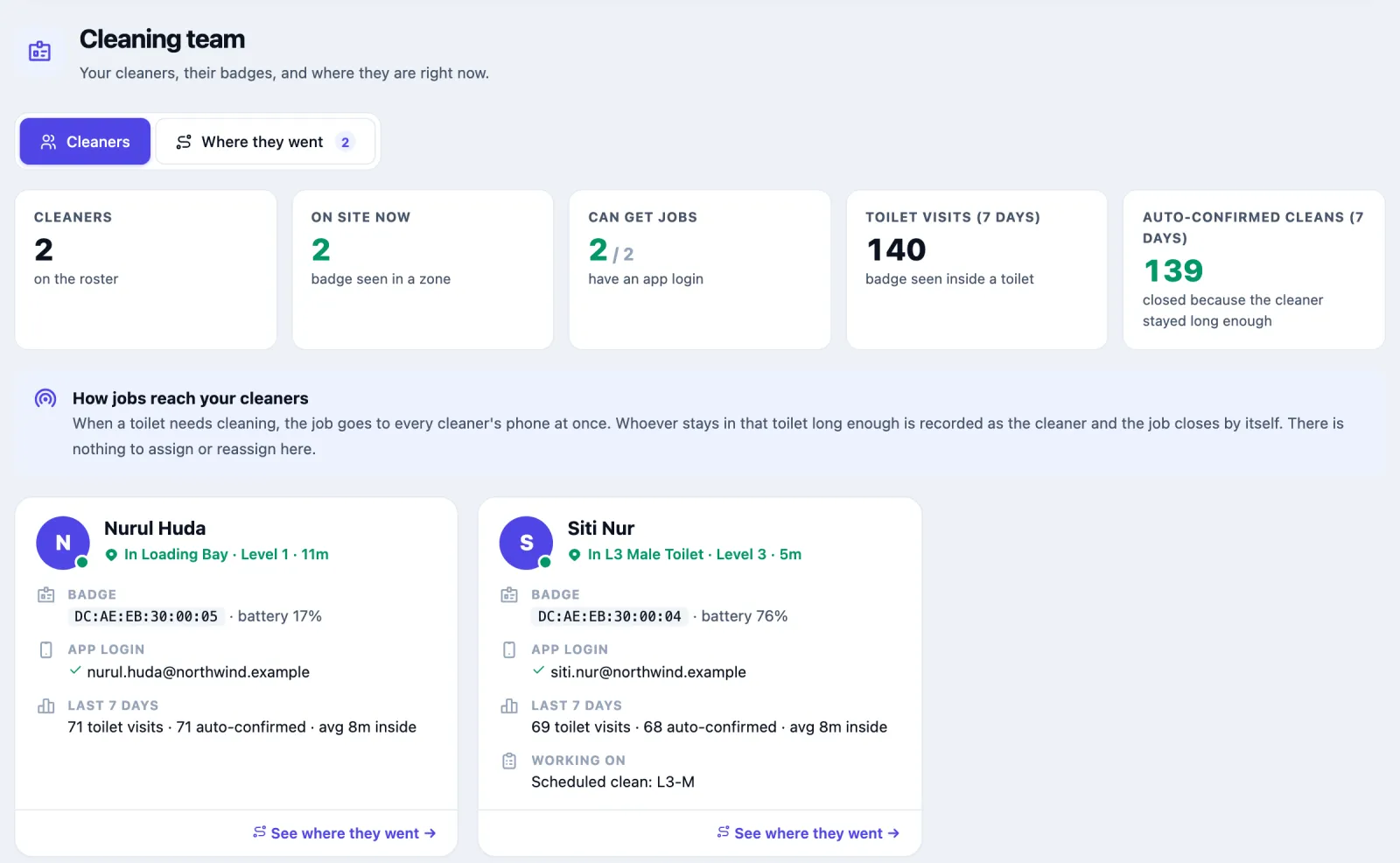
Both Northwind cleaners have a badge and a login, so both can get jobs Add schedules for each toilet (how).
Turn on the busy-hour auto clean on the busy toilets (how).
Print and put up the QR posters (how).
Optional: send a cleaner for a high dirty score or a bad review. Turn on Send a cleaner when the dirty score passes its limit and Send a cleaner after a 1–2 star guest review per toilet, in Edit → Advanced settings (how). Both are off by default. For anything beyond that, an administrator can still add a rule with Create toilet-hygiene work order, for example an ammonia sensor over its limit.
With the roster, every new job goes to every cleaner's phone at once, and whoever stays in the toilet long enough is recorded as the cleaner.
Cleaners on admin accounts (older set-up)
Some sites run cleaners as admin accounts with the cleaner role and a paired badge. They are listed on Staff under Admin accounts with badges, and jobs go to them before the roster, one person per job. Only for these cleaners can you press Toilets on their row to make them Main, Backup or Second backup for a toilet, Mark absent, Pair badge or Disable a badge, and pick them in a schedule's Always send this cleaner. Roster cleaners have no assignments: the job goes to all of them.
The toilet's settings
Open a toilet and press Edit, then Save changes at the bottom.
| Setting | Default | What it changes |
|---|---|---|
| Toilet code | The short name staff use, such as L3-M. Printed on the QR poster. | |
| Location on floor plan | The toilet's zone. | |
| Toilet type | Male, Female, Unisex or Accessible. | |
| Toilet is in use | On | Off pauses cleaning jobs and alerts, for example during a refit. History is kept. |
| Cubicles, Urinals, Floor area | The toilet's size, used for the busy-hour threshold suggestion. | |
| One clean takes about | 5 minutes | A badge staying this long closes the job by itself. Shorter stays do not count. |
| Job is late after | 30 minutes | How long a job may take before it counts as late, for jobs with no deadline of their own. |
| Cleaners can close a job early | Off | On lets a cleaner whose badge has been at the toilet close the job from My work before the clean time is reached, with a reason. Recorded as Closed early, never as a full clean. |
| Normal time between cleans | 60 minutes | How fast the time part of the dirty score rises. Smaller rises faster. |
| Dirty score limit | 90 | A target to keep below. The toilet is flagged as over its limit above it; it does not create jobs. |
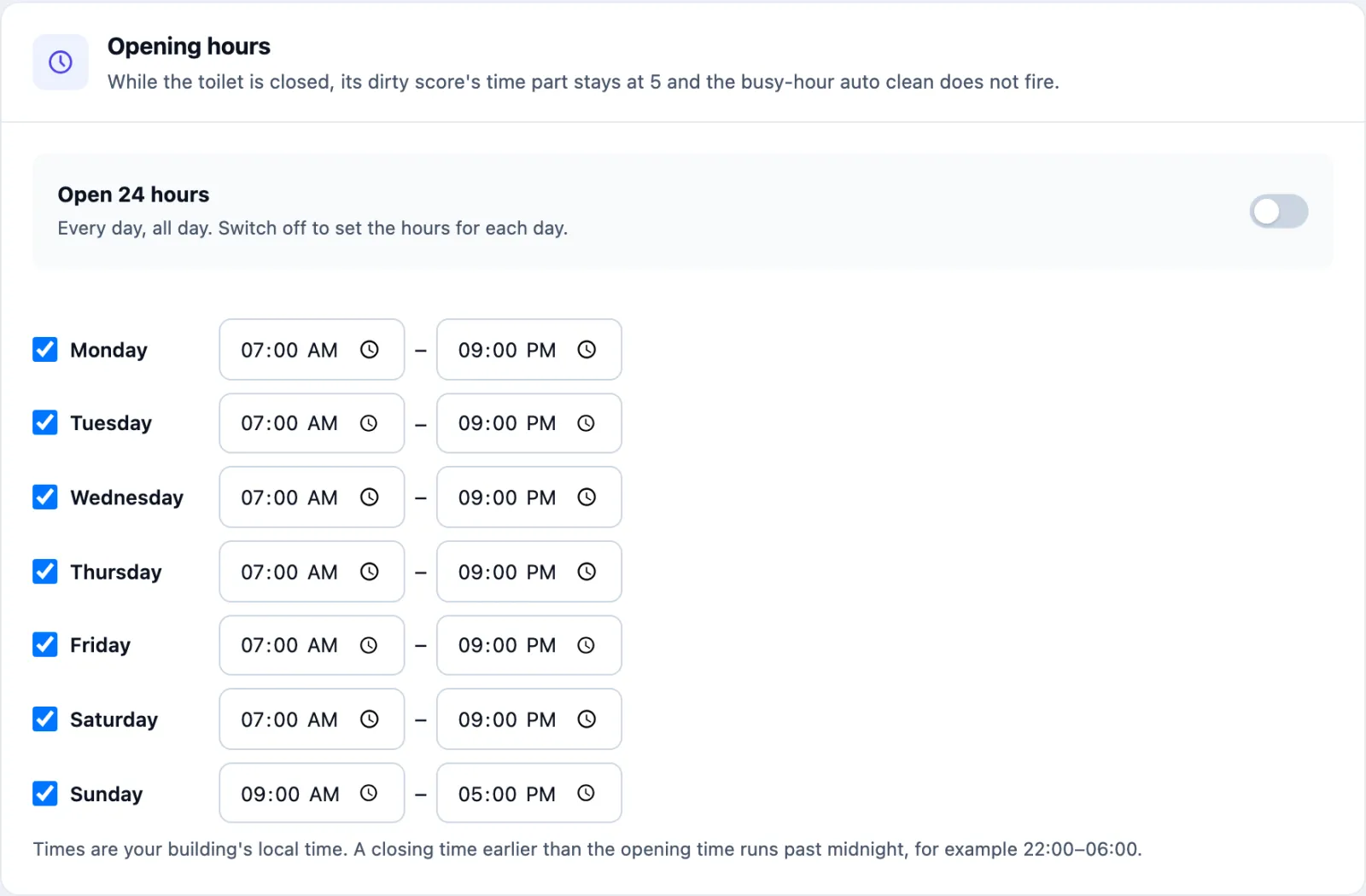
| Open 24 hours | On | Switch off to tick the days the toilet is open and set an opening and closing time for each. |
| Send a cleaner when traffic is high | Off | The busy-hour auto clean. |
| Busy when visits reach | From the size | Leave blank to use the suggestion. |
| Wait before next extra clean | 15 minutes | How soon the busy-hour clean may fire again. |
| Reassign after | 30 minutes | How long a job may sit before it is sent again. |
| Give up after | 3 tries | Re-sends before the job is marked Missed. |
| Keep job if cleaner seen in building within | 15 minutes | If the cleaner holding the job was seen anywhere in the building this recently, it stays with them. |
Remove toilet, at the bottom of the edit page, hides the toilet and stops its jobs; history is kept and an admin can restore it. On the admin side, Unmap in Current Toilets takes a zone out of the app; tick the box to keep the profile if you might map it again.
Opening hours. New toilets are open 24 hours. To set hours, switch off Open 24 hours under Opening hours on the edit form, tick the days the toilet is open and set the times; an unticked day is closed. A closing time earlier than the opening time runs past midnight. The hours show on the Cleaning plan tab. While the toilet is closed, the time part of its score is held at 5 points and the busy-hour clean does not fire. Schedules keep their own hours.
Questions and problems
Every toilet's score is driven by time alone. Nothing is counting visits. Check the people counter is online and linked to the toilet's zone. A counter that has said nothing for a day is treated as missing.
The score is high but nobody has a job. The score raises nothing by itself. Add a schedule, turn on the busy-hour auto clean, or add the dirty-score rule. Work orders → Needs attention lists toilets at 60 or more with no open job.
A schedule never sends anyone. Look at Schedules → Cleaning rules → What actually ran. Already clean means the score was under the skip limit each time; lower it or choose Always send a cleaner. On a toilet with no sensors the score cannot pass 56 on time alone, so a limit of 60 skips every time. Previous job open means the last job was never closed; check the toilet's Work orders tab.
The schedule runs at different times than I expected. Cleans start at the schedule's From time, then repeat at its interval, so a 3-hour schedule from 08:00 runs at 08:00, 11:00 and 14:00. If Minute past the hour is filled in, they start at the first such minute at or after From. Until 3 October 2026 cleans were counted from midnight instead (09:00, 12:00, 15:00 for the same schedule).
The board shows a row of Missed. Nothing was sent within 20 minutes of each slot. Check the schedule is switched on and its toilet is in use.
The busy-hour auto clean never fires. It is off until you turn it on. It also waits while a high or urgent job is open, while a cleaner is in the toilet, during its wait time and while the toilet is closed. The count starts again at every clean.
Cleaners do their rounds but jobs stay open. The badge has to stay for One clean takes about; a quick look in does not count. Also check on Staff that the cleaner's badge is linked to an app login.
Jobs do not reach a cleaner's phone. Their card on Staff says there is no app login. Create an app user linked to that person under Apps → App Users.
Nobody appears on Live. The cleaners are not marked as cleaners in the admin settings, or their person has no badge.
Cleaners on shift counts fewer people than I expect. The Cleaners on shift tile on Toilets counts roster cleaners whose person has a badge, plus cleaners on admin accounts with an active badge. A roster cleaner with no badge linked is not counted, and neither is a badge whose admin account has been deleted or disabled (switched off on the Admins page) — turn the account back on and they count again. Only cleaners on admin accounts can be marked absent, so Absent today never includes a roster cleaner.
The Cleaning plan tab says no one is assigned. On a site that uses the cleaning roster, that is expected: every roster cleaner gets every job, so there is nothing to assign. Main and Backup cleaners exist only for cleaners on admin accounts.
On the phone
Cleaners and supervisors can do all of this from the Omaya Mobile app too: their jobs, the unclaimed jobs nearby, where to go next and the schedule. See Facility and Cleaning on the phone.