Appearance
Energy Monitoring
Energy Monitoring shows what each electricity meter in your building is drawing right now, how much it has used today, and how its draw moved over the last day. It is for whoever pays the electricity bill and whoever is asked to bring it down: the operations lead, the facilities manager, and the technician who goes to look when a circuit misbehaves.
Who uses it
RaviOperations LeadAishaFacilities ManagerDanielTechnician
| Role | What they do with Energy Monitoring | At Northwind Tower |
|---|---|---|
| Operations lead | Checks today's use and the biggest loads, opens a meter when something looks wrong, downloads the monthly report | Ravi Kumar |
| Facilities manager | Looks at the same numbers when an alert or a complaint comes in, and decides what to fix | Aisha Rahman |
| Technician | Opens a single meter to see whether a circuit is drawing what it should before and after a repair | Daniel Lim (through Ravi or Aisha: he does not have the app at Northwind) |
| Finance or sustainability | Receives the energy report file each month | Ravi sends it on |
Everyone who has the app sees every screen. There are no settings inside the app itself: the meters come from your administrator's setup (see Setting it up).
A day at Northwind Tower
Northwind Tower has nine meters behind its metering gateway: the Main incomer (TNB), and the eight sub-meters it feeds: the HVAC — chiller & AHUs board, a Lighting & power board for each of the three floors, the Server Room — DB-SR board that feeds the comms racks on Level 3, the Server Room aircon, the Pantry, and the EV chargers — car park. They have reported every few minutes for weeks.
| Time | What happens | How |
|---|---|---|
| 07:30 | The chiller pulls the building down to temperature before people arrive. When Ravi opens Meters at his desk, the HVAC board is the biggest load after the incomer. | See every meter |
| 10:04 | The Server Room aircon trips. Its draw drops to 0 W. The room keeps heating: the server board still draws about 6 kW. | Open one meter |
| 10:12 | The Server Room passes 27 °C. Aisha gets the temperature alert from a rule (rules are set up by your administrator, see Alerts). Ravi opens Server Room aircon: the chart shows the draw falling to nothing at 10:04, so the aircon has stopped. It is not a cooling unit working too hard. He calls Daniel. | Read a sudden change |
| 10:38 | Daniel resets the aircon. The chart shows it running flat out for half an hour to pull the room back down, then cycling normally again. | Read a sudden change |
| 12:30 | Lunch: the Pantry board peaks at the microwaves and water heater, then falls back. | Open one meter |
| 16:00 | Ravi downloads the Energy report for the last 30 days. He checks the HVAC share of the main incomer, and sends the file to finance with the Compliance Reports air-quality report for the building owner. | Download the energy report |
The same morning, the Data Centre app was watching the tower's basement data hall. Its own meters were in range, so the problem was only the Level 3 comms room.
How to see every meter at once
- Open Energy Monitoring from your apps. It opens on Overview: Total meters, energy today, This month (kWh used since the 1st) and Power now, with a short description of what the app does. Once your administrator sets a rate per kWh, today's and this month's cost show under the kWh, in your organisation's currency.
- Choose Meters (Live power and kWh per meter) at the top, or press See meters.
Every total is net: what your top-level meters used, minus what any meter marked as generating power (solar, a generator) produced. When you have such a meter, each total says so (Net energy · today, This month · net, Power now · net) and shows the split underneath: used … · generated …. When generation is more than use, the total goes below zero and is marked exporting; the cost then reads as an export credit.

Energy per person, and kWh while empty
Under the Overview boxes, the Energy per person card covers this month, in two halves.
Energy per person divides this month's net kWh by how many people the meters' places held. The places are the venues your meters are in, or the whole organisation when no meter is placed in a venue; the card names them. The people figure is the best one available:
- Where the rooms have counting sensors (a radar or a people counter), it is person-hours: each hour's peak, added up over the rooms and hours. The figure reads kWh per person-hour.
- Where there is no counting sensor, it is visitor-days from Footfall: each registered tag once per place per day, so someone who came on three days counts three times. The figure reads kWh per visitor-day. Days with no visitor count are left out, and the card says how many.
Tag counts and occupied-or-empty sensors are never used: a tag count misses everyone without a tag, and an occupied-or-empty sensor does not say how many. With neither, the card says there is nothing to divide by yet.
kWh while empty splits the same kWh by the hour it was used in:
| Line | What it is |
|---|---|
| Opening hours, nobody there | Used in the venue's opening hours while its counting sensors counted nobody: the lights and air-conditioning left on for an empty floor |
| Opening hours, people there | Used while people were counted |
| After hours | Used outside the venue's opening hours and open days |
| Opening hours, no count (sensor silent) | Used in opening hours when the counting sensor sent nothing, so nobody knows |
Opening hours are the venue's own, or your organisation's when the venue has none. This half needs counting sensors in the meters' rooms and meters that report at least once an hour, because a reading can only be placed in an hour when the one before it is at most an hour earlier. The line under the table says how much of the kWh could be placed; otherwise the card says which of the two is missing.
The energy report carries the same two figures in its header lines, for the dates you download.
On Meters, the four boxes across the top describe the whole building:
| Box | What it means |
|---|---|
| Total meters | How many meters the app knows about; underneath, how many are reporting now (a reading in the last 15 minutes) |
| Total energy | kWh used today, since midnight local time, and its cost when a rate is set; net of any generating meter (then titled Total energy · net, with used … · generated … under it). It counts each piece of electricity once: a sub-meter is already inside the meter that feeds it, so only top-level meters are added (the box says counted once, at the top-level meters). If your administrator has not said which meter feeds which, it is the sum of every meter, and the box says so |
| Peak power now | The highest current draw of any single meter, with its name (peak: …) |
| Avg voltage | The average supply voltage across all meters that report it |

Sub-meters are counted once
At Northwind the Main incomer (TNB) feeds the eight boards, so Total energy is the incomer's kWh, not the incomer plus the boards. If the box says sum of every meter (no meter has a parent meter set) and you do have a main meter with sub-meters, ask your administrator to set the meter hierarchy: until then the total counts the same electricity twice.
Under the boxes is the list of meters. Each sub-meter is listed under the meter that feeds it, marked ↳ (on a phone: ↳ sub-meter of …). A generating meter is marked generates power; its Today kWh is what it produced, and its cost shows as a credit (negative). For each one you see Today kWh, Cost today (when a rate is set), the Cumulative counter, Power now, Voltage, Temp (only if the meter reports a temperature; otherwise a dash), and when its Last reading came in, in your building's local time. A ≈ before Today kWh means it was estimated from the meter's power readings, because the meter's own kWh counter did not move (see below). On a computer, sort any column by clicking its heading, or type in Search All Fields to find a meter by name, zone or floor. Click a row to open that meter.
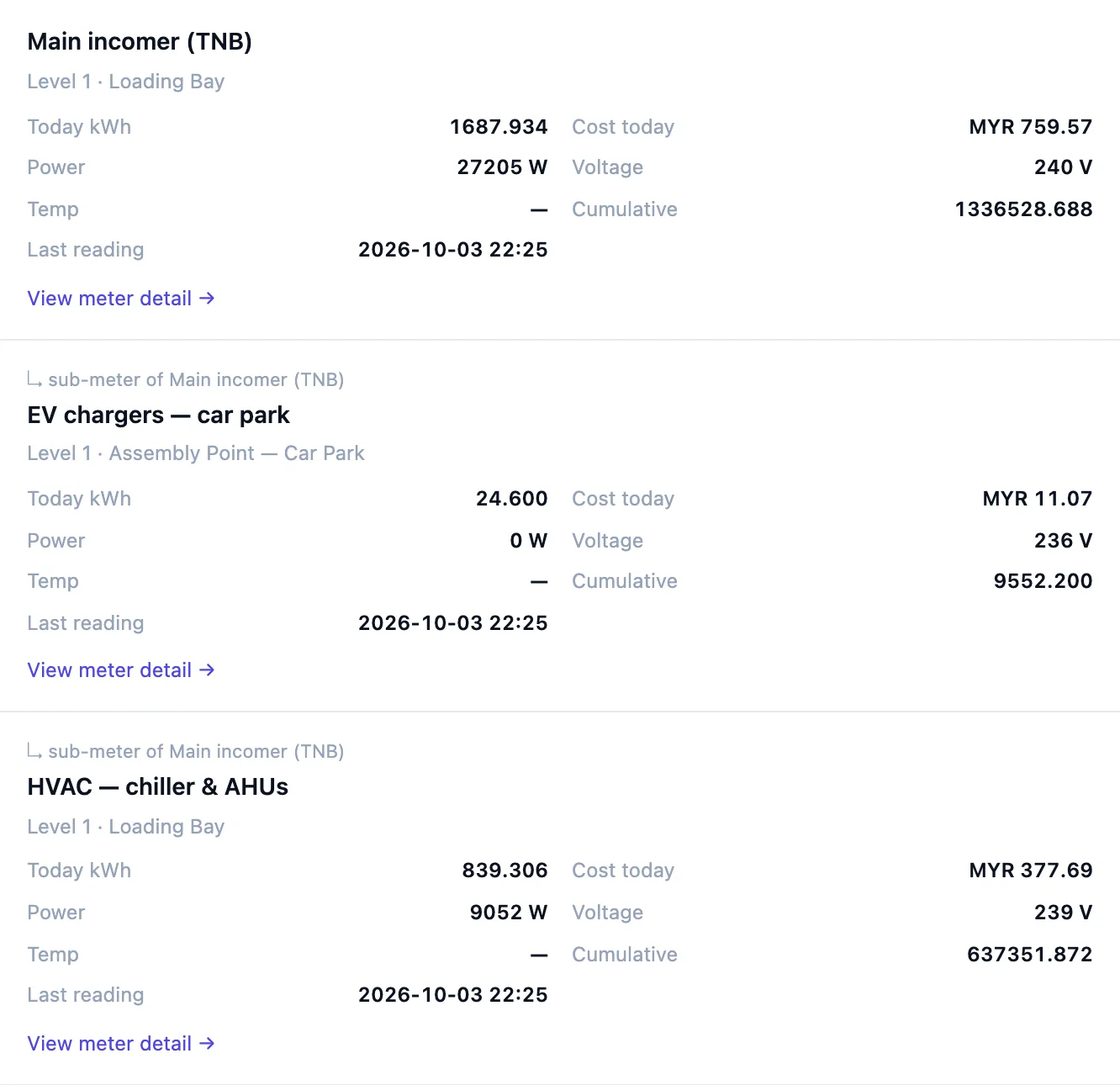
A dash always means the meter did not send this, never zero. A meter only appears once it has sent its first reading.
How to look at one meter
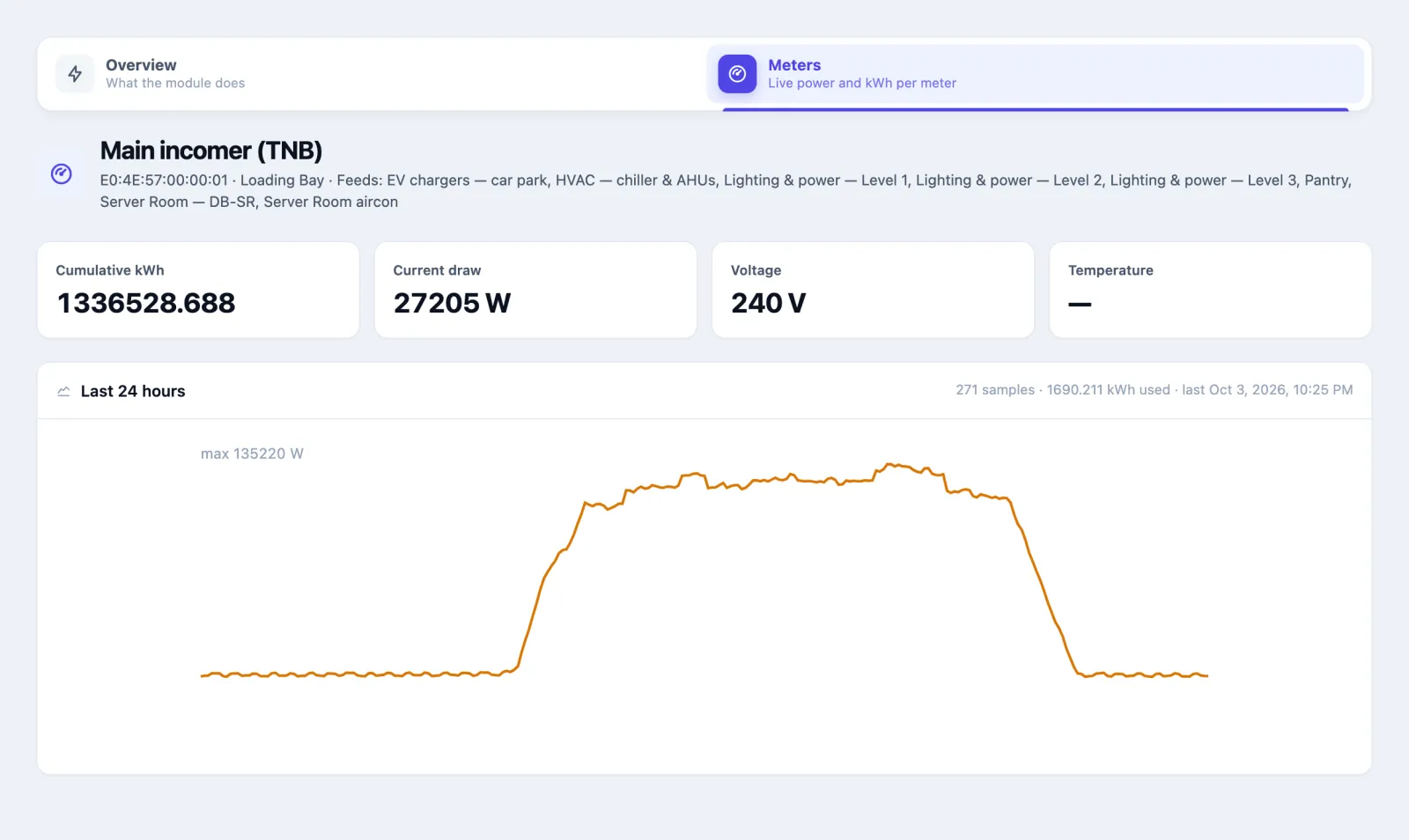
- In Meters, click the meter's row (or View meter detail → on a phone or narrow window). Under the meter's name, a sub-meter says Sub-meter of …, and a meter that feeds others says Feeds: ….
- The four boxes show the meter's latest Cumulative kWh, Current draw, Voltage and Temperature.
- The Last 24 hours chart is the meter's power draw over the past day, oldest on the left, now on the right. The line starts at zero at the bottom, and the top is the day's maximum (max … W, top left).
- Above the chart: how many readings the day holds (288 samples is one every five minutes), the kWh used in those 24 hours, and the time of the last reading.
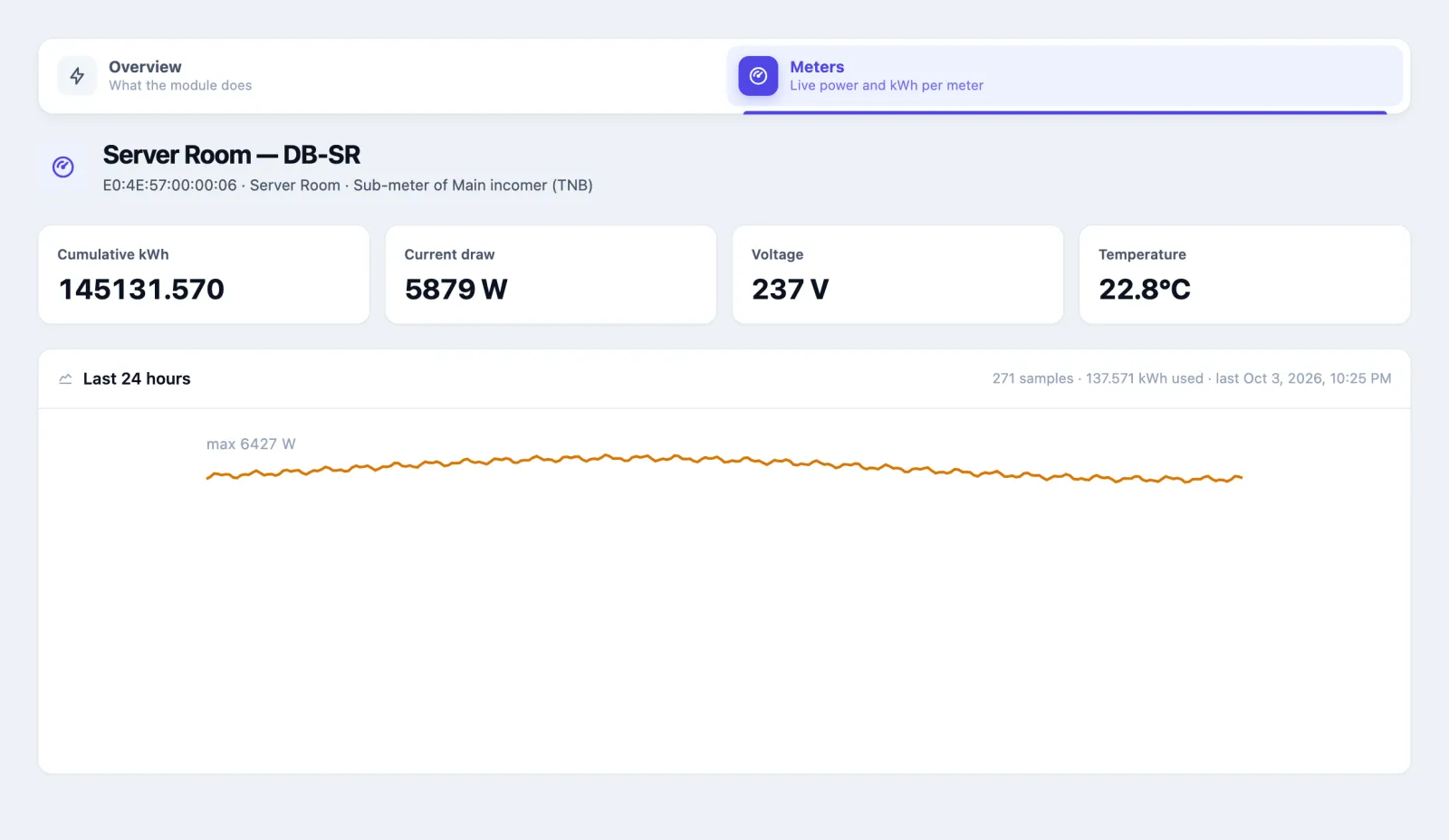
The meter page always shows the last 24 hours. There is no date picker. For an earlier day, use the energy report.
How to read a sudden change
The shape of the line tells you most of the story:
- A drop to zero that stays there: the circuit has stopped drawing. Either it was switched off, a breaker tripped, or the equipment failed.
- A step up that does not come down at night: something was left on, or a new load was added to that board.
- A saw-tooth: equipment that cycles on and off, like an aircon compressor or a fridge. That is normal; a change in its rhythm is not.
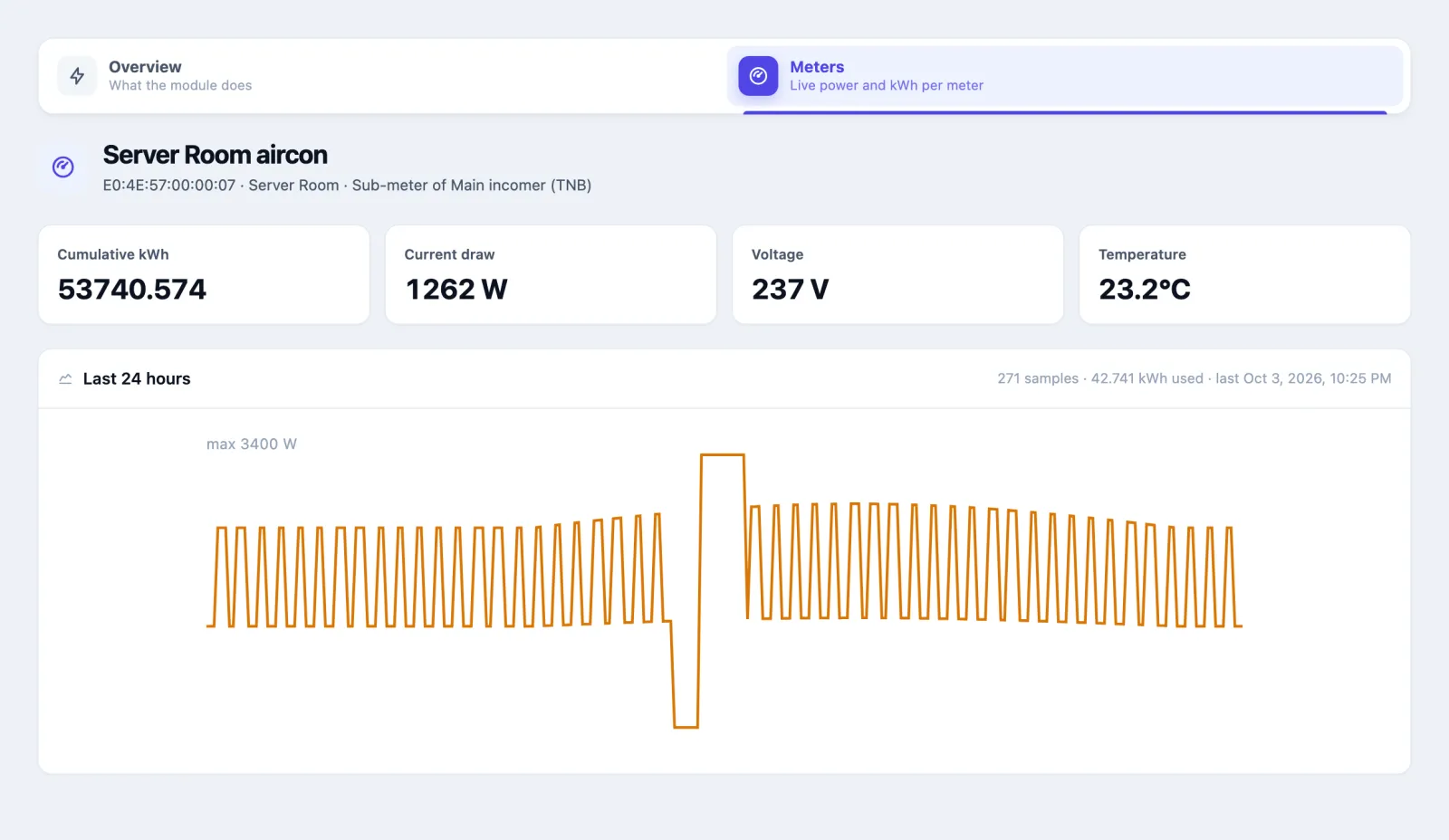
The chart only plots power. A meter that reports temperature shows its latest temperature in the box above, not its history: by the afternoon, the Server Room's 10:12 peak no longer shows on the meter page. For the peak, see the peak_temp_c column of the energy report, or ask your administrator for the platform's environment report.
How to download the energy report
- Open Energy Monitoring (either Overview or Meters).
- Press Energy report (top right). A file named like
energy-report-20260903-20261003.csvdownloads. - Open it in Excel, Numbers or Google Sheets.
The report always covers the last 30 days plus today, as whole days in your local time. There is no way to choose another period from the app. The lines at the top give the Total energy (net) for the period, then Consumed (the top-level consumption meters, as on the Overview) and Generated (the meters marked as generating power), and, when a rate is set, the rate used and the net cost (an export credit when it is negative). Each row is one meter, each sub-meter right after the meter that feeds it:
| Column | What it means |
|---|---|
device_name, zone, venue | The meter and where it is |
parent_meter | The meter that feeds it; empty for a top-level meter |
generates | yes for a meter marked as generating power |
energy_start_kwh, energy_end_kwh | The counter at the first and last reading in the period |
energy_delta_kwh | The electricity it used in the period. This is the number to use |
cost_myr (your currency) | energy_delta_kwh × the rate per kWh, negative (a credit) for a generating meter; empty when no rate is set |
avg_power_w, peak_power_w | Average and highest draw |
avg_temp_c, peak_temp_c | Average and highest temperature, for meters that report one |
samples | How many readings it sent. A meter that was offline for days has far fewer |
A meter that sent nothing in the period is still listed, with empty values, so a dead meter is visible instead of quietly missing.
At Northwind, Ravi's 30-day report shows the main incomer at about 45,000 kWh and the HVAC board at about 21,000 kWh: just under half the building's electricity goes on cooling.
One rate, applied to every kWh
Cost is kWh × the single rate per kWh your administrator sets (Northwind uses MYR 0.45). Generation saves at the same rate. It is not your utility bill: time-of-use rates, export tariffs, maximum-demand charges and taxes are not included, and a new rate also changes the cost shown for past days. Add up only top-level meters, never a meter and its sub-meters.
Emailed on a schedule
Whoever can change this app's settings can have energy per meter emailed daily, weekly or monthly, from Reports › Scheduled reports in the app, to the app's users or any address. See Scheduled reports in the apps.
How to get an alert from a meter
Energy Monitoring does not send alerts itself. Your administrator sets them up as rules, with two energy measures:
| Measure | Is | Use it for |
|---|---|---|
| Power Draw Now | Watts, net over the meters in the rule's device, zone or floor: the top-level meters' draw minus any generating meter's output. Below zero when that scope is exporting | "Level 3 is drawing more than 15 kW at 21:00" |
| Energy Used Today | kWh since local midnight, net the same way | "The pantry has already used more than 30 kWh today" |
Power Draw Now only counts a reading from the last quarter of an hour. A meter that has stopped reporting has no value, not zero, so a "below 100 W" rule does not fire on a dead meter. Energy Used Today starts again at midnight.
Both count each unit of electricity once, the same way the totals do: when a rule covers a main meter and the sub-meters it feeds, only the main meter is added. A rule on a single sub-meter still measures that sub-meter. A rule whose scope holds only a generating meter measures what it produces, as a positive number ("the rooftop solar is giving less than 5 kW at noon"). If the other meters in a scope send power but no kWh counter, their kWh is estimated from their power readings, as on the Energy page.
A rule can also raise a work order in Facility Management, so a runaway circuit becomes somebody's job, not an email nobody opens.
If your organisation uses the OAIA assistant, it also watches these meters for you. An hour after a floor closes, a meter still drawing most of its daytime load is reported as Power left on after hours. A server board that runs all night is never reported, because it draws the same by day.
Using it in your organisation
Corporate office or tower
Setting. A main incomer plus one board per floor and one for the chiller plant, as at Northwind. Who does what. The operations lead reads the meter list each morning and the report each month; the facilities manager follows up odd shapes with the technicians. What matters. Name meters so they sort sensibly (Lighting & power — Level 1, Level 2…), and put each one in the zone it serves so the floor shows in the list. Tip. Look at the HVAC board at 07:00 and at 20:00. If the chiller starts an hour before anyone arrives, or keeps running after everyone has gone, that is often the cheapest saving in the building.
Hospital
Setting. Wards, theatres, imaging (MRI and CT), the kitchen and the central sterile department on separate boards; essential supplies run around the clock. Who does what. The engineering team watches imaging and theatre boards; the energy manager reports monthly to the hospital board. What matters. Expect flat 24-hour lines on wards and critical-care boards: those are not waste. Put rules on Power Draw Now for theatres outside the scheduled list, and on cold rooms in the kitchen, where a drop to zero means food at risk. Tip. A cold-room or pharmacy-fridge circuit that drops to 0 W is an emergency, not a saving. Pair it with a rule that raises a work order at once.
Factory or warehouse
Setting. Compressors, production lines, cold rooms and EV or forklift chargers, often three-phase. Who does what. The plant engineer watches compressors and lines; the shift supervisor checks that lines are off between shifts. What matters. One meter per compressor and per line. Use the energy report's peak_power_w against your maximum-demand charge. Tip. A compressor that keeps drawing at weekends usually means an air leak. Open its meter on Sunday afternoon: a line that should be near zero but sits at a third of its weekday level is worth an ultrasonic leak survey.
Setting it up for your organisation
For the administrator.
What must exist first
- Your floors and zones, so each meter can be placed where it serves.
- The meters as devices, each with its own identifier, placed in its zone.
- A route for the readings. Any device whose readings include energy (kWh) or power (W) writes a reading at most once a minute, and appears in the app after its first one. Three routes deliver that today:
- An edge or metering gateway over MQTT. The gateway reads your meters (often over Modbus) and publishes already-decoded readings such as
kwhandkw. See MQTT gateways. This is how Northwind's meters report. - Home Assistant. Connect your Home Assistant under Connectors → Home Assistant and map each plug's or meter's entities to an Omaya device: energy, power, and — where the plug has them — current and voltage. Units are converted (Wh to kWh, kW to W, mA to A, mV to V). Home Assistant sends each of these on its own; Omaya puts every value that arrives in the same minute into that minute's one reading, whatever order they come in. An
unavailablestate is dropped, not stored as zero, and does not count as the plug being heard: a plug Home Assistant cannot reach goes offline in Omaya like any device that stops reporting. - Your own decoder. If a meter broadcasts over Bluetooth, define its frame in New sensor types and map the counter to energy and the draw to power.
- An edge or metering gateway over MQTT. The gateway reads your meters (often over Modbus) and publishes already-decoded readings such as
Checklist
- Under Your Apps, switch on Energy Monitoring for the organisation (it needs the plan that includes it).
- Register each meter as a device, with a name people will recognise and its zone.
- Connect the readings by one of the routes above, and wait for the first reading. The meter then appears under Meters.
- Give the app to the people who need it (app users, Energy). There is nothing to configure inside the app.
- Under Your Apps → Energy, set the Rate per kWh and Currency if you want costs shown, and in Meter hierarchy choose, for each sub-meter, the meter that feeds it, and tick Generates power for solar or a generator. Check Active meters, Readings (24h), kWh added (24h) and Last reading.
- Set up the rules people will want.
Settings
| Setting (admin console, Your Apps → Energy) | What it changes |
|---|---|
| Rate per kWh | Turns kWh into cost: today and this month on the Overview, Cost today per meter on Meters, the cost_… column and total in the energy report, and cost today on the TV Dashboard energy widget. Empty (the default): no cost is shown anywhere |
| Currency | The currency the cost is shown in; the organisation's currency until you change it |
| Meter hierarchy | For each meter, Fed by (parent meter), or none (top-level). Totals then count top-level meters only, and sub-meters are listed under their parent. A meter cannot feed itself, directly or round a loop; the page refuses such a save |
| Generates power (in Meter hierarchy) | Tick for solar, a generator or any on-site source. Its output is subtracted, so every total is net, and it needs a kWh counter for the kWh totals. A generating meter cannot have a parent or feed another meter; the page says which and saves nothing |
Everything else comes from the devices themselves: their name, zone and floor are what the app shows.
Questions and problems
A meter is missing from the list. It has not sent a reading yet. Check that its readings arrive with energy or power in them: a meter sending only temperature or voltage is not an energy meter to the app (a Home Assistant plug is the exception: its current or voltage alone is enough to list it).
"Today kWh" has a ≈ in front of it. The meter's power readings show it was used, but its own kWh counter did not move today (or it has no counter). The app then works the kWh out from power: each power reading is held until the next one, over gaps of at most 15 minutes, and the result is marked ≈ and estimated from power on the Energy page, its cost and every total that includes it. A counter that did move is always trusted over the estimate. Rack PDUs and plant registered for the Data Centre app often send power only, and are estimated the same way.
"Today kWh" is a dash, but the meter is listed. It sent neither a counter value nor any power reading showing use today.
The Cumulative kWh stays the same while Power changes. The meter's energy counter is not reaching Omaya. For a Home Assistant plug, check that its energy entity is mapped to the device under Connectors → Home Assistant, beside the power entity. Before 9 October 2026 a Home Assistant plug's energy reading could be dropped when it arrived in the same minute as its power reading, which left its kWh unchanged; kWh used during that time cannot be recovered, and the power readings are complete.
The Total energy box looks far too high. If it says sum of every meter (no meter has a parent meter set), it adds a main incomer and the boards under it. Ask your administrator to set the meter hierarchy (see Settings).
Today's total is lower than the main incomer's Today kWh. It is net: a meter marked as generating power (solar) is subtracted. The box shows used … · generated … underneath.
The total is negative and says exporting. Your generation was more than your use over that period. The cost shows as an export credit at your rate per kWh.
There is no cost anywhere. No rate per kWh is set. Your administrator sets it under Your Apps → Energy.
Consumption in the report looks wrong. Use energy_delta_kwh, not energy_end_kwh: the end figure is the meter's lifetime counter. If a meter was replaced or reset during the month, the app counts from the new value and does not guess the electricity used between the last old reading and the reset.
Energy per person says there is nothing to divide by. The meters' places have no counting sensor and no Footfall figure yet. Place each meter in the zone it serves, so that its venue is known, and make sure that venue's gateways or counting sensors report.
kWh while empty is blank. It needs a counting sensor in the meters' rooms and meters that report at least hourly; the card says which is missing. Tags alone cannot tell an empty room from one full of people without tags.
A "Power Draw Now" rule never fires. The meters in its scope have not reported in the last 15 minutes, so there is no current value to compare. Check the meter before the rule.
On the phone
Energy Monitoring is not in the Omaya phone app. On a phone, open it in the browser: the meter list switches to cards, and each meter's page works the same way.